
The Tovala Smart Oven Pro sits in an interesting corner of the kitchen-appliance market: not just a countertop oven, and not just an air fryer, but a connected cooking appliance built around automation. That matters, because plenty of ovens now call themselves "smart" when what they really me...
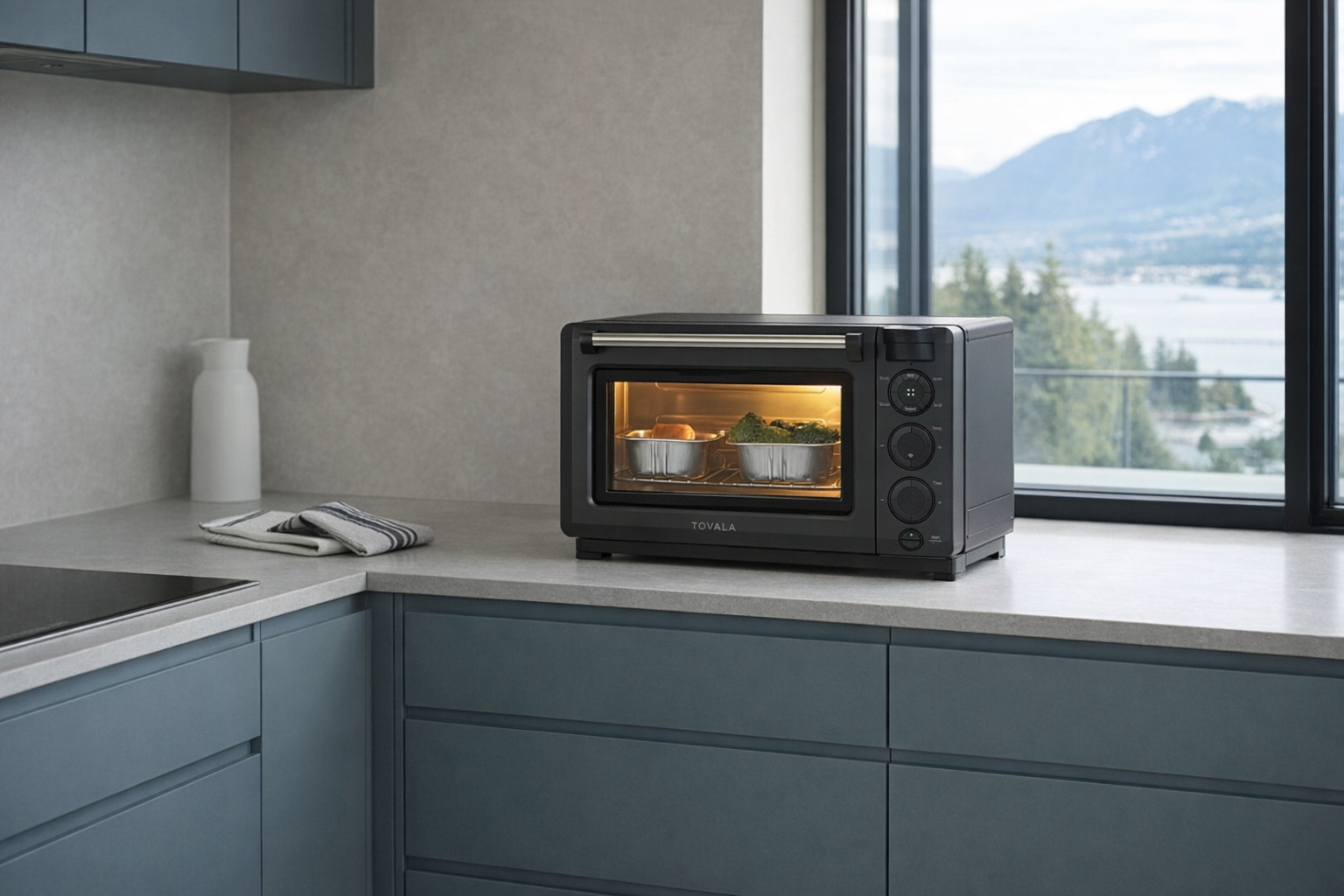
The Tovala Smart Oven Pro sits in an interesting corner of the kitchen-appliance market: not just a countertop oven, and not just an air fryer, but a connected cooking appliance built around automation. That matters, because plenty of ovens now call themselves "smart" when what they really mean is "has an app." Tovala is aiming at something more specific. Its pitch is that the oven can recognize certain foods, run pre-set cooking programs, and tie into a meal-subscription system so dinner becomes more like scanning a barcode than figuring out timing and temperature yourself.
This article is not a hands-on review. Nothing here is based on personally using the oven. Instead, the goal is to explain what the Tovala Smart Oven Pro actually is, what the listed features suggest about everyday use, and who it realistically makes sense for. If you are deciding between a standard toaster oven, an air fryer, and something more automated — and want a calmer read than the product page — this is for you.
📺 Watch: Tovala Smart Oven Pro in context
Quick snapshot
| Question | What the Tovala Smart Oven Pro actually is |
|---|---|
| Category | Smart Kitchen |
| Made by | Tovala |
| Typical price | ~$813 CAD (listing at the time of writing — verify current pricing) |
| Rating signal | 3.9/5 on the source listing |
| Best for | Busy households, meal-kit users, people who want more automation than a normal air fryer offers |
| Skip if | You want a cheap countertop oven, dislike app-linked appliances, or prefer fully manual cooking |
Pro tip: If the Tovala Smart Oven Pro appeals to you, evaluate it primarily as a meal-simplifying system rather than as a pure toaster oven. If you would never use app presets, barcode scanning, or the Tovala meal ecosystem, you are paying a lot of money for convenience you may not actually touch.
What the Tovala Smart Oven Pro actually is
In plain English, the Tovala Smart Oven Pro is a compact multi-function countertop oven that tries to remove guesswork from cooking. It combines 6 cooking modes — Air Fry, Steam, Bake, Broil, Reheat, and Toast — with app control, automated cooking programs, and support for Tovala's own prepared-meal service. The smart part is not that it magically cooks better than every other oven. It is that it tries to make cooking more repeatable: scan a compatible item, press start, and let the oven handle the sequence.
Versatile 6-in-1 smart oven: Air Fry, Steam, Bake, Broil, Reheat, and Toast. Controlled by smartphone app with access to 1,000+ scannable groceries and Tovala meal subscription. Each oven includes $50 credit for Tovala meals.
That description tells you almost everything important about the product's identity. This is not just a toaster oven with Wi-Fi. It is a countertop oven designed around guided cooking workflows. The promise is less "become a chef" and more "stop babysitting dinner." That will sound either genuinely useful or faintly depressing depending on how much you enjoy cooking.
A useful real-world comparison is the June Oven, one of the better-known smart ovens that pushed the idea of app-connected countertop cooking. Compared with the June Oven, Tovala's angle is less about broad kitchen experimentation and more about convenience through meal integration and scan-to-cook simplicity. That's a more focused pitch, and arguably a more honest one. Tovala seems less interested in pretending this replaces a full-size range than in becoming the thing that handles weekday lunches, quick dinners, reheating leftovers, and subscription meals without much input.
Key features at a glance
- 6-in-1 cooking modes: Air Fry, Steam, Bake, Broil, Reheat, and Toast
- Smartphone app control with presets and guided cooking programs
- 1,000+ scannable groceries supported according to the listing
- Tovala meal subscription compatibility with a $50 credit included
- Custom automated cook cycles that can combine multiple modes
- Included accessories: spacious air fryer basket and compact sheet pan
How the Tovala Smart Oven Pro actually works
The easiest way to understand the Tovala Smart Oven Pro is to think of it as a countertop oven with a software layer on top. The hardware side is familiar enough: heating elements, a cooking chamber, a tray, a basket, and different cooking modes. What makes it different is that the app and barcode system are meant to tell the oven exactly how to cook certain foods, including changes in mode over time.
That multi-stage part is the key. A normal toaster oven usually asks you to choose one mode, one temperature, and one timer. The Tovala Smart Oven Pro is built to automate more than that. According to the listing, you can create custom automated cook cycles with multiple modes, which means a single program could, in principle, steam first, then bake, then broil to finish. That is the kind of thing a decent home cook can already do manually, but automation makes it more repeatable and less annoying on a Tuesday night.
There are really three ways the oven appears to be meant to operate:
- Manual mode cooking. You use it like a regular countertop oven for toast, reheating, baking, broiling, or air frying.
- App-driven presets and custom cycles. You choose a programmed routine in the app, which then controls timing and mode changes.
- Scan-to-cook food support. For compatible groceries and Tovala meals, the oven uses a barcode-linked program so you do not have to figure out the settings yourself.
The 1,000+ scannable groceries claim is one of the more specific parts of the pitch. That suggests Tovala has built a database of supported packaged foods with pre-assigned cook programs. In practice, that likely means the oven is best with foods Tovala has already accounted for, rather than literally any grocery item in your freezer. That's still useful. It just helps to read the feature as "broad convenience support" rather than "this oven understands food."
The inclusion of steam is also worth pausing on, because it is less common than air fry in this category. Steam can help with keeping some foods from drying out during reheating or cooking, and it is part of what lets Tovala run more nuanced cooking sequences than a basic air fryer toaster oven. That does not automatically mean every meal comes out better, but it does mean the oven has a more flexible cooking toolkit than many one-note air fryer boxes.
A realistic "day in the life" with Tovala Smart Oven Pro
Because this is an informational explainer, here is what a typical day might look like based on the listed features and the broader category — not a tested account.
- Morning. You use the Toast mode for breakfast, or reheat a pastry without firing up a full-size oven. In a small kitchen, that alone can justify a countertop appliance: quicker heat-up, less wasted space, and less commitment than your range.
- Midday. Lunch is a frozen or prepared grocery item that happens to be in Tovala's 1,000+ scannable groceries library. You scan it, the oven loads the preset, and the main appeal is not brilliance — it is not having to guess whether something should air fry for 12 minutes or bake for 18.
- Afternoon. You build a custom cooking routine in the app for something you make often, like vegetables followed by a quick broil finish. This is where the "smart" side makes the most sense for repeat meals rather than one-offs.
- Evening. Dinner is a Tovala meal-kit tray, and the oven runs through its programmed steps while you do something else. Or, more simply, it reheats leftovers with a combination of steam and heat that may preserve texture better than a microwave. That is a realistic use case, and probably a stronger one than treating it as your main family oven.
Who the Tovala Smart Oven Pro is actually for (and who it isn't)
Great fits
- Busy professionals who routinely get home too tired to think about temperatures, timings, and when to switch cooking modes.
- Small-condo households that already rely heavily on countertop appliances and want one box to cover toast, reheating, air frying, and simple dinners.
- Meal-kit and prepared-food users who care less about scratch cooking and more about reliable, low-effort results.
- Parents managing lunch-and-dinner churn who want a more controlled alternative to the microwave for nuggets, leftovers, and quick meal trays.
- People who repeat the same meals often and would genuinely benefit from saved custom cook cycles.
Poor fits
- Serious hobby cooks who already know how to manage steam, broil, bake, and timing manually and may find the app layer more annoying than helpful.
- Budget-focused shoppers comparing this to a regular air fryer or toaster oven in the $100 to $250 range. This is not playing in that price bracket.
- Households with lots of counter-space pressure where another permanent appliance is a hard sell, no matter how versatile it is.
- People who dislike subscriptions or do not want to be nudged toward a branded meal ecosystem.
- Anyone expecting a full-size oven replacement for large trays, multiple portions, or holiday cooking. That is not what this is built to be.
Practical trade-offs
Counter space and capacity
A countertop oven always sounds compact on paper until it is sitting permanently on the counter. The Tovala Smart Oven Pro includes a spacious air fryer basket and a compact sheet pan, which gives a clue about its intended scale: useful for personal meals, side dishes, small-batch cooking, and reheating, but not the same thing as a full-size wall oven.
That makes it a good fit for one or two people, or as a secondary cooking station in a busier household. But if you are imagining roasting a very large dinner or batch-prepping for days in one go, you should check the current dimensions and interior capacity on the spec page before buying. "Countertop oven" still means compromise.
App dependence and ecosystem lock-in
The oven can clearly do manual cooking, which is important. But the whole reason this product costs around $813 CAD is the software layer: app control, scan-to-cook programs, and integration with Tovala's meal subscription. If the app experience is not something you want, much of the premium starts to look hard to justify.
There is also a broader lock-in question. Tovala's meal subscription may be convenient, and the included $50 credit lowers the barrier to trying it, but meal-linked hardware always raises the same issue: if you stop using the service, do you still love the appliance? That is the right question to ask before checkout.
Cleaning and maintenance
Steam is useful, but it also means this is not just a dry-heat box. Any oven that air fries, broils, and steams will need regular cleaning if you do not want grease and residue building up. The basket and sheet pan should make some of that easier, but the basic reality remains: convenience cooking appliances stay convenient only if you keep them clean enough to use without dread.
That is especially true if you are reheating saucy meals, cooking oily foods, or using it often. Evaluate it like a nice espresso machine, not like a dumb toaster. The maintenance is not extreme, but it is part of the ownership deal.
Where the Tovala Smart Oven Pro fits in a modern kitchen
The Tovala Smart Oven Pro makes the most sense as the weekday workhorse in a kitchen that already has the usual basics. It sits somewhere between a microwave, an air fryer, and a toaster oven, with the app and meal system acting as the convenience layer.
A realistic setup might look like this:
- Your full-size range or wall oven handles large dinners, baking projects, and anything family-sized.
- A microwave still covers the fastest possible reheating when texture is not a priority.
- The Tovala Smart Oven Pro takes over for better reheating, quick tray meals, toast, air frying, and app-guided weekday cooking.
- A smart-home platform like Alexa or Google Home may sit nearby in the kitchen for timers and voice help, but Tovala is not trying to be the control centre for the room. It is a cooking appliance first.
That positioning is important. The Tovala Smart Oven Pro is not best understood as a universal replacement for your kitchen. It is a convenience appliance for the meals that happen most often: rushed breakfasts, office-day lunches, leftovers, frozen foods, and subscription dinners. If that describes your actual life, it fits neatly. If your kitchen revolves around scratch cooking and big pots, it fits less neatly.
The buying decision, in plain terms
Before buying the Tovala Smart Oven Pro, three questions usually get to the heart of it:
- Do you actually want cooking automation, or just a countertop oven? If all you need is toast, air frying, and reheating, cheaper options exist. If you want saved routines, scan-to-cook support, and less decision-making, Tovala makes more sense.
- Will you use the Tovala ecosystem? You do not need the meal subscription for the oven to function, but the product is clearly designed around it. If that part actively annoys you, the value proposition weakens.
- Is convenience worth roughly $813 CAD to you? This is not an impulse appliance. Treat it like a premium kitchen system, not like a casual toaster-oven upgrade.
Three yeses make it a reasonable buy. If you are hesitating on two or more, a strong non-smart air fryer oven is probably the better fit.
Got Questions About the Tovala Smart Oven Pro? Let's Clear Things Up.
Is this a hands-on review?
No. This is an informational explainer based on the listed product details, retailer information, and broader patterns in the smart-countertop-oven category. It is meant to help you decide whether this product category and this specific model fit your kitchen.
What does the "smart" part actually do?
The smart side appears to centre on app control, saved presets, multi-stage cook programs, and support for 1,000+ scannable groceries plus Tovala meal kits. In practical terms, it is about reducing guesswork and automating cooking sequences rather than simply letting you turn on an oven from your phone.
Do you have to subscribe to Tovala meals to use it?
The product listing says the oven is compatible with Tovala meal subscription and includes a $50 credit for meals, but that does not mean the oven only works with the subscription. It should still function as a 6-in-1 countertop oven for manual cooking and app-based programs. The better question is whether the subscription is part of why the oven appeals to you in the first place.
Is the Tovala Smart Oven Pro basically just an air fryer?
Not really. Air Fry is only 1 of the 6 modes. The more distinctive features are steam cooking, app-linked automation, and multi-mode cook cycles, which put it closer to a connected countertop oven than to a single-purpose air fryer.
Is it a good replacement for a microwave?
For some foods, possibly — especially reheating items where texture matters. But it is unlikely to replace a microwave for sheer speed and convenience. Think of it as a better-quality reheating option for selected meals, not as the fastest option every time.
Where can I verify the current price or buy it?
The current retailer listing linked for this model is on Amazon here: Tovala Smart Oven Pro. Since smart-appliance pricing and bundled promotions can shift, it is worth checking that page directly for the latest availability, credits, and details.
What does it cost in Canada?
At the time of writing, the listed price is roughly ~$813 CAD. That places it firmly in premium-appliance territory, so it makes sense to compare it not just with other toaster ovens, but with the actual value of the time and effort it may save you.
Where is the Celmin Directory listing for this product?
For a catalog-style view of the same product — structured specs, pros and cons, similar picks, and FAQ — see Tovala Smart Oven Pro on Celmin Directory.
If you're building a smarter home in Canada and want honest explainers on gadgets worth considering — plus the ones worth skipping — Celmin covers the full catalog without the marketing theater. More reviews, comparisons, and buyer guides at https://celmin.ca.
Discussion
Sign up or sign in to join the conversation.