

Apple's Magic Keyboard is fine. It's thin, it connects instantly, and it matches your Mac. But "fine" isn't great. The key travel is shallow, the typing experience is flat, and the price is steep for what you get. There are better wireless keyboards for Mac that offer superior typing feel, better...
Apple's Magic Keyboard is fine. It's thin, it connects instantly, and it matches your Mac. But "fine" isn't great. The key travel is shallow, the typing experience is flat, and the price is steep for what you get. There are better wireless keyboards for Mac that offer superior typing feel, better ergonomics, and features Apple doesn't include.
Whether you want a mechanical feel, better ergonomics, or just a keyboard that makes typing enjoyable, here are the best wireless keyboards for Mac users in Canada.

Top Wireless Keyboards for Mac
| Keyboard | Type | Connectivity | Battery | Mac Layout | Price |
|---|---|---|---|---|---|
| Apple Magic Keyboard with Touch ID | Membrane | Bluetooth + Lightning/USB-C | ~1 month | Native | ~$270 CAD |
| Logitech MX Keys S | Membrane | Bluetooth + USB receiver | ~10 days (backlit) | Mac layout option | ~$150 CAD |
| Logitech MX Mechanical Mini | Mechanical | Bluetooth + USB receiver | ~10 months | Mac layout option | ~$149 CAD |
| Keychron K2 Pro | Mechanical | Bluetooth + USB-C | ~100 hrs (backlit) | Mac/Windows toggle | ~$119 CAD |
| NuPhy Air75 V2 | Mechanical (low-profile) | Bluetooth + 2.4 GHz + USB-C | ~50 hrs (backlit) | Mac layout | ~$149 CAD |
Best Overall: Logitech MX Keys S
The Productivity Keyboard
The MX Keys S is the keyboard most Mac professionals end up with. The key shape is sculpted to match your fingertips—each key has a slight concave dish that guides your fingers to the centre. It sounds small, but it makes a noticeable difference in typing accuracy and comfort over long sessions.
Smart backlighting turns on when your hands approach and adjusts brightness based on ambient light. The backlight is the main battery drain—with it on, you get about 10 days. With it off, up to 5 months.
The killer feature for Mac users: Easy-Switch lets you pair with up to three devices and switch between them with dedicated buttons. MacBook, iPad, and iMac—one keyboard for all three.
- Type: Membrane (scissor-like)
- Connectivity: Bluetooth + Logi Bolt USB receiver
- Battery: Rechargeable (USB-C), ~10 days backlit
- Backlight: Yes (smart, proximity-activated)
- Multi-Device: 3 devices (Easy-Switch)
- Mac Layout: Yes (dedicated Mac key caps)
- Price: ~$150 CAD
The MX Keys S is the best all-around wireless keyboard for Mac. The typing feel is excellent for a non-mechanical keyboard, the smart backlighting is genuinely useful, and Easy-Switch between multiple Apple devices is seamless.
Best Mechanical: Logitech MX Mechanical Mini
Mechanical Feel, Mac Compatible
If you want the satisfying tactile feedback of a mechanical keyboard with full Mac compatibility, the MX Mechanical Mini delivers. Available in three switch types: Tactile Quiet (brown-like), Clicky (blue-like), and Linear (red-like). The Tactile Quiet is the best choice for office and home use—satisfying bump without the noise.
The compact 75% layout saves desk space while keeping the function row and arrow keys. The same Easy-Switch and Logi Bolt connectivity as the MX Keys S.
- Type: Mechanical (low-profile switches)
- Layout: 75% compact
- Switches: Tactile Quiet / Clicky / Linear
- Connectivity: Bluetooth + Logi Bolt
- Battery: ~10 months (backlit off)
- Mac Layout: Yes
- Price: ~$149 CAD
Best Value Mechanical: Keychron K2 Pro
Hot-Swappable and Affordable
The Keychron K2 Pro is the favourite keyboard of the Mac mechanical keyboard community. Hot-swappable switches mean you can change switches without soldering—try different feels until you find your preference. The Mac/Windows toggle switch on the side instantly changes the key layout.
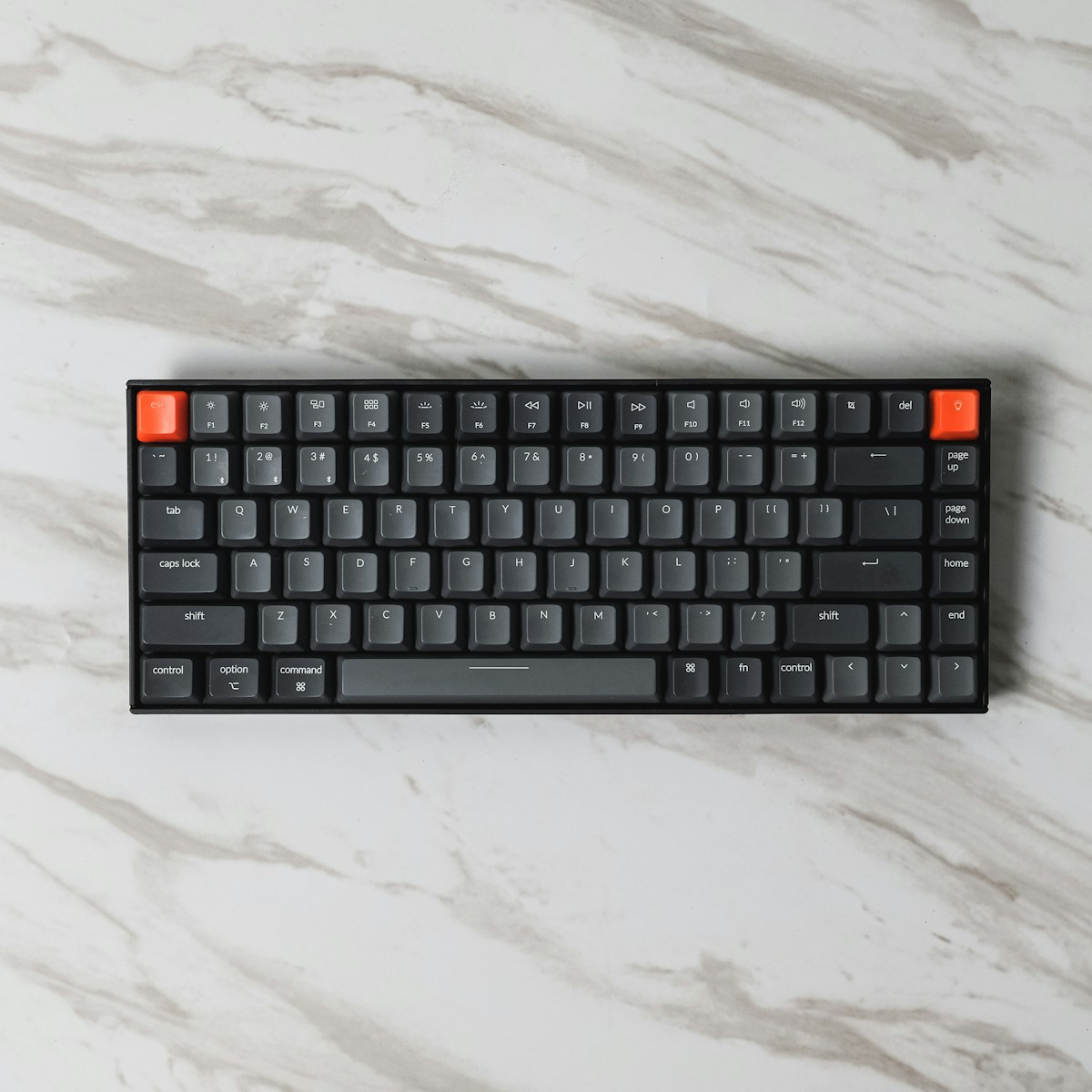
The aluminium frame feels premium, and the south-facing LEDs provide RGB backlighting that's visible through shine-through keycaps. QMK/VIA firmware support lets you remap every key.
- Type: Mechanical (hot-swappable)
- Layout: 75% compact
- Switches: Gateron G Pro (Red/Brown/Blue)
- Connectivity: Bluetooth (3 devices) + USB-C wired
- Battery: ~100 hrs (backlit on)
- Mac Layout: Yes (toggle switch)
- Firmware: QMK/VIA (full remapping)
- Price: ~$119 CAD
The Keychron K2 Pro is the best value mechanical keyboard for Mac. Hot-swappable switches, QMK support, and a solid aluminium build for $119 CAD. If you want to explore mechanical keyboards without a huge investment, start here.
Best Premium: Apple Magic Keyboard with Touch ID
Native Mac Experience
The Magic Keyboard with Touch ID is the only wireless keyboard with a built-in fingerprint sensor that works with macOS. Touch ID for unlocking your Mac, Apple Pay, and password autofill is genuinely convenient—especially on a Mac mini or Mac Studio without a built-in sensor.
The typing experience is shallow but consistent. If you're used to MacBook keyboards, the Magic Keyboard feels identical. The aluminium body is thin and elegant.
- Type: Membrane (scissor)
- Connectivity: Bluetooth (auto-pairs with Mac)
- Battery: ~1 month (Lightning or USB-C charging)
- Touch ID: Yes
- Mac Layout: Native
- Price: ~$270 CAD
Mac-Specific Features to Look For
Command Key Placement
On Mac, Command (⌘) is the primary modifier key. Windows keyboards put the Windows key where Command should be. Look for keyboards with:
- Native Mac layout (Apple, Logitech Mac versions)
- Mac/Windows toggle (Keychron, NuPhy)
- Software remapping (most keyboards via Karabiner-Elements)
Function Row Behaviour
Mac uses the function row for brightness, volume, Mission Control, and media controls. Third-party keyboards handle this differently:
- Logitech: Mac function keys printed on keycaps
- Keychron: Mac function keys via Fn layer
- Apple: Native Mac function keys
Multi-Device Switching
If you use multiple Apple devices, multi-device Bluetooth switching is essential:
| Keyboard | Devices | Switching Method |
|---|---|---|
| Apple Magic Keyboard | 1 | Manual re-pair |
| Logitech MX Keys S | 3 | Dedicated buttons |
| Logitech MX Mechanical Mini | 3 | Dedicated buttons |
| Keychron K2 Pro | 3 | Fn + 1/2/3 |
| NuPhy Air75 V2 | 3 | Fn + 1/2/3 |
📺 Watch: Best Wireless Keyboards for Mac 2026
Got Questions About Mac Wireless Keyboards? Let's Clear Things Up.
Do mechanical keyboards work with Mac?
Yes. Any Bluetooth keyboard works with Mac. Keyboards with Mac layout support (Keychron, Logitech, NuPhy) have the correct modifier key positions out of the box. For other keyboards, macOS lets you swap modifier keys in System Settings > Keyboard.
Is the Apple Magic Keyboard worth $270?
For Touch ID alone, maybe—if you use a Mac mini or Mac Studio and want fingerprint authentication. For typing quality, no. The Logitech MX Keys S and Keychron K2 Pro both offer better typing experiences for less money.
What switch type is best for Mac users?
Personal preference, but Tactile (brown) switches are the most popular for productivity. They provide a satisfying bump without being loud. Linear (red) switches are smoother and quieter. Clicky (blue) switches are loud—great if you live alone, annoying if you don't.
Can I use a Windows keyboard with Mac?
Yes. The Windows key becomes Command, and Alt becomes Option. macOS lets you remap these in System Settings. It works, but dedicated Mac-layout keyboards are more convenient.
The right wireless keyboard transforms your Mac typing experience. The Logitech MX Keys S is the best all-rounder, while the Keychron K2 Pro is the best value for mechanical keyboard enthusiasts. Either way, you'll type better than on the Magic Keyboard.
⌨️
Take Our Free Keyboard Finder Quiz
Answer a few quick questions and get personalized recommendations.
Start Quiz →



Discussion
Sign up or sign in to join the conversation.