
The VITURE Luma Ultra sits in a part of consumer tech that is still a bit awkward to describe because the industry cannot agree on the language. Some brands say smart glasses, some say XR glasses, some say AR wearable display. In practical terms, this is a face-worn personal scree...
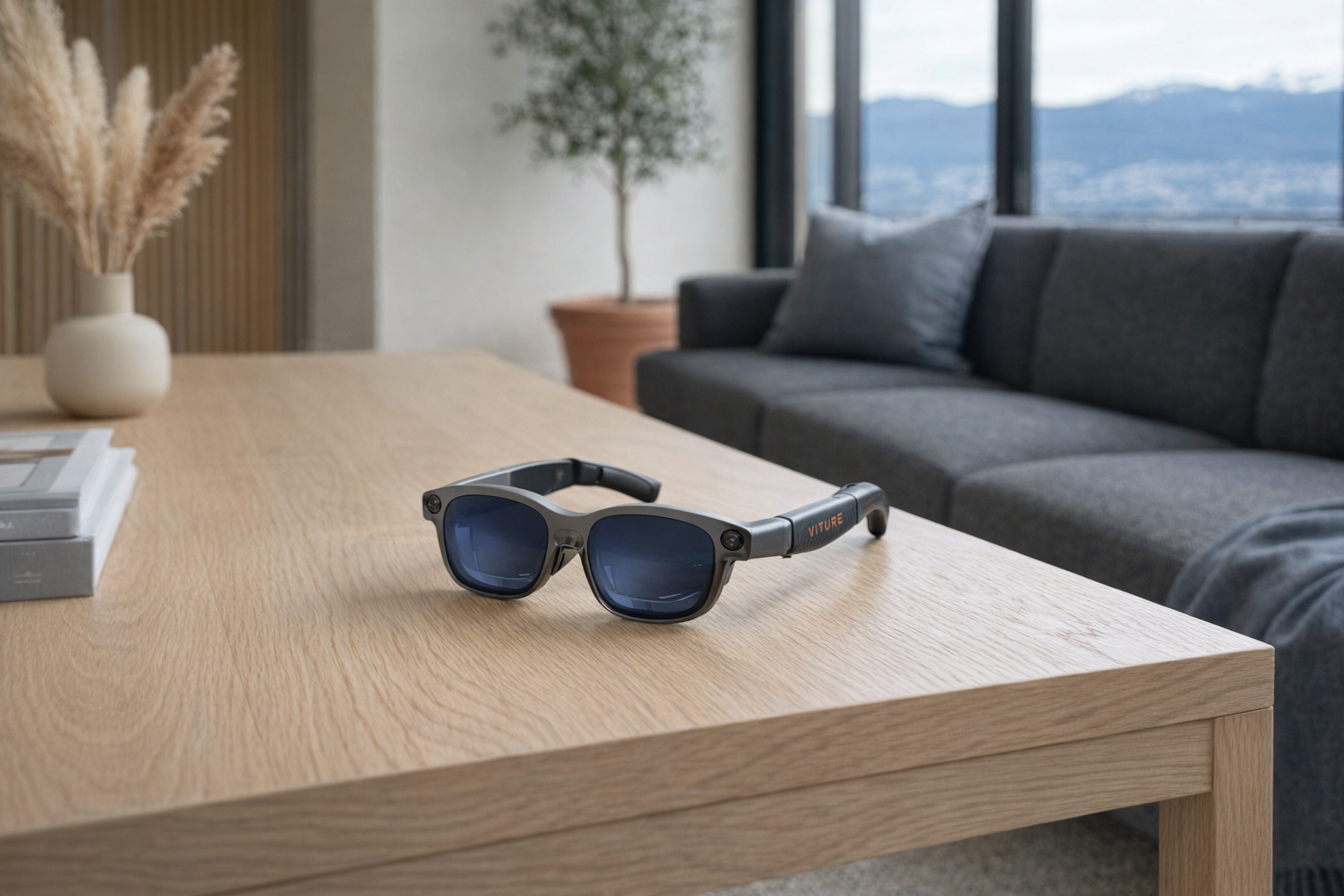
The VITURE Luma Ultra sits in a part of consumer tech that is still a bit awkward to describe because the industry cannot agree on the language. Some brands say smart glasses, some say XR glasses, some say AR wearable display. In practical terms, this is a face-worn personal screen with spatial features: something you wear like glasses, connect to a phone, laptop, or game system, and use as a large private display that appears to float in front of you. The Luma Ultra pushes that idea further than basic video glasses by adding 6DoF tracking, hand gesture control, and a real-time 2D-to-3D conversion feature that is clearly meant to separate it from simpler media viewers.
This article is not a hands-on review. Nothing here is based on personally using the product. The goal is simpler and, frankly, more useful for many buyers: to explain what the VITURE Luma Ultra actually is, what the listed features suggest in real life, how it compares with a more familiar rival in the category, and who it genuinely makes sense for. If you are staring at the product page and wondering whether this is a serious display tool, an expensive toy, or something in between, this is the calmer breakdown.
📺 Watch: VITURE Luma Ultra in context
Quick snapshot
| Question | What the VITURE Luma Ultra actually is |
|---|---|
| Category | Smart Glasses |
| Made by | VITURE |
| Typical price | ~$830 CAD (listing at the time of writing — verify current pricing) |
| Rating signal | Check current reviews |
| Best for | Travellers, handheld gamers, laptop users who want a private large display, early adopters curious about spatial controls |
| Skip if | You want ordinary prescription eyewear, all-day battery-free simplicity, or a cheap second screen |
Pro tip: Treat the VITURE Luma Ultra as a premium personal display first and a spatial-computing device second. If the giant private screen part does not already appeal to you, the gesture controls and 3D tricks probably will not justify the price on their own.
What the VITURE Luma Ultra actually is
In plain English, the VITURE Luma Ultra is a pair of connected display glasses that projects a large virtual screen into your field of view while adding more advanced tracking than the earlier wave of “plug in and watch” XR glasses. The headline numbers tell the story: 1920 x 1200 resolution per eye, a 152-inch equivalent display, a 52° field of view, and 1500 nits peak brightness. That means VITURE is not pitching this as a tiny notification gadget or a camera-on-your-face social experiment. It is pitching it as a serious visual display you can wear.
VITURE Luma Ultra are premium XR/AR smart glasses featuring a 152-inch equivalent display with 1920x1200 resolution per eye, full 6DoF support, AR hand gestures, 52° FOV, and 1500 nits peak brightness. Compatible with iPhone, Android, Mac, PC, and Nintendo Switch. Includes the world's first real-time 2D to 3D conversion.
The most useful comparison is to XREAL Air 2 Ultra, another real product aimed at buyers who want more than a floating movie screen. Both live in the “AR/XR glasses with spatial ambitions” lane, but the Luma Ultra’s listing leans especially hard on full 6DoF, gesture input, and real-time 2D-to-3D conversion as differentiators. That suggests VITURE wants to be seen not just as a travel display brand, but as a bridge between ordinary display glasses and more involved mixed-reality gear. Whether that bridge is worth ~$830 CAD depends heavily on how much you value private-screen convenience versus spatial novelty.
Key features at a glance
- 152-inch equivalent display with 1920 x 1200 resolution per eye
- Full 6DoF spatial tracking for more stable, position-aware virtual content
- AR hand gesture control instead of relying only on a phone or controller
- 52° field of view for a wider image than many simpler display glasses
- 1500 nits peak brightness to help the image stay usable in brighter environments
- Real-time 2D to 3D conversion for compatible viewing scenarios
- Broad compatibility with iPhone, Android, Mac, PC, and Nintendo Switch
How the VITURE Luma Ultra actually works
At a basic level, the VITURE Luma Ultra is doing two jobs at once. First, it acts as a personal external display connected to another device such as a phone, laptop, PC, or Switch. Second, it uses onboard spatial features to anchor that display or AR content in a more stable, position-aware way than simpler screen glasses typically can.
The display side is the easier part to understand. Instead of looking at a laptop panel or handheld console, you wear the glasses and see what is effectively a virtual monitor. The “152-inch equivalent” claim should not be taken literally as a TV replacing your living-room wall; it is marketing shorthand for perceived screen size at a certain virtual viewing distance. The useful takeaway is not the fake-inch number. It is that VITURE is promising a large, immersive private screen in a compact wearable form.
The more advanced part is the 6DoF piece. That stands for six degrees of freedom, meaning the system can track movement across three axes of position and three axes of rotation. In plain terms, the display is meant to understand not just where you turn your head, but how you move through space. That matters because it can make virtual content feel more anchored instead of simply following your face around. Done well, that is more comfortable and more convincing than the older “screen glued to your vision” style of wearable display.
Then there is AR hand gesture control, which suggests the Luma Ultra can let you interact with elements without always reaching for a separate controller. That sounds slick, but it is also the kind of feature that depends heavily on software support and environment. Gesture systems can feel convenient when you are selecting simple on-screen elements in a controlled setting. They can also feel fussy if you expect mouse-level precision. The healthy expectation is not magic. It is a new input option that may be great for media and simple spatial interactions, and less ideal for detailed work.
A practical way to think about the whole system is this:
- A source device provides the content — your phone, laptop, PC, or Nintendo Switch.
- The glasses render that content as a large virtual display in front of your eyes.
- Spatial tracking helps stabilize or position the content in a more natural way.
- Hand gestures add another control layer for selected AR interactions.
- 2D-to-3D processing attempts to convert standard visual content into a more dimensional viewing effect.
That last feature — real-time 2D to 3D conversion — is the biggest wildcard. It is interesting, and it will absolutely attract attention on a product page, but it is not wise to treat it as the main reason to buy. Evaluate it like a bonus mode on top of a premium display, not the core value.
A realistic "day in the life" with VITURE Luma Ultra
Because this is an informational explainer rather than a test report, the best approach is to sketch what the listed features imply in real use.
- Morning: You connect the VITURE Luma Ultra to a laptop to create a private, oversized workspace for email, documents, or a browser session. The big appeal here is not that it replaces a proper dual-monitor desk forever, but that it gives you a more expansive viewing setup in a kitchen, hotel, train, or shared office without broadcasting your screen to everyone nearby.
- Midday: On a commute or lunch break, you plug it into a phone or handheld-friendly device and watch video on what feels like a much larger display than any normal mobile screen. The 1500 nits peak brightness claim matters here, because wearable displays live or die on whether the image can hold up outside dim rooms.
- Afternoon: You switch to a PC or Mac session where 6DoF tracking and gesture features make more sense for spatial content or pinned virtual windows. This is the part that moves the Luma Ultra beyond “travel media glasses” into “light spatial-computing accessory,” though how often an average buyer actually uses those functions is a real question worth asking.
- Evening: You connect a Nintendo Switch for private gaming in bed, on the couch, or while travelling. That is probably one of the clearest use cases in the entire category: a larger personal screen without carrying a monitor. If the glasses are comfortable for your face and compatible with your setup, that alone can be the deciding feature.
Who the VITURE Luma Ultra is actually for (and who it isn't)
Great fits
- Frequent travellers who work from laptops in airports, hotels, and shared spaces and want a more private large-screen setup.
- Nintendo Switch owners who like portable gaming but want a bigger view without packing a separate display.
- Apartment dwellers or shared-house users who do not always have a quiet room or dedicated desk for a monitor setup.
- Early adopters already interested in XR gear who understand terms like 6DoF, FOV, and spatial interfaces and actually want to explore them.
- People sensitive to screen privacy on planes, trains, or open offices, where a face-worn display can be more practical than a visible laptop screen.
Poor fits
- Anyone hoping for ordinary glasses convenience. This is wearable tech, not a simple pair of specs you forget you are wearing.
- Budget shoppers looking for a casual gadget. At roughly $830 CAD, this is a premium discretionary purchase.
- People who want zero setup friction. Compatibility with iPhone, Android, Mac, PC, and Switch is promising, but multi-device gear still tends to involve cables, apps, modes, and occasional troubleshooting.
- Users expecting full VR-headset immersion with deep app ecosystems and standalone computing. That is not what this product is.
- People who dislike wearing anything on their face for long sessions, especially if they already struggle with heavy headphones or standard glasses discomfort.
Practical trade-offs
Comfort and fit
This is the first real question for any smart-glasses product, even before image quality. A wearable display can have excellent specs on paper — 1200p per eye, 52° FOV, 1500 nits — and still be a bad purchase if the physical experience does not suit your face, nose bridge, or general tolerance for head-worn gear. Because this is not a hands-on review, the only honest advice is to treat comfort as unresolved until you verify return policies and current buyer feedback.
That sounds boring, but it matters more than the flashy features. A mediocre monitor you can comfortably use for hours is often better than a futuristic display you stop wearing after 20 minutes.
Compatibility and setup reality
VITURE lists compatibility with iPhone, Android, Mac, PC, and Nintendo Switch, which is genuinely broad and one of the product’s strongest points. But broad compatibility is not the same as identical compatibility. Different devices may support different modes, accessories, or software layers, and some features are likely to make more sense on certain platforms than others.
That is why it helps to decide on your primary device first. If your main goal is Mac productivity, verify that workflow. If it is Switch gaming, verify that workflow. If it is iPhone media use, verify that one. “Works with everything” is encouraging, but “works best with my exact setup” is the buying question that actually matters.
Spatial features versus everyday value
The Luma Ultra’s advanced features — especially 6DoF, hand gestures, and 2D-to-3D conversion — are what justify its identity as more than a simple wearable monitor. But they are also the features most likely to be underused by ordinary buyers after the first wave of curiosity.
That does not make them bad. It just means you should be honest about your habits. If you mainly want Netflix on planes and Switch gaming in bed, buy it for that reason. If the spatial features become a fun extra, great. That is a more honest purchase logic than paying premium money because “AR gestures” sounded futuristic in a listing.
Where the VITURE Luma Ultra fits in a smart home
The VITURE Luma Ultra is not really a smart-home control device, and it should not be forced into that role. It fits better as a personal display layer that sits beside the rest of your tech rather than replacing any of it.
A realistic setup looks like this:
- MacBook Air or Windows laptop for work, with the Luma Ultra acting as a private large display in shared spaces.
- Nintendo Switch for handheld-style gaming with a much bigger apparent screen.
- iPhone or Android phone for media playback, casual viewing, or mobile productivity.
- Bluetooth earbuds or headphones for private audio, since visual privacy is only half the story.
- A regular monitor or TV at home for long sessions where shared viewing, comfort, and simplicity still win.
That division makes sense because glasses like this are strongest when they solve a very specific problem: how to carry a large private screen without carrying a large screen. Evaluate it like a travel and personal-computing accessory, not like a replacement for your living-room TV or your proper office monitor.
The buying decision, in plain terms
Before buying the VITURE Luma Ultra, three yes-or-no questions usually surface the right answer.
- Do you genuinely want a private large display you can wear? If that core use case does not excite you, the rest of the product is built on shaky ground.
- Will you actually use 6DoF, gesture control, or 3D features — or are they just interesting words? If they are just interesting words, make sure the display quality and compatibility alone justify the cost.
- Is roughly $830 CAD reasonable for your use case? That price makes sense only if it solves a recurring problem in your life, like travel work, portable gaming, or privacy in shared spaces.
If the answer is yes to all three, the VITURE Luma Ultra looks like a credible premium buy. If not, a standard portable monitor or cheaper XR display glasses may be the smarter move.
Got Questions About the VITURE Luma Ultra? Let's Clear Things Up.
Is this a hands-on review?
No. This is an informational explainer based on the product listing, published features, and what those features usually mean in the smart-glasses category. It is meant to help you decide whether this product deserves deeper research, not to replace direct testing.
What does the “152-inch equivalent display” actually mean?
It does not mean you are carrying around a literal 152-inch TV on your face. It means the virtual image is intended to feel like a very large screen at a certain apparent distance. The useful part is the sense of scale, not the literal inch number.
Does the VITURE Luma Ultra work with a Nintendo Switch?
According to the listing, yes — Nintendo Switch compatibility is specifically named. That makes it especially relevant for portable gaming buyers, since Switch use is one of the clearest and most practical reasons to buy display glasses in the first place.
Is the 2D-to-3D conversion a reason by itself to buy this?
Probably not for most people. It is an interesting feature and a clear marketing differentiator, but it is wiser to treat it as a bonus on top of the core value: a large private wearable display with spatial features. Buy the product for the display use case first.
Where can I verify the current price or buy it?
The current retailer listing linked in the product data is on Amazon, and that is the easiest place to verify price and availability before buying. You can check it here: VITURE Luma Ultra on Amazon.
What does it cost in Canada?
At the time of writing, the listing price is roughly ~$830 CAD. As with most imported niche gadgets, pricing can move around with exchange rates, promotions, and seller inventory, so verify the current amount before checkout.
Is VITURE Luma Ultra a replacement for a VR headset?
Not really. The listed features suggest a more display-focused product with spatial extras, not a full standalone VR platform with its own large software ecosystem. Think of it as an advanced pair of XR display glasses, not as a direct substitute for a Meta Quest-style headset.
Where is the Celmin Directory listing for this product?
For a catalog-style view of the same product — structured specs, pros and cons, similar picks, and FAQ — see VITURE Luma Ultra on Celmin Directory.
If you're building a smarter home in Canada and want honest explainers on gadgets worth considering — plus the ones worth skipping — Celmin covers the full catalog without the marketing theater. More reviews, comparisons, and buyer guides at https://celmin.ca.
Discussion
Sign up or sign in to join the conversation.