

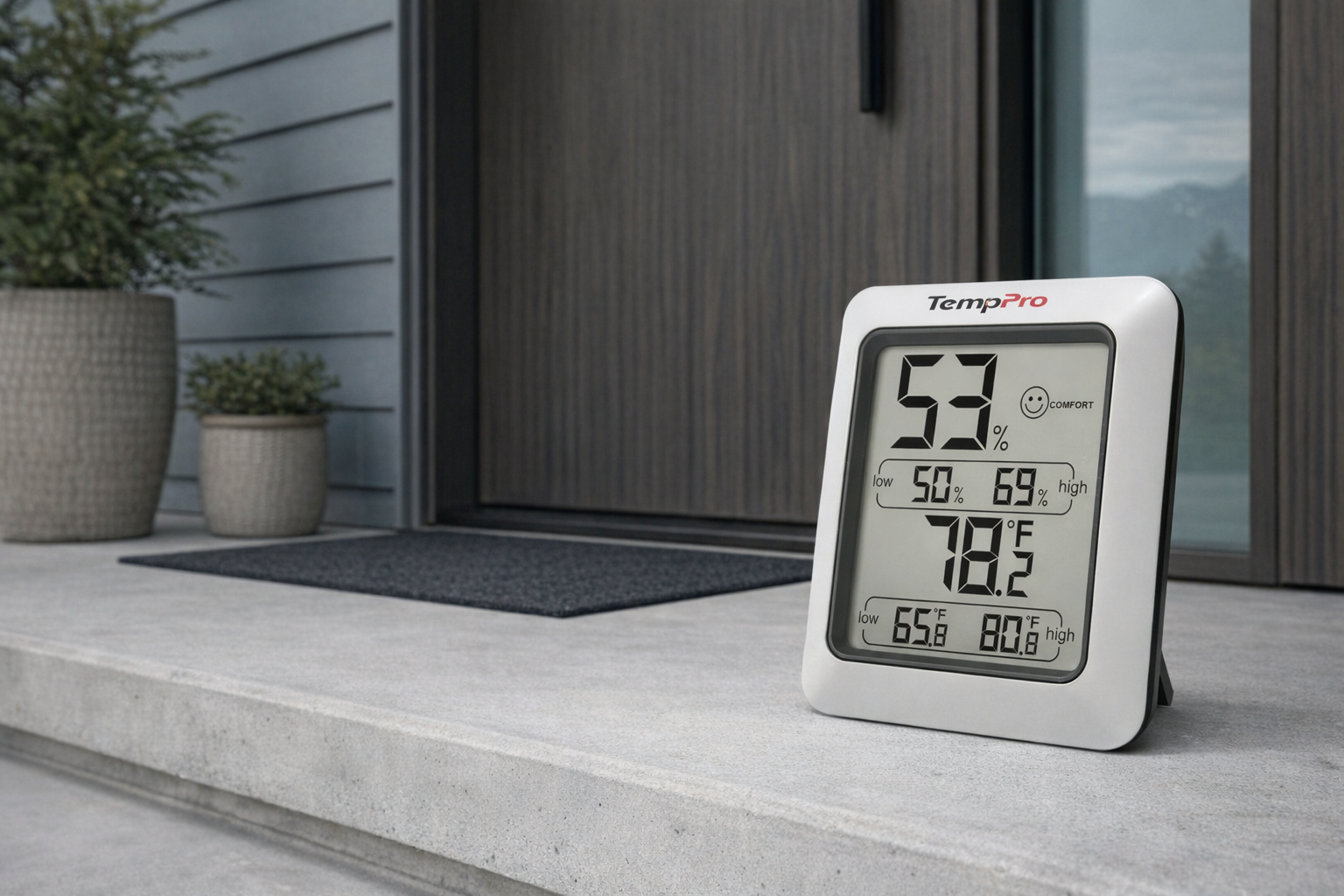
The TempPro TP50 Digital Hygrometer Indoor Thermometer sits in a very practical corner of the smart-home-adjacent world: the cheap, simple indoor climate monitor that tells you whether a room is actually comfortable or just *feels* fine until your skin, plants, guitars, or windows start compl...
The TempPro TP50 Digital Hygrometer Indoor Thermometer sits in a very practical corner of the smart-home-adjacent world: the cheap, simple indoor climate monitor that tells you whether a room is actually comfortable or just feels fine until your skin, plants, guitars, or windows start complaining. It is not glamorous. It does not connect to Wi-Fi. It does not try to become your home hub. It just shows indoor temperature and humidity, updates frequently, and gives you a blunt comfort signal.
This article is not a hands-on review. Nothing here is based on personally testing the device. Instead, the goal is to explain what the TempPro TP50 Digital Hygrometer Indoor Thermometer actually is, what its listed features mean in real life, how it compares with a well-known alternative, and who it genuinely makes sense for. If you are trying to solve dry winter air, a damp basement, a nursery comfort issue, or you just want a clearer read on one room without overcomplicating things, this is for you.
📺 Watch: TempPro TP50 Digital Hygrometer Indoor Thermometer in context
Quick snapshot
| Question | What the TempPro TP50 Digital Hygrometer Indoor Thermometer actually is |
|---|---|
| Category | Patio, Lawn & Garden |
| Made by | TempPro |
| Typical price | ~$15 CAD (listing at the time of writing — verify current pricing) |
| Rating signal | 4.6/5 on the source listing |
| Best for | Bedrooms, nurseries, basements, plant rooms, and anyone troubleshooting indoor comfort cheaply |
| Skip if | You want app alerts, historical charts, outdoor sensing, or whole-home automation |
Pro tip: Buy this to answer one basic question clearly — is this room too dry, too damp, or fine? If you want graphs and phone notifications, skip straight to a Wi‑Fi sensor instead of expecting a $15 display to be something it isn't.
What the TempPro TP50 Digital Hygrometer Indoor Thermometer actually is
The TempPro TP50 Digital Hygrometer Indoor Thermometer is a small stand-alone indoor monitor for two things: temperature and relative humidity. In plain English, it is the kind of gadget you put on a shelf, bedside table, or fridge and glance at when a room feels off. Its main job is not precision lab work; its main job is helping ordinary people notice that the bedroom is sitting too dry in winter, the basement is getting muggy, or the nursery is warmer than expected.
Digital indoor hygrometer and thermometer with humidity comfort level indicator (DRY/COMFORT/WET). Features high accuracy of ±1°F and ±2-3% RH, 10-second refresh rate, high/low records, tabletop stand and magnetic back. Includes 1 AAA battery.
That description tells you almost everything important. The useful part is not just that it shows numbers, but that it also translates humidity into a simple DRY / COMFORT / WET indicator. That matters because many people do not naturally know whether 28% humidity is a problem or whether 62% means dehumidifier time. Compared with a popular alternative like the ThermoPro TP50 Digital Hygrometer Indoor Thermometer, the TempPro model appears to aim at the same low-cost, no-fuss role: fast local readings, no app, no subscription, no drama. That's a more honest design than many “smart” climate gadgets that add complexity without solving the core problem better.
Key features at a glance
- Humidity comfort level indicator with DRY, COMFORT, and WET labels
- Claimed accuracy of ±1°F for temperature
- Claimed humidity accuracy of ±2-3% RH
- 10-second refresh rate for relatively quick room updates
- High and low records for temperature and humidity
- Tabletop stand and magnetic back for flexible placement
- °F/°C selector
- Includes 1 AAA battery
How the TempPro TP50 Digital Hygrometer Indoor Thermometer actually works
At a basic level, the TempPro TP50 Digital Hygrometer Indoor Thermometer uses internal sensors to sample the air around it and display two readings: room temperature and relative humidity. Relative humidity is the percentage of moisture currently in the air compared with the maximum it could hold at that temperature. That sounds technical, but in practice it helps answer familiar questions: why does the room feel clammy, why is static electricity bad, why are the windows fogging up, and why is the air making your throat feel dry?
The listed 10-second refresh rate is one of the more useful details here. It means the display is meant to update every 10 seconds rather than lingering on old data for long stretches. That will not make it instant in the way a thermostat feels instant when you walk past a vent, but it does mean it should react reasonably quickly if you open a window, run a humidifier, or move the unit from one room to another. For this category, that is a sensible refresh interval.
There are really three layers to how you use it:
- Read the current numbers. Temperature tells you how warm the room is; humidity tells you how dry or damp the air is.
- Check the comfort label. DRY, COMFORT, and WET are quick shorthand for people who do not want to interpret humidity percentages all day.
- Look at the high/low records. This is quietly one of the most useful features, because it gives you a rough memory of what happened in the room when you were not staring at the display.
That last point is worth dwelling on. High/low records make this more than just a momentary readout. If you are troubleshooting a nursery that gets chilly overnight, a basement that spikes in humidity during the afternoon, or a bedroom that dries out after the furnace runs, the max/min memory gives you a clue. It is not a full log and it is not a graph, but for a simple battery-powered monitor, it is often enough to confirm whether your discomfort is a one-off feeling or a pattern.
Placement matters too. Because this unit has both a tabletop stand and a magnetic back, you can put it where it is actually useful rather than where a cable reaches. On a dresser, it acts like a nightstand climate readout. On a metal shelf or fridge, it stays visible without taking counter space. The main thing is to avoid treating it like a decorative object: if you tuck it beside a heat source, above a radiator, or directly in humidifier mist, the reading will reflect that microclimate rather than the room.
A realistic "day in the life" with TempPro TP50 Digital Hygrometer Indoor Thermometer
Because this is an informational piece, here is what a normal day might look like based on the listed features and the way indoor thermometers are typically used — not a tested account.
- Morning. You wake up in winter, glance at the display, and see the room is comfortable in temperature but the humidity has dropped into the DRY zone overnight. That is your cue to run a humidifier or turn one up, especially if the heat has been running hard.
- Midday. Sun hits a room or a humidifier has been running for a while. With a 10-second refresh rate, the unit should adjust often enough to show the room changing rather than leaving you guessing for several minutes.
- Afternoon. In a basement office or laundry area, you check the display and see humidity drifting higher than expected. The WET comfort indicator and current %RH tell you whether it is time to start a dehumidifier or crack ventilation before things get stale.
- Evening. Before bed, you check the high/low records to see how the room behaved during the day. That is especially useful for a baby’s room, a plant shelf, or a room with instruments, where the question is not just “what is it now?” but “how far did it swing?”
Who the TempPro TP50 Digital Hygrometer Indoor Thermometer is actually for (and who it isn't)
Great fits
- Parents setting up a nursery who want a cheap, always-visible read on room comfort without needing an app at 3 a.m.
- Condo or house dwellers dealing with dry winter air and trying to decide whether a humidifier is actually helping.
- Basement owners who suspect the space is getting damp and want a simple way to keep tabs on humidity.
- Plant owners with a single shelf, room, or cabinet area who want a quick climate check without building a full sensor network.
- People with guitars, pianos, books, or other humidity-sensitive items who need an affordable room-level warning sign.
- Renters who want to monitor one problem room without drilling, wiring, or committing to a larger system.
Poor fits
- Smart-home tinkerers who want app history, notifications, or integrations with Alexa, Google Home, or Home Assistant.
- People trying to monitor outdoor weather or multiple rooms from one screen; this is an indoor local display, not a weather station.
- Anyone expecting medical- or lab-grade environmental precision rather than ordinary home-monitoring accuracy.
- Users who want automatic control over a humidifier or dehumidifier; this device informs decisions, it does not make them.
- People who rarely look at standalone displays and know they will ignore a shelf gadget unless it pings their phone.
Practical trade-offs
Accuracy and interpretation
The listed claims of ±1°F and ±2-3% RH are solid for a low-cost home unit, but they still need to be interpreted realistically. This is enough precision for deciding whether a bedroom is too dry or whether a basement is trending damp. It is not the same as calibrated commercial instrumentation. Evaluate it like a good household gauge, not like a scientific reference device.
Also, humidity itself is a moving target. Open a window, boil water, run a shower, or move the sensor near a vent, and the reading will shift. That is not the device failing; that is the room changing. The real value is trend awareness and room comfort, not decimal-point obsession.
Placement and local bias
Because the TempPro TP50 is small and portable, it can be placed almost anywhere. That convenience is useful, but it also creates the biggest user error: putting it in the wrong spot and assuming the number represents the whole room. On a sunny windowsill, near a space heater, beside a humidifier outlet, or on top of warm electronics, the reading may be technically real for that spot and misleading for the room overall.
A better approach is to place it at roughly breathing height, out of direct sun, away from obvious heat or moisture blasts. If you are using it in a nursery, bedroom, or basement, think of it the same way you would place a thermostat: somewhere representative, not somewhere dramatic.
No connectivity, and that is both good and bad
One reason a product like this remains appealing is precisely what it does not do. There is no app setup, no account creation, no firmware maintenance, and no subscription. It runs on 1 AAA battery, which is refreshingly boring in a category where even basic sensors increasingly want your email address.
The trade-off is obvious: no phone alerts, no exportable history, no remote checking from work, and no automation hooks. If you want a sensor to trigger a smart plug, log humidity over months, or tell you your cottage basement is damp while you are away, this is the wrong tool. If you want a local number on a screen for fifteen dollars, it makes a lot more sense.
Where the TempPro TP50 Digital Hygrometer Indoor Thermometer fits in a smart home
This is not a smart-home hub, and it does not need to be. The TempPro TP50 Digital Hygrometer Indoor Thermometer fits best as a sanity-check device inside a larger home setup.
A practical setup might look like this:
- Humidifier in a bedroom or nursery, using the TP50 to confirm whether you are solving dry air or just making noise.
- Dehumidifier in a basement or laundry room, with the TP50 acting as the quick visual readout for when the room starts creeping into the wet zone.
- Smart thermostat from ecobee, Nest, or Honeywell handling heating and cooling, while the TP50 gives you room-level humidity context that a central hallway thermostat may miss.
- Window and insulation troubleshooting, especially in winter, where a simple humidity display helps explain condensation and comfort issues.
That last use is underrated. In many homes, especially older ones, comfort problems are not purely temperature problems. A room can be 21°C and still feel harshly dry, or 19°C and feel muggy. The TP50 gives you a second piece of the puzzle. It is best treated as a support tool beside your HVAC gear, not as a replacement for it.
The buying decision, in plain terms
Before buying the TempPro TP50 Digital Hygrometer Indoor Thermometer, three honest questions usually get you to the right answer:
- Do you actually need local visibility, or do you need alerts and history? If you just want to glance at a room and know whether it is dry or damp, this is a good fit. If you need phone notifications, buy a connected sensor instead.
- Are you troubleshooting one room, not a whole system? This product is best for a bedroom, nursery, basement, office, or plant area. It is not a whole-home monitoring platform.
- Are you comfortable with “good household accuracy” rather than pro instrumentation? For roughly $15 CAD, the expectation should be useful environmental guidance, not perfection.
Three yeses make this an easy, low-risk buy. If any answer is clearly no, skip it and move up to a smarter or more specialized monitor.
Got Questions About the TempPro TP50 Digital Hygrometer Indoor Thermometer? Let's Clear Things Up.
Is this a hands-on review?
No. This is an informational explainer based on the listed product details and the way devices in this category generally work. It is meant to help you understand what the TempPro TP50 Digital Hygrometer Indoor Thermometer is for and whether it fits your room or routine.
What does the DRY/COMFORT/WET indicator actually do?
It gives you a quick interpretation layer on top of the humidity number. Instead of needing to decide what, say, 27% or 65% relative humidity means on the fly, the display flags whether conditions are generally too dry, comfortable, or too wet. That is especially handy in bedrooms, nurseries, and basements where you want a fast read.
How often does it update?
According to the listing, it refreshes every 10 seconds. That should be frequent enough to show room changes in a practical way, such as after turning on a humidifier, opening a window, or moving the unit between spaces.
Does it record past readings?
It does not appear to offer app-based history or graphing, but it does list high and low temperature/humidity records. In practice, that means it can show the max and min values it has seen over a period, which is useful for spotting overnight dryness or daytime humidity spikes.
Does it need Wi‑Fi or an app?
No Wi‑Fi or app is listed, and that is part of the appeal. It is a self-contained display powered by 1 AAA battery, which is included according to the listing. That makes setup simple, but it also means no remote alerts or smart-home automations.
Where can you verify the current details or buy it?
The simplest place to verify the current listing, price, and feature details is the retailer page here: Amazon product listing. As with any low-cost home sensor, check the latest listing for current pricing and availability before buying.
What does it cost in Canada?
At the time of writing, the listed price is roughly ~$15 CAD. That is cheap enough to treat as a practical household tool rather than a major gadget purchase, but pricing can move, so verify the current listing before checkout.
Where is the Celmin Directory listing for this product?
For a catalog-style view of the same product — structured specs, pros and cons, similar picks, and FAQ — see TempPro TP50 Digital Hygrometer Indoor Thermometer on Celmin Directory.
If you're building a smarter home in Canada and want honest explainers on gadgets worth considering — plus the ones worth skipping — Celmin covers the full catalog without the marketing theater. More reviews, comparisons, and buyer guides at https://celmin.ca.

Discussion
Sign up or sign in to join the conversation.