

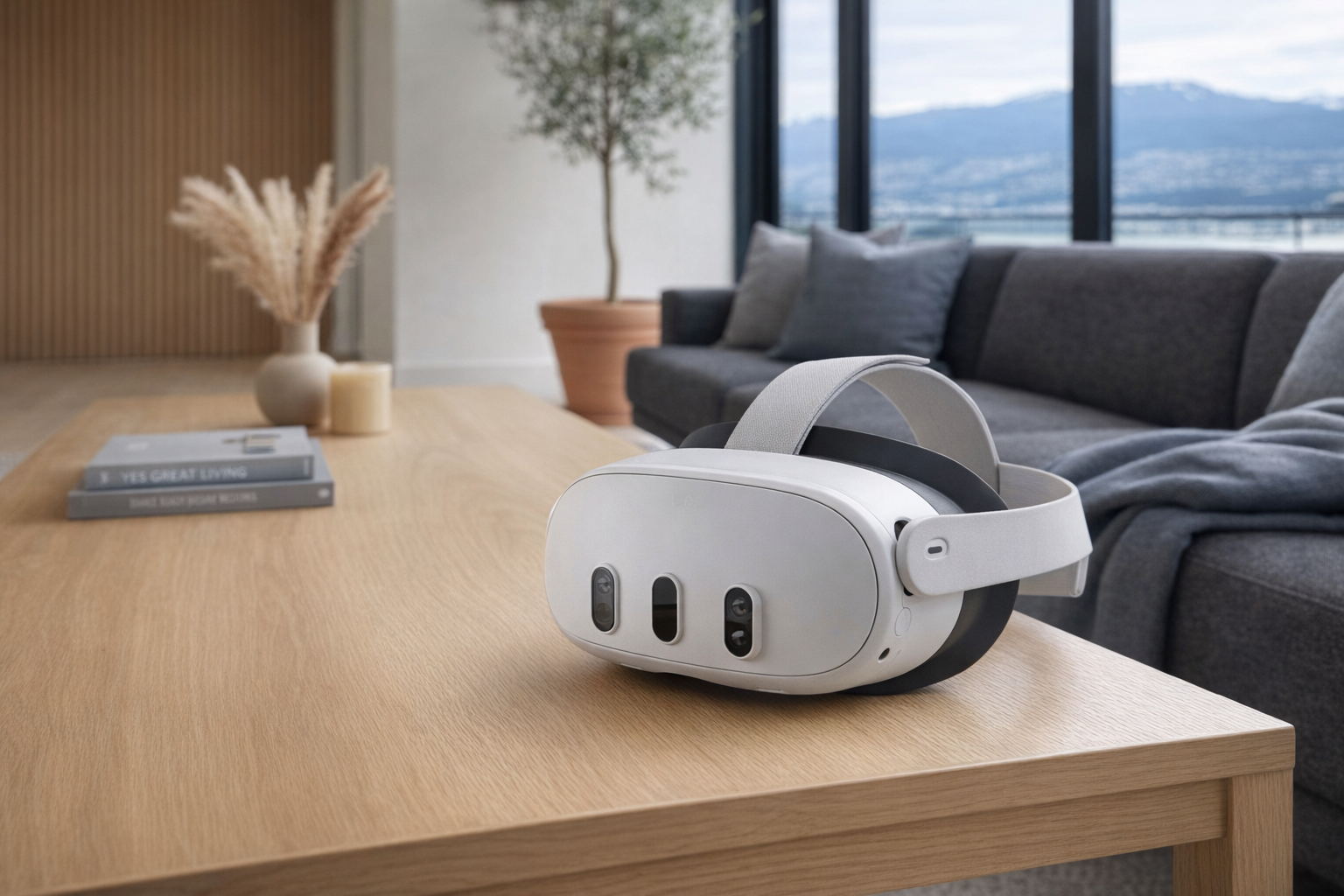
The Meta Quest 3 VR Headset sits in a part of consumer tech that has finally become easier to explain to normal people. It is a standalone virtual-reality headset that also leans hard into mixed reality, which means it is not just for fully enclosed VR games anymore. The pitch is broader than...
The Meta Quest 3 VR Headset sits in a part of consumer tech that has finally become easier to explain to normal people. It is a standalone virtual-reality headset that also leans hard into mixed reality, which means it is not just for fully enclosed VR games anymore. The pitch is broader than that: gaming, fitness, media watching, social apps, and productivity-style experiences, all from one headset that does not need to be tethered to a gaming PC to function. That broader pitch is exactly why Quest devices have become the mainstream reference point for VR, even for people who are only vaguely following the category.
This is not a hands-on review. Nothing here is based on personally using the headset. The goal is simpler and, frankly, more useful for many buyers: explain what the Meta Quest 3 VR Headset actually is, how it differs from older and competing headsets, and who it realistically makes sense for. If you are trying to figure out whether this is a serious entertainment device or just an expensive novelty, this calmer breakdown is for you.
Quick snapshot
| Question | What the Meta Quest 3 VR Headset actually is |
|---|---|
| Category | Entertainment |
| Made by | Meta |
| Typical price | Pricing varies — check current Canadian listings |
| Rating signal | 4.6/5 on the source listing |
| Best for | People who want a flexible standalone VR headset for games, fitness, mixed reality, and media |
| Skip if | You get motion sick easily, want ultra-light eyewear-style hardware, or expect console simplicity with no setup learning curve |
Pro tip: Buy the Meta Quest 3 VR Headset for its standalone library and mixed-reality flexibility, not because you assume you will use it every day for productivity. For most people, this is still an entertainment device first.
What the Meta Quest 3 VR Headset actually is
In plain English, the Meta Quest 3 VR Headset is Meta's mainstream all-in-one VR headset: a self-contained unit with its own processing hardware, cameras, sensors, speakers, and controllers. You put it on, define a safe play area, and launch apps or games directly from the headset without needing a console or PC for the basic experience. That matters because older VR setups often involved external sensors, cables, and a general sense that you were setting up lab equipment in your living room. Quest headsets helped remove that friction, and the Quest 3 continues that approach while putting more emphasis on colour passthrough and mixed reality.
That blank description field is a little awkward, but the product itself is still well understood. According to Meta's current positioning and widely known product details, the Quest 3 is the step above the more budget-oriented Meta Quest 3S and the successor in spirit to the Meta Quest 2. Compared with the Quest 2, the Quest 3 is generally understood to offer a slimmer design, improved display clarity, a newer chipset, and much stronger mixed-reality capability through full-colour passthrough cameras. That is a more meaningful upgrade than many annual gadget refreshes, because it changes what the headset is good at, not just how fast menus load.
Key features at a glance
- Standalone VR headset design with no PC or console required for core use
- Mixed reality support through outward-facing cameras and colour passthrough
- Motion controllers for games, workouts, and interactive apps
- Access to Meta's Quest app library for games, fitness, media, and social experiences
- Optional PC VR use for buyers who want to connect to a gaming computer
- Inside-out tracking, meaning the headset tracks movement using onboard cameras rather than external base stations
How the Meta Quest 3 VR Headset actually works
The Meta Quest 3 VR Headset combines several systems that used to be sold separately. It has internal processing hardware to run apps, built-in displays to present the virtual world, and external cameras and sensors to understand where your head and hands are in physical space. When you put the headset on, it maps your environment, helps you set a boundary, and then uses that map to keep virtual objects stable as you move around.
There are really three modes people should think about.
- Standalone VR. This is the main use case. You download apps from Meta's store and run them directly on the headset. No PC required, no cable required, and usually the lowest-friction way to actually use it regularly.
- Mixed reality. The cameras show your real room in colour while apps place digital objects into that real environment. That is how you get things like rhythm games in your living room, digital workout overlays, or a giant floating screen while still being aware of your surroundings.
- PC-connected VR. If you have a capable gaming PC, the headset can also act as a viewer for more demanding PC VR content. For some buyers, this is a bonus. For others, it is the whole point. But it is best treated as optional, not the headline feature.
The practical difference between this and older VR is mostly about friction. The Quest 3 does not ask you to mount sensors around the room or permanently dedicate a spare office to VR. You still need space and you still need tolerance for wearing a headset on your face, but the setup is much closer to "put it on and go" than classic PC VR ever was. That's a more honest consumer product shape than many enthusiast headsets have managed.
One more thing worth being clear about: mixed reality is useful, but it is not magic. The colour passthrough on headsets like this is there to make VR less isolating and to enable new styles of apps. It does not mean the device becomes a pair of invisible glasses you can wear around the house all day. Evaluate it like a premium game and media device, not like a replacement for your laptop or TV.
A realistic "day in the life" with Meta Quest 3 VR Headset
Because this is an informational explainer, the examples below are based on the product's known feature set and how the category is commonly used, not on direct testing.
- Morning. You clear a bit of floor space and launch a guided fitness or boxing-style app. The headset tracks your movement with its onboard sensors, and the controllers translate punches, swings, or hand motions into the app. This is one of the most believable recurring uses for a headset like this because it turns exercise into something more structured than a YouTube video.
- Midday. You use mixed reality mode to open a large floating screen while still seeing your room around you through colour passthrough. That could mean watching a show, browsing, or experimenting with a work-style app. For some people this becomes a real secondary use; for others, it is impressive for 20 minutes and then largely ignored.
- Afternoon. You hand the headset to a family member for a rhythm game or an interactive experience. Standalone VR makes these quick swaps easier than old PC-tethered systems because there is no cable management and no external sensor setup to explain. This matters if the headset is meant to be a shared household gadget rather than a personal hobby machine.
- Evening. You settle in for a more traditional gaming session, either with a native Quest title or, if you have the hardware, a PC VR connection. This is where the Quest 3's role becomes clearest: it is an entertainment device that can stretch across casual use, active use, and enthusiast use depending on the app.
Who the Meta Quest 3 VR Headset is actually for (and who it isn't)
Great fits
- People who wanted to try VR before but were put off by cables, sensors, and PC complexity.
- Apartment dwellers who do not have a dedicated game room but can clear a safe patch of floor when needed.
- Fitness-minded buyers who are more likely to stick with active games than with a treadmill routine.
- Families with older teens or adults who want a shared entertainment gadget beyond another tablet or console.
- Existing Meta Quest 2 owners who are specifically interested in better mixed reality and clearer visuals, not just "something newer."
Poor fits
- Buyers expecting the comfort and simplicity of ordinary glasses. A VR headset still sits on your face and asks you to tolerate weight, heat, and isolation.
- Anyone strongly prone to motion sickness or visual discomfort in immersive environments.
- Parents shopping for very young children. VR headsets are not casual toy-bin devices.
- People who mainly want to watch Netflix on a giant virtual screen and nothing else. A real TV may be the better use of money.
- Buyers who dislike account systems, app-store ecosystems, and the reality that platform owners shape what works and how.
Practical trade-offs
Comfort and session length
This is the first real-world trade-off with any VR headset, and the Meta Quest 3 VR Headset is no exception. Even a well-designed headset still places hardware on your face, and that limits how long many people will want to use it in one sitting. Some buyers imagine two- or three-hour work sessions in virtual space and then discover that 30 to 60 minutes of active use feels more natural. That is not a flaw unique to Meta; it is just where the category still is.
The other side of comfort is physical effort. A fitness app, a room-scale game, and a seated media session all feel very different. A headset that seems fine during passive video watching can feel heavier during active movement. If you already know you dislike wearing over-ear headphones for long stretches, pay attention to that instinct.
Space, setup, and household friction
The Quest 3 avoids the old mess of external base stations, but it does not remove the need for room awareness. You still need a safe area free of coffee tables, lamps, pets, and the sort of low furniture that exists purely to attack shins. For some households, that is easy. For others, every VR session begins with rearranging the living room.
There is also the social issue. A TV invites a room to watch together. A headset usually turns one person inward while everyone else sees someone waving controllers around. That is not always bad, but it does affect how often the device comes off the shelf. Shared devices that only really entertain one person at a time need a stronger reason to stay in regular rotation.
Privacy and platform dependence
The Meta Quest 3 VR Headset relies on cameras, tracking, user accounts, and a platform storefront. That is normal for a modern VR headset, but it is still worth saying plainly. The device observes your movement and environment to function properly. Buyers should review Meta's current privacy settings, data policies, and account requirements rather than assuming all of that is trivial.
Platform dependence matters too. When you buy into Quest, you are buying into Meta's ecosystem, store policies, software roadmap, and compatibility decisions. That can be perfectly reasonable — many people prefer a centralized store because it reduces hassle — but it means long-term value is tied to Meta's support. Evaluate it like a game console platform, not like a generic display you control completely.
Where the Meta Quest 3 VR Headset fits in a smart home
The Meta Quest 3 VR Headset is not really a smart-home control centre, and trying to make it one misses the point. It fits better as an entertainment endpoint alongside the rest of a normal home setup.
For example, a realistic stack might look like this:
- A smart TV or streaming box handles casual living-room viewing.
- A game console like a PlayStation 5 or Xbox Series X handles traditional flat-screen gaming.
- A fitness watch or smartwatch tracks workouts and health data.
- The Meta Quest 3 VR Headset covers immersive gaming, active fitness apps, virtual big-screen viewing, and mixed-reality experiments.
If you already use Spotify, YouTube, Netflix, or similar services, the Quest 3 can become another place to access content — but in a more immersive format. If you already own a gaming PC, it can also sit beside Steam and your desktop setup as a bridge into PC VR. That is where the Quest 3 makes the most sense: not as the centre of your tech life, but as the specialized device you reach for when you want immersion that a phone, laptop, or TV cannot deliver.
The buying decision, in plain terms
Before buying the Meta Quest 3 VR Headset, three questions usually surface the right answer.
- Do you actually want VR and mixed reality, or do you mostly want to be impressed for a weekend? If it is the second one, borrowing or trying a headset first is the smarter move.
- Do you have the space and tolerance to use a headset regularly? A good VR device still needs floor space, comfort tolerance, and a little setup patience.
- Are you buying it for games, fitness, and immersive media — not as a fantasy laptop replacement? That expectation line matters more than most spec sheets do.
Three yeses make the Meta Quest 3 VR Headset a sensible buy. If any of those are a firm no, a console, TV upgrade, or tablet may suit you better.
Got Questions About the Meta Quest 3 VR Headset? Let's Clear Things Up.
Is this a hands-on review?
No. This is an informational explainer based on the product listing, widely known category details, and what the headset's feature set implies in real use. It is meant to help frame the buying decision, not replace direct testing or a full review.
Does the Meta Quest 3 VR Headset need a PC?
No, not for its main purpose. The Quest 3 is a standalone headset, which is one of its biggest selling points. A gaming PC can expand what it can do, but you do not need one to play Quest apps, use mixed reality features, or watch media.
Is the Meta Quest 3 better than the Meta Quest 2?
For buyers who care about mixed reality, general clarity, and a more modern hardware platform, yes, that is the usual case. Compared with the Meta Quest 2, the Quest 3 is generally understood to offer a more advanced overall experience rather than just a minor tune-up. The catch is simple: if you only use a handful of basic VR apps and are price-sensitive, the upgrade may matter less.
Is the Meta Quest 3 VR Headset good for fitness?
Potentially, yes. Standalone VR has become a genuine fitness category because active games and guided workout apps are easier to launch when no PC or sensor setup is involved. The real question is whether you personally enjoy exercising in a headset enough to return to it consistently.
Can you watch movies and shows on it?
Yes, that is one of the common uses. The appeal is the virtual-screen effect: you can make content appear much larger than the screen you physically own. For some people that feels immersive and private; for others, a real television is still more comfortable for longer viewing.
Where can I verify the current listing or buy it?
The simplest place to verify the current seller page, price, and package details is the source listing on Amazon. Here is the direct link: Meta Quest 3 VR Headset listing. Since listings can change, check the exact storage version, included accessories, and return policy before ordering.
What does it cost in Canada?
Current pricing can vary by retailer and by storage bundle, so the safest answer is the same one in the snapshot table: Pricing varies — check current Canadian listings. The provided product data also includes a listed price of 55.71 CAD, but that figure does not line up with the usual market position of a Quest 3 headset, so it is wise to verify the live listing carefully before treating that number as reliable.
Where is the Celmin Directory listing for this product?
For a catalog-style view of the same product — structured specs, pros and cons, similar picks, and FAQ — see Meta Quest 3 VR Headset on Celmin Directory.
If you're building a smarter home in Canada and want honest explainers on gadgets worth considering — plus the ones worth skipping — Celmin covers the full catalog without the marketing theater. More reviews, comparisons, and buyer guides at https://celmin.ca.



Discussion
Sign up or sign in to join the conversation.