
The LOONA Deskmate by KEYi Technology sits in a fairly new corner of consumer tech: the AI desk companion that is not trying to be a full robot and not trying to be just another chatbot window either. Its pitch is more specific than that. This is a small desktop companion built around your ...
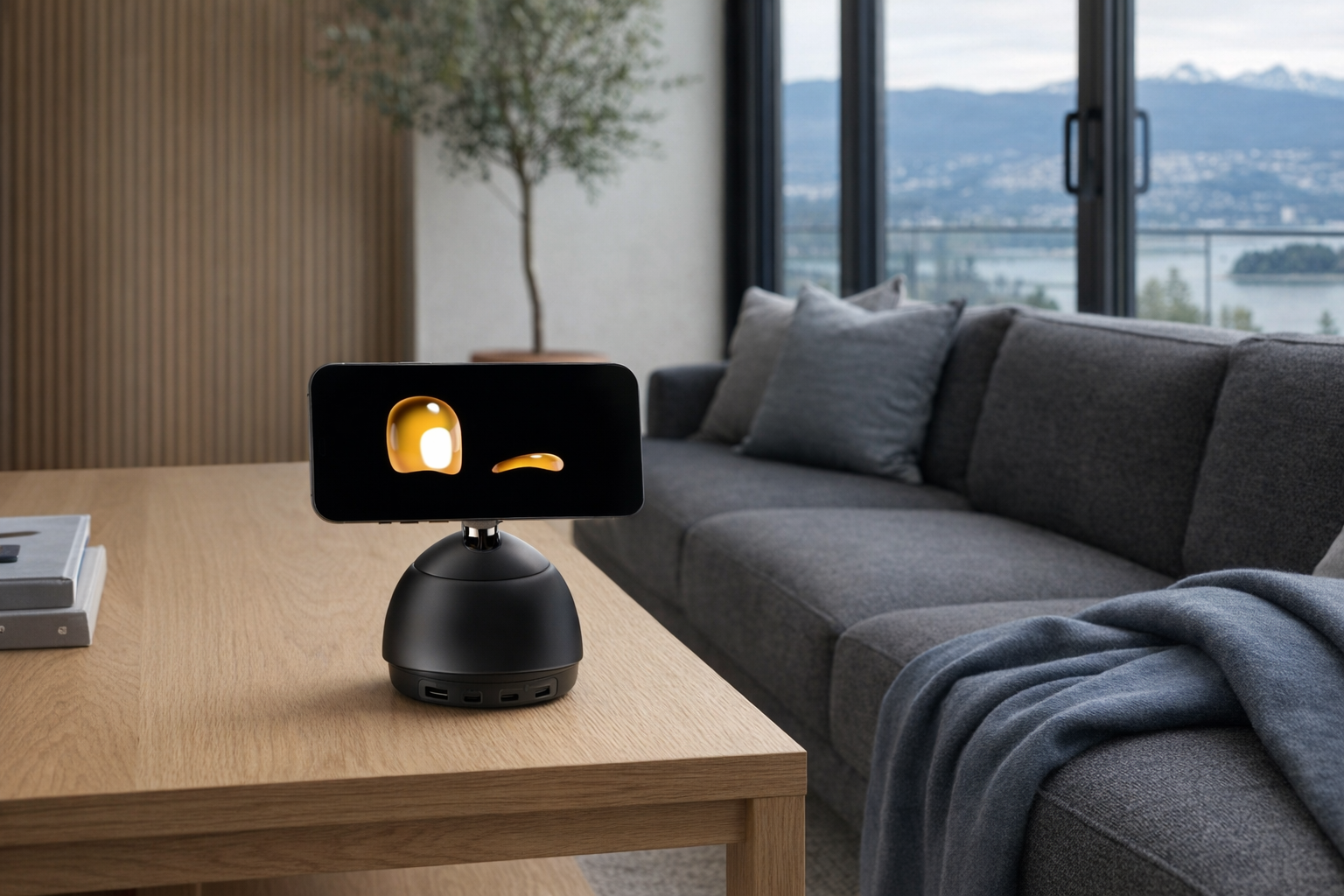
The LOONA Deskmate by KEYi Technology sits in a fairly new corner of consumer tech: the AI desk companion that is not trying to be a full robot and not trying to be just another chatbot window either. Its pitch is more specific than that. This is a small desktop companion built around your iPhone — physically attached by MagSafe — so the phone handles the screen and much of the intelligence while the robot body gives that AI a presence on your desk. In plain terms, it is meant to turn your phone from a thing you constantly pick up into a thing that stays put and helps you work.
This article is not a hands-on review. Nothing here is based on personally using the device. Instead, the goal is to explain what the LOONA Deskmate appears to be, how its iPhone-dependent design changes the experience, and who it actually makes sense for based on the listed features and the broader AI-companion category. If the product page makes it sound intriguing but slightly vague, this is the calmer version.
📺 Watch: LOONA Deskmate in context
Quick snapshot
| Question | What the LOONA Deskmate actually is |
|---|---|
| Category | AI Companions |
| Made by | KEYi Technology |
| Typical price | ~$275 CAD (listing at the time of writing — verify current pricing) |
| Rating signal | Check current reviews |
| Best for | iPhone users who want an AI helper visible on the desk during work |
| Skip if | You use Android, want a fully self-contained robot, or dislike giving a desk gadget access to your screen context |
Pro tip: Treat the LOONA Deskmate as a desk interface for your iPhone AI tools, not as a stand-alone robot. If that distinction sounds disappointing, this probably is not the right gadget.
What the LOONA Deskmate actually is
The shortest honest description is this: the LOONA Deskmate is a robotic dock for your iPhone that tries to make AI assistance feel more immediate and less buried in apps. Instead of opening ChatGPT, switching between windows, and repeatedly touching your phone, you attach the phone to the robot with MagSafe and use the setup as a visible, voice-accessible desk companion. The robot gives the interaction a face and a physical presence; the iPhone supplies the display, processing, and much of the context.
LOONA Deskmate is an embodied AI workmate for your desk that uses your iPhone via MagSafe to provide real-time, context-aware collaboration. It replaces prompts, chat windows, and app switching with a physical desktop AI companion that supports focus, screen tasks, and daily digital workflows.
That wording matters because it explains what LOONA Deskmate is not. It is not being pitched as a roaming household robot or a pet-first toy. It is a desk-bound helper focused on workflows, attention, and AI interaction while you work. That makes it closer in spirit to a productivity accessory than to a novelty robot, even if the physical form is clearly designed to feel friendlier than a phone stand.
It is also worth comparing it to the EMO AIBI Pocket Pet, a real competing AI companion product in the same broad category. EMO AIBI is sold as a pocket-sized pet with its own built-in personality layer, cameras, and offline behaviours. LOONA Deskmate takes a different route: it leans on your iPhone for the heavy lifting and frames itself around screen tasks and work collaboration. That is a more practical idea for some users, and a less magical one for others.
Key features at a glance
- iPhone-powered via MagSafe attachment
- Real-time context-aware AI collaboration
- Desktop workflow automation
- Voice interaction and screen task support
- Compact desk-friendly robot form factor
- ChatGPT integration
How the LOONA Deskmate actually works
The core concept is simpler than the marketing language makes it sound. You place a compatible iPhone onto the LOONA Deskmate using MagSafe, and the combined setup becomes a sort of physical AI workstation for your desk. The phone acts as the obvious screen, but also likely supplies app access, connectivity, and much of the intelligence stack behind the interaction. That immediately sets expectations: this is not a robot you use independently of your phone. It is a robot through your phone.
The second layer is the "context-aware" piece. According to the listing, LOONA Deskmate is designed to help with screen tasks, focus, and daily digital workflows. In plain English, that suggests the device is intended to know something about what you are working on or what app context you are in, then offer voice-based help or automation without forcing constant window switching. Whether that feels genuinely useful will depend heavily on software support and how well KEYi handles permissions, app integration, and latency. Those details are where these products either become handy or become a conversation piece that mostly holds your phone.
There are really three working parts here:
- The physical dock and robot body. This provides the desk presence, the MagSafe mount, and the "companion" aspect that makes interaction feel more like talking to something than talking at a slab of glass.
- The iPhone layer. Your phone likely handles the display, account login, networking, and a large share of the AI processing or cloud access. This is why iPhone compatibility is not a side note; it is the product.
- The AI service layer. With ChatGPT integration listed, the richer conversational or task-support features likely depend on cloud AI, which means internet access, account setup, and possibly evolving feature availability over time.
That last part is important. A lot of AI hardware today is really a wrapper around cloud services plus a custom interface. There is nothing inherently wrong with that, and in fact it can be a more honest design than pretending tiny desk hardware is doing everything locally. But it does mean you should evaluate the LOONA Deskmate like a connected software product, not like a static appliance.
A realistic "day in the life" with LOONA Deskmate
Because this is an informational explainer rather than a hands-on account, the best way to understand LOONA Deskmate is to imagine what the listed features imply during a normal workday.
- Morning. You place your iPhone onto the MagSafe mount at the start of the day instead of leaving it flat on the desk or face-down beside the keyboard. LOONA Deskmate becomes your visible AI station, ready for voice interaction and quick task support while you check messages, your calendar, or a work list.
- Midday. While working through browser tabs, notes, or email, you use the ChatGPT-linked assistant for context-aware help rather than opening a separate chat window every time. The main promise here is less app switching and less interruption to focus.
- Afternoon. During repetitive desk work, workflow automation is the interesting feature to watch. If KEYi's software support is solid, this is where LOONA Deskmate could feel meaningfully different from a cute dock — helping with recurring actions, quick prompts, or screen-related tasks while staying in view.
- Evening. When work is done, you take the iPhone off the mount and the setup stops being useful in the same way. That sounds obvious, but it is the key trade-off of the product: unlike a self-contained robot, LOONA Deskmate only really lives when your phone is attached.
That final point is not necessarily a flaw. For some people, "works when my phone is there, disappears from my life when it is not" is exactly the right level of commitment for an AI desk gadget.
Who the LOONA Deskmate is actually for (and who it isn't)
Great fits
- Remote workers with iPhones who already keep a phone on the desk all day and want AI help to be more visible and less hidden in apps.
- Students with Mac and iPhone setups who live in the Apple ecosystem and want a dedicated study companion for prompts, summaries, and task nudges.
- People curious about AI companions but not ready to spend big on a fully self-contained robot. At around $275 CAD, this lands more like a premium accessory than a luxury gadget.
- Desk-bound professionals who hate constant app switching and are specifically drawn to the "physical AI presence" idea rather than another floating window on a monitor.
Poor fits
- Android users, obviously. The iPhone via MagSafe design is not a minor limitation; it is the entire product architecture.
- People who want a robot with its own screen, battery life, and identity independent of a phone. LOONA Deskmate is closer to an intelligent dock than a fully autonomous companion.
- Minimalists who do not want their phone occupied during the workday. If you frequently grab your phone and walk around, this setup may become annoying quickly.
- Privacy-cautious users who are uncomfortable with a device designed around real-time context and screen task support, especially if that implies broad app permissions or cloud processing.
Practical trade-offs
iPhone dependence
This is the biggest one, and it is not subtle. LOONA Deskmate uses your iPhone through MagSafe, which means the quality of the experience depends on having the right phone, keeping it attached, and being willing to dedicate it to the desk for long stretches. If you were hoping for a robot you could set up once and forget, that is not this.
That dependence does have an upside. Your phone already has the best screen in the house outside your laptop, strong wireless connectivity, and mature app support. Borrowing that hardware is cheaper and arguably smarter than building all of it into a small robot. But it also means the robot is only as convenient as your willingness to leave your phone parked there.
Privacy and permissions
Any device promising real-time, context-aware collaboration deserves a skeptical read. To be useful, software like this usually needs access to some combination of voice input, app state, notifications, on-screen information, or workflow permissions. The exact implementation matters a lot, and that is something buyers should verify directly on the current product and support pages.
The calm way to think about it is simple: if the product's appeal is that it knows what you are doing and helps in the moment, then data access is part of the bargain. That does not automatically make it unsafe, but it does mean you should review permissions the same way you would for a password manager, keyboard app, or AI assistant — carefully, not casually.
Long-term software support
The hardware is only half the product. The other half is app support, cloud AI access, and whatever workflow integrations KEYi maintains over time. That is a normal reality for AI gadgets, but it matters more here because so much of LOONA Deskmate's usefulness sits in its software layer rather than in raw hardware capability.
Evaluate it like a software-dependent accessory, not like a lamp or speaker. Features tied to ChatGPT integration and workflow automation can improve, change, or become more limited depending on platform updates, API costs, or subscription decisions. That is not unique to KEYi; it is just the honest cost of this category.
Where the LOONA Deskmate fits in a smart home
LOONA Deskmate fits best at the home office desk, not as the centre of a smart home. It is not the thing to buy for controlling lights throughout the house or replacing your main assistant ecosystem. If you already use Apple Home, Alexa, or Google Home for plugs, thermostats, speakers, and routines, keep using those for infrastructure.
Where LOONA Deskmate makes more sense is alongside a productivity setup that already includes an iPhone, a MacBook or desktop monitor, maybe a MagSafe charger, and a voice assistant somewhere else in the room. Think of it as the desk-specific AI layer: the object that keeps your phone upright, available, and more conversational while you work.
That distinction helps avoid disappointment. A HomePod mini can run smart-home commands. An Echo can manage timers and routines from across the room. LOONA Deskmate appears to be more personal and more local to the desk: less "run the house," more "help me through the next three hours of screen work."
The buying decision, in plain terms
Before buying, three questions will usually make the answer obvious.
- Are you an iPhone user who is happy to dedicate the phone to your desk for parts of the day? If not, the whole concept starts to wobble immediately.
- Do you want AI help to feel physical and visible, or are you perfectly fine with a normal app window? If a ChatGPT tab already feels sufficient, LOONA Deskmate may be an expensive change in packaging.
- Are you comfortable betting on software support as much as hardware design? This is a ~$275 CAD accessory whose long-term value depends heavily on KEYi's app and AI integration quality.
Three yeses make it a sensible buy for the right desk setup. Any firm no, and a MagSafe stand plus an AI app may be the more rational choice.
Got Questions About the LOONA Deskmate? Let's Clear Things Up.
Is this a hands-on review?
No. This is an informational explainer based on the product listing, stated features, and the broader AI-companion category. It is meant to clarify what the LOONA Deskmate appears to do, not to replace direct testing.
Does the LOONA Deskmate work without an iPhone?
Based on the listing, the product is fundamentally built around using your iPhone via MagSafe. That suggests the iPhone is not just an optional accessory but a core part of the system. If you want a self-contained AI robot, this is likely the wrong product to target.
Is LOONA Deskmate basically just a MagSafe phone stand?
Not quite, but that is the skeptical question buyers should ask. The value proposition is that it adds voice interaction, workflow support, ChatGPT-linked assistance, and a physical AI presence on the desk. Whether that feels meaningfully different from a premium dock will depend on how strong the software experience is.
Does it replace ChatGPT on your phone or computer?
Probably not in the literal sense. It appears to be a more physical and workflow-oriented way to access AI help, not a replacement for every chatbot app or browser tab. Think of it as a different interface layer for the same kind of assistance.
Where can I verify the latest details or buy it?
The best place to verify current pricing, compatibility, and any updates is the official retailer page here: LOONA Deskmate at KEYi Technology. Since AI products can change quickly, it is smart to check the latest support and FAQ information there before ordering.
Is there anything privacy-sensitive to check before buying?
Yes. Because the product is marketed around real-time, context-aware collaboration and screen task support, buyers should pay close attention to app permissions, account requirements, and data handling policies. That is especially true if you plan to use it for work, school, or anything involving private information.
What does it cost in Canada?
At the time of writing, the listed price is roughly ~$275 CAD. Pricing can move, especially for niche AI gadgets and early-order products, so verify the current amount on the retailer page before buying.
Where is the Celmin Directory listing for this product?
For a catalog-style view of the same product — structured specs, pros and cons, similar picks, and FAQ — see LOONA Deskmate on Celmin Directory.
If you're building a smarter home in Canada and want honest explainers on gadgets worth considering — plus the ones worth skipping — Celmin covers the full catalog without the marketing theater. More reviews, comparisons, and buyer guides at https://celmin.ca.
Sign up or sign in to join the conversation.