
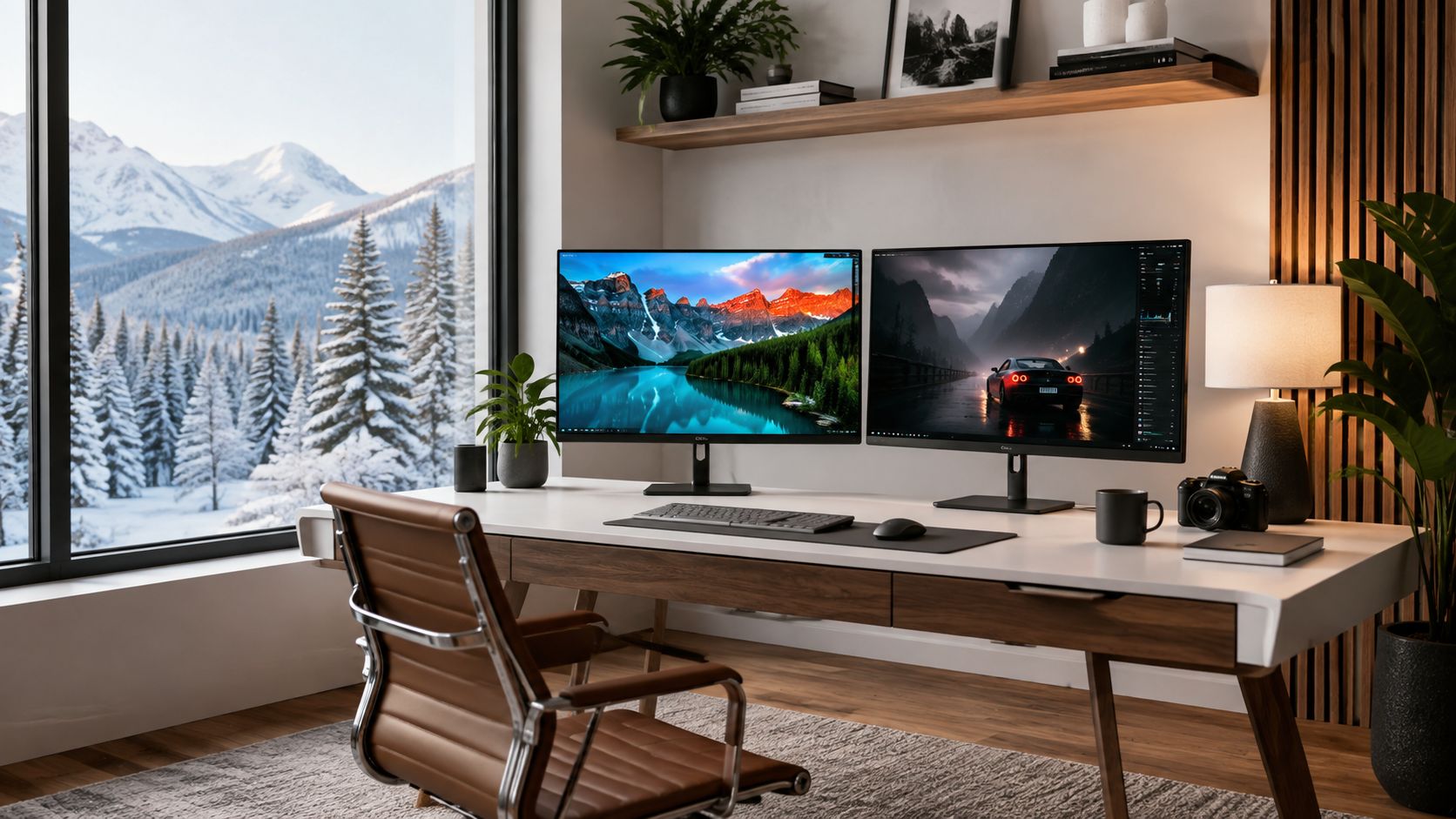
You're probably doing this the hard way right now. Two monitors are open in different tabs. One says IPS. One says VA. The specs look close enough that you start comparing nonsense like stand shape, bezel thickness, or whether one has a “gaming” label slapped on the box.
That's the wrong way to buy a monitor in Canada.
I've tested enough screens in condos, basement offices, spare bedrooms, and shared family rooms to say this plainly. The IPS vs VA panel decision usually comes down to where the monitor lives. A screen that looks perfectly fine under bright overhead light at Best Buy can feel washed out in your dim office at home. Another one that looks rich and punchy in a darker room can be annoying the second you shift off-centre on the couch.
Most buyers don't need a lecture on panel theory. They need a verdict that fits a real room. A bright west-facing condo living room in July behaves differently from a north-facing office. A basement den during a Canadian winter is a completely different test. A family desk in a shared space adds another variable because people won't always sit dead-centre.
If you're planning a two-screen desk, the panel choice matters even more because off-angle consistency starts to affect your second display. If that's your setup, Celmin's guide to a dual monitor setup is worth reading alongside this one.
Table of Contents
- The Monitor Choice That Comes Down to Your Room
- How IPS and VA Panels Actually Work
- Side-by-Side Performance in Real Numbers
- Canadian Lighting Conditions and Panel Performance
- Matching the Panel to Your Primary Use Case
- Canadian Price Bands and Availability in 2026
- Which Panel Should You Buy for Your Home
- Common Questions Canadian Buyers Ask in Store
The Monitor Choice That Comes Down to Your Room
At 8 p.m. in a Toronto condo, the monitor by the balcony door can look completely different from the same model under store lighting. In a dim basement office in Calgary or a north-facing spare room in Halifax, the wrong panel choice shows up fast. Blacks turn grey, glare gets annoying, or the image falls apart the second someone shifts off-centre.
That is why panel type is a room decision first.
Canadian buyers usually see IPS and VA presented as a simple feature comparison. IPS gets pitched for colour consistency and wider viewing angles. VA gets pitched for stronger contrast and darker blacks, which matches the general retailer guidance summarized in this Canadian monitor market overview. Useful, but still incomplete. Specs do not tell you how the screen will feel in your actual space.
Your monitor lives somewhere specific:
- Next to a bright condo window where reflections and shifting daylight hit hard
- In a basement office where dark mode, movies, and shadow detail matter more
- In a north-facing home office with softer light that stays fairly consistent
- On a shared family desk where people sit beside you, not perfectly centred
That room decides what flaws you notice first.
In a bright room, weak black depth matters less than glare, reflections, and whether the image stays consistent while you move around. In a darker room, poor contrast gets exposed immediately. In a shared space, narrow viewing performance stops being a spec-sheet detail and becomes a daily irritation.
My rule is simple. Buy for the room, then match the job.
For a typical Canadian home office, bedroom desk, or two-screen setup, IPS is the safer pick. It handles mixed lighting better, looks more consistent across the panel, and makes more sense if your second display sits off to the side. If that is your plan, this dual monitor setup guide will help you sort out placement and spacing.
For a dim basement, media room, or evening-heavy setup focused on shows, YouTube, and darker games, VA usually looks better at home. The stronger contrast is obvious the moment the lights go down.
That is the starting point. Not the marketing label. Not the stand. Not the box art. The room.
How IPS and VA Panels Actually Work
Panel type is not a branding exercise. It is a hardware choice that changes how the screen handles light in your room.
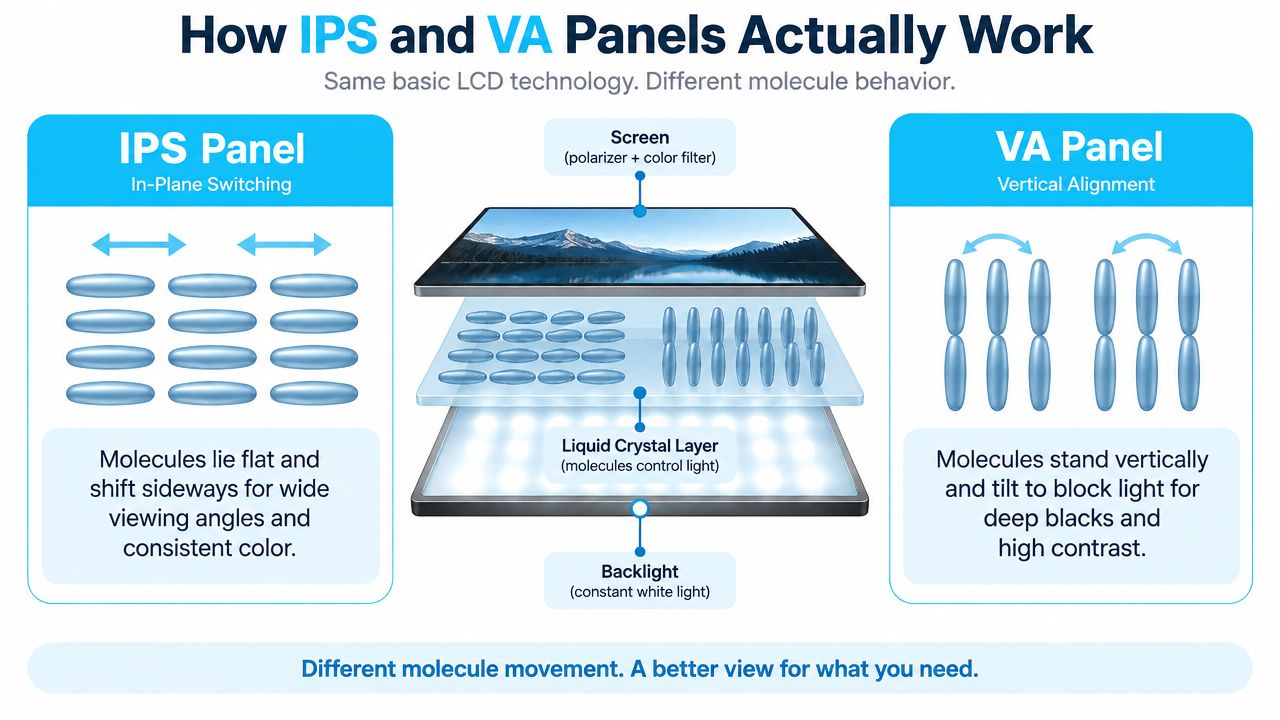
IPS and VA are both LCD technologies. The backlight sits behind the panel, and the liquid crystals control how much of that light gets through. The difference is the way those crystals line up and move. That one design choice is why an IPS screen usually looks steadier across the panel, while a VA screen usually looks darker and richer in a dim room.
How IPS behaves
IPS stands for In-Plane Switching. The crystals stay more parallel to the panel surface and rotate in a more uniform way when voltage is applied. The practical result is simple. Colour and brightness hold together better when you shift in your chair, mount the monitor a bit high, or keep a second person beside you at the desk.
That matters in the kinds of spaces many Canadians use. A north-facing home office gives you fairly even daylight for most of the day, and IPS tends to look clean and consistent there. On a shared family desk in a condo, IPS is usually the panel that causes fewer complaints because the image changes less when someone sits off-centre.
This visual makes the difference easier to grasp.
IPS also tends to have cleaner pixel transitions. That helps with desktop clarity, scrolling, and fast on-screen motion. The trade-off is weaker native contrast, so black areas often look more grey once the room gets dark.
How VA behaves
VA stands for Vertical Alignment. In the resting state, the crystals line up in a way that blocks more backlight. That is why VA panels are known for stronger contrast and deeper blacks.
According to this IPS versus VA contrast guide, VA panels typically deliver about 3,000:1 to 6,000:1 static contrast, while standard IPS panels are usually around 1,000:1. In real use, that means dark scenes look fuller and less washed out. Put a VA monitor in a basement office or a bedroom setup used mostly at night and the benefit is obvious within minutes.
VA makes the most sense in rooms where low-light viewing is the priority. A dim rec room exposes weak blacks right away. VA handles that better than IPS.
To see the panel mechanics explained another way, this short video is useful.
The trade-off you can't ignore
You are choosing which flaw you can live with.
IPS gives you a more consistent image across angles and usually better motion behaviour. VA gives you stronger contrast and better black depth, but it is more likely to show dark-level smearing and image shift when viewed from the side.
My advice is straightforward:
- Buy IPS for bright home offices, shared desks, side-by-side seating, and general work
- Buy VA for dim basements, movie-heavy setups, and solo use where contrast matters more than viewing angle
That is the panel difference at the hardware level, and it lines up closely with what you will notice at home.
Side-by-Side Performance in Real Numbers
Specs matter, but they only matter if they line up with the room you live in. A monitor in a sun-filled Toronto condo behaves differently from the same monitor in a dark basement office in Halifax.
IPS vs VA Panel Performance Comparison
| Metric | IPS Panel | VA Panel |
|---|---|---|
| Colour and image consistency | More stable across wider viewing angles, better for desks where you shift position or share the screen | Best straight on, less consistent once you move off-centre |
| Contrast ratio | Around 1,000:1 in standard IPS panels | About 3,000:1 to 6,000:1 |
| Black depth in dim rooms | Blacks look lighter, especially at night | Deeper blacks with better separation in shadows |
| Response time | Commonly around 1 ms to 4 ms gray-to-gray | Roughly 4 ms to 10 ms gray-to-gray |
| Fast-motion behaviour | Usually cleaner in fast content | More prone to dark smearing and trailing in darker scenes |
| Best fit | Work, editing, general use, bright or shared rooms | Movies, night use, solo setups, contrast-first gaming |
Contrast decides the mood of the image
Contrast is the number that changes the feel of the screen fastest.
IPS usually sits around 1,000:1. In a bright room, that can look completely fine because daylight and lamps already raise the black floor. In a dim room, the limit shows up right away. Black menus look charcoal. Dark scenes lose depth. Letterbox bars stand out more than they should.
VA pushes much harder here, as noted earlier. In a bedroom setup, basement rec room, or office used after dinner, that extra contrast is easy to see and hard to give up once you notice it.
One clear takeaway. If your monitor lives in a darker Canadian room, contrast is not a background spec. It is part of daily comfort.
Motion is the part buyers underestimate
IPS usually handles motion better. Typical specs put IPS around 1 ms to 4 ms gray-to-gray, while VA often lands around 4 ms to 10 ms, according to this response time comparison of IPS and VA panels.
That difference has a real visual cost. VA panels are more likely to show dark-level smearing, especially when dark objects move across dark backgrounds. You see it in horror games, muddy shooter maps, and fast camera pans in low-light scenes. If you play competitive titles or you are picky about motion clarity, buy IPS and move on.
What these numbers look like in actual homes
Bright condo living room
This room punishes weak screen coatings, narrow viewing sweet spots, and any panel that falls apart once you shift a foot left or right. IPS usually wins here. The contrast advantage of VA matters less once daylight fills the room, while IPS keeps a steadier image if the monitor sits in an open living area or near big windows.
Dim basement office
VA has the stronger case. Dark scenes look fuller, blacks look deeper, and the whole image feels less washed out at night. If the screen is used for Netflix, YouTube, slower games, or general evening use, VA is usually the better value.
North-facing home office
This is one of the easiest rooms for IPS. Soft daylight and controlled glare play to its strengths. Documents, browser tabs, spreadsheets, and video calls all look consistent without forcing you into one exact seating position.
Shared family space
Go IPS unless one person always sits dead centre and the screen is used mostly for movies. In real apartments and family rooms, people stand up, move around, and glance from the side. IPS handles that better.
My blunt read
If you care most about black depth, buy VA.
If you care most about motion clarity, desktop work, and a screen that still looks right when your seating is less than perfect, buy IPS.
For Canadian buyers, that split is usually practical, not theoretical. Condos and shared spaces push me toward IPS. Basements and night-heavy setups push me toward VA.
Canadian Lighting Conditions and Panel Performance
A monitor that looks great in a demo aisle can look wrong the minute you bring it into a Toronto condo with west sun, a Halifax basement office, or a shared kitchen desk in Calgary. Room light changes the result more than spec-sheet arguments do.
Panel Performance Across Canadian Room Types
| Room Type | Main lighting issue | IPS in that room | VA in that room | Better fit |
|---|---|---|---|---|
| Bright condo living room | Strong daylight, reflections, people sitting off-centre | Holds colour and brightness more consistently across seats | Contrast advantage gets washed down by daylight, side viewing suffers sooner | IPS |
| Dim basement or rec room | Low ambient light, evening use, dark scenes | Fine for general use, but blacks can look grey | Stronger black depth and better perceived contrast at night | VA |
| North-facing home office | Soft, stable daylight | Clean, consistent image for work and long desk sessions | Acceptable, but less even if you notice shifts across the screen | IPS |
| Shared family space | Mixed lighting and changing viewing positions | More forgiving when people move around | Best only if one person sits centred most of the time | IPS |
Bright condo living rooms
This is the hardest room for bad monitor advice.
In a bright condo living room, deep blacks are not the first problem. Reflections, window glare, and off-centre viewing are. That pushes me toward IPS almost every time, especially in open-plan apartments where the monitor sits near a balcony door or large window.
VA still works if you sit dead centre and mostly use the screen after dark. During the day, its contrast edge matters less than people expect. The bigger win is a panel that stays consistent when you shift in your chair or someone else glances at the screen from the sofa.
I would also avoid dim budget models for this room. Some cheaper displays sold in Canada are not bright enough to stay comfortable once afternoon sun hits the space.
Dim basements and rec rooms
VA earns its keep here.
Low-light rooms expose weak black levels fast. If your monitor lives in a basement office, rec room, or den and gets most of its use at night, VA gives the more satisfying picture. Dark games look heavier, movies look less flat, and black bars stop pulling your eye away from the content.
Buy IPS in this room only if desktop work, colour-sensitive tasks, or fast-response gaming matter more than movie performance.
Fast rule: Night-heavy setup, low room light, mostly solo viewing. Buy VA first.
North-facing home offices
North light is the easiest light to live with. It is usually softer and more stable through the workday, so you do not need to fight the room as much.
That makes IPS the cleaner fit for a home office used for email, spreadsheets, browser tabs, meetings, and general productivity. In these rooms, image consistency usually matters more than maximum contrast. You notice that every day.
VA is still serviceable. It just gives up one of the main things that makes office use feel better over long hours, a screen that stays even and predictable across the panel.
Shared family spaces
A shared family space is where abstract panel debates fall apart. Real homes are messy. One person is seated properly, another is standing at the counter, and someone else is looking over a shoulder from an angle.
IPS handles that reality better. If the monitor sits in a kitchen nook, open living area, or family study corner, I would not overthink it. Buy IPS unless the screen is basically a personal movie display for one centred viewer.
Matching the Panel to Your Primary Use Case
Your main job for the monitor can still overrule the room.
If the screen earns its keep with work all day and entertainment at night, buy the panel that matches the task you care about most, not the one that wins an argument on Reddit.
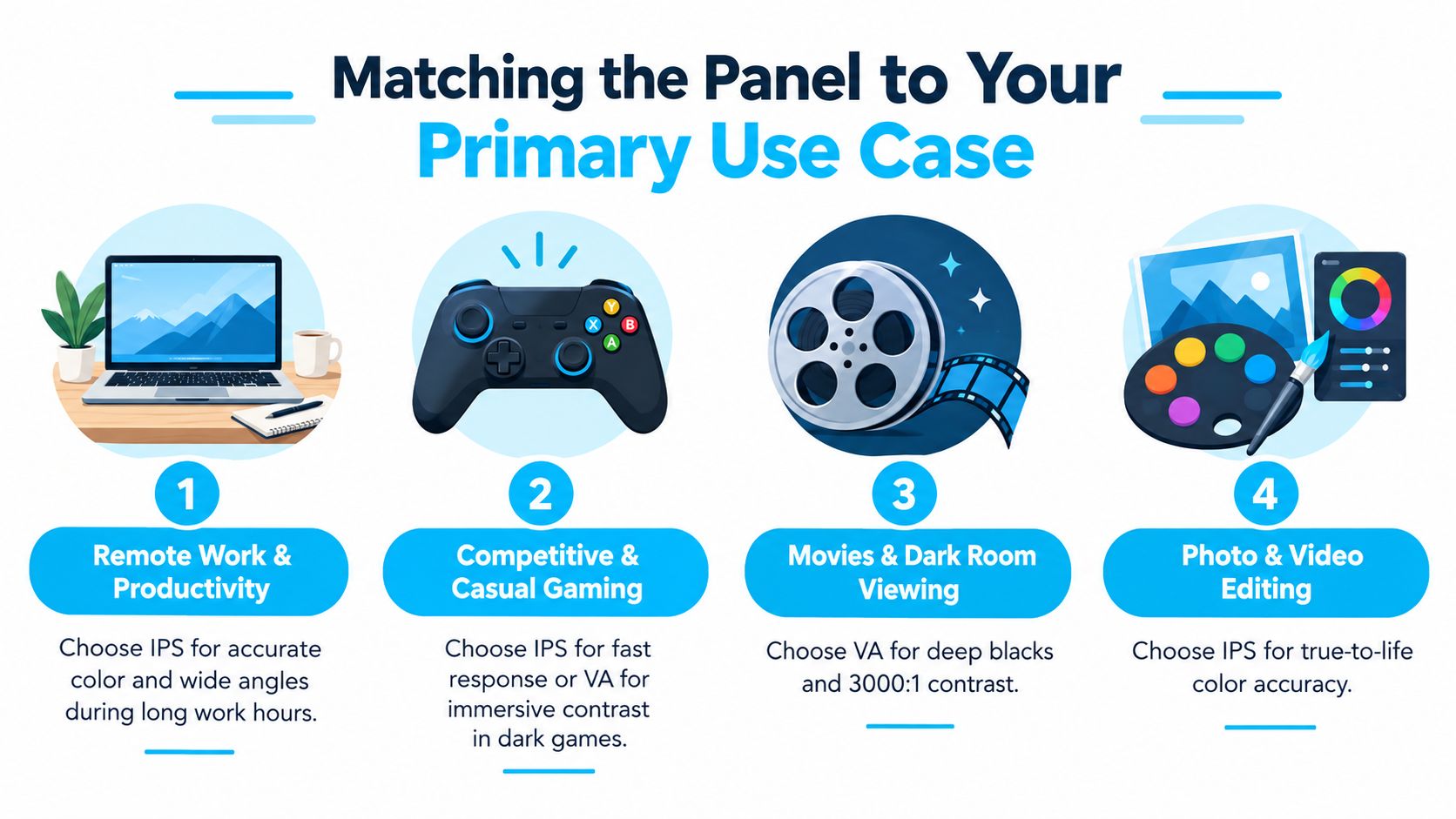
Remote work and productivity
For office work, buy IPS.
That applies even more in a typical Canadian condo or townhouse where the desk ends up near a window, in a spare bedroom, or along a dining wall with uneven daylight through the day. Text looks more consistent, colours stay steadier across the panel, and shared-use tasks feel less fussy. If your day is emails, spreadsheets, browser tabs, video calls, and occasional design work, IPS is the right tool.
Do not overcomplicate a work monitor.
This visual sums up the use-case split cleanly.
Gaming
Gaming buyers get distracted by spec sheets fast. Start with the kind of games you play and the room you play them in.
If you play competitive shooters, racing, or fast action
Buy IPS. Motion usually looks cleaner, and you are less likely to notice trailing in bright daytime rooms or multipurpose setups where the monitor also handles school or work.
If you play slower cinematic games
Buy VA if the monitor lives in a dim bedroom, basement office, or evening-only corner. Dark scenes look deeper, horror games carry more tension, and story-heavy titles benefit from the extra contrast.
If you do both
Buy IPS unless gaming is the only priority and you mostly play at night. It is the safer call for a Canadian apartment setup where one screen often has to do everything.
Movies and streaming
For streaming, VA is the easy recommendation.
If your monitor doubles as a small TV in a bedroom, den, or condo living room, VA gives the more satisfying picture for solo viewing. Black bars look darker. Shadow detail feels less washed out. You notice it right away with evening Netflix, sports recaps, or late-night YouTube.
Skip VA if people regularly watch from off-centre seats. In a shared apartment or family room nook, IPS avoids the colour and brightness shift that makes one person get the good seat and everyone else get the worse one.
Mixed-use family monitor
For a family monitor, buy IPS and move on.
It handles homework, web browsing, forms, video calls, streaming, and casual gaming with fewer compromises across different seating positions. That matters more than perfect contrast in a real home where somebody is always standing, leaning, or glancing over a shoulder.
If you also want a second screen for travel days, hybrid work, or a temporary setup at the kitchen table, Celmin's guide to the best portable monitor with USB-C for Canadian buyers is a useful companion to the same IPS-first logic.
Price bands that actually matter
Price still shapes the decision, but panel type no longer maps cleanly to budget.
- Entry level: IPS is now easy to find at budget prices in Canada, especially in common 24-inch and 27-inch sizes. Old advice that says VA is the default cheap option is outdated.
- Mid-range: For most desks, a 27-inch 1440p IPS model is still the smartest buy for mixed work and general use.
- Bigger screens: If you want a 32-inch all-rounder for productivity and media, IPS remains the easier fit for most homes because it adapts better to varied seating and daytime use.
One practical note. Celmin also publishes monitor buying guides and comparison content for Canadian shoppers, which helps if you are sorting by room, work style, and local pricing instead of chasing generic global advice.
Canadian Price Bands and Availability in 2026
In Canada, panel pricing no longer gives VA a clear budget advantage. For the monitor sizes people buy for condos, apartments, and home offices, IPS is often priced close enough that the better room fit matters more than the old “VA is cheaper” rule.
Canadian Pricing Comparison by Size and Resolution 2026
| Size & Resolution | IPS Price Range (CAD) | VA Price Range (CAD) | Typical Use | Stock Availability |
|---|---|---|---|---|
| 24-inch to 27-inch mainstream budget models | Under CA$150 options are now widely available in IPS | Budget VA remains available, often aimed at media and value gaming | Work, school, entry-level home office, casual use | IPS is widely available |
| 27-inch 1440p | Around CA$250 to CA$400 for strong all-round IPS options | VA commonly appears in affordable curved media and gaming models | Home office, mixed use, gaming, streaming | IPS is common in stores, VA varies by model |
| 32-inch 4K | Around CA$400 to CA$600 for IPS all-rounders | Available in larger-format contrast-first models | Large desks, mixed productivity, media | Both exist, but IPS is often easier to find broadly |
Key takeaway on budget
The cheap-panel shortcut is outdated.
In the Canadian market, IPS now shows up at entry pricing in the sizes that suit real homes best, especially 24-inch and 27-inch models for spare bedrooms, den desks, and north-facing offices. That changes the buying decision. You can choose based on your room and your daily use instead of settling for VA just to keep the bill down.
VA still earns its place, but mainly in setups where the room helps it. A dim basement office, a late-night gaming corner, or a small media desk gets more value from VA's stronger contrast than a bright condo living room ever will.
What's easier to find in Canada
IPS is usually the simpler local purchase. If you shop at major Canadian retailers or browse Amazon.ca, Best Buy, and Staples, IPS dominates the work-focused and mixed-use shelves.
VA is still around, but the selection is narrower and more specific. You see it more often in curved displays, budget gaming screens, and larger entertainment-first monitors. If your target is a very particular combo such as 32 inches, curved, high refresh, and low price, expect to order online instead of picking it up the same day.
Where I'd save money, and where I'd spend it
Keep the budget tight on IPS if the monitor is going into a bright shared room, a kitchen-adjacent condo workspace, or a general-use family desk. Those spaces benefit more from consistent image quality and better viewing angles than from deeper blacks.
Spend extra on VA if the monitor lives in a darker, more controlled room and the screen is used mostly head-on. That includes basement gaming setups, evening streaming spaces, and desks that pull double duty as a small home theatre.
My buying rule is simple. In bright Canadian rooms, pay for fit and flexibility. In dark Canadian rooms, pay for contrast.
Which Panel Should You Buy for Your Home
You don't need another “it depends” conclusion. You need a direct recommendation.
Which Panel Wins in Your Canadian Home
| Canadian Room & Use Scenario | Recommended Panel | Why It Wins Here |
|---|---|---|
| Bright condo living room with mixed family use | IPS | Better image consistency from different seats and better all-round usability |
| Dim basement office or gaming den | VA | Deeper blacks and stronger contrast show up clearly in low light |
| North-facing workspace with photo or design work | IPS | More dependable colour and a steadier image during long work sessions |
| Shared apartment or dorm bedroom for work and gaming | IPS | More versatile and less likely to frustrate you across different tasks |
| Dedicated late-night streaming and immersive gaming setup | VA | Dark-scene depth matters more here than wide-angle flexibility |
My straight verdict
For most Canadian buyers, IPS is the better default choice.
It fits the way people use monitors in apartments, condos, and home offices. It handles productivity better. It works better in shared spaces. It's the safer pick for mixed use. It's also easier to recommend because current Canadian pricing no longer forces a huge penalty for choosing it.
Buy VA when you know your room is darker, your seating is mostly centred, and your priority is visual depth rather than flexibility.
If your main job is remote work, spreadsheets, writing, research, calls, and general desktop life, don't overcomplicate it. IPS wins. If you're setting up a dark den for movies and evening gaming, VA earns its place.
If your buying shortlist still feels messy, Celmin's guide to the best monitor for home office can help narrow the field by actual desk use rather than raw specs.
The best panel isn't the one with the louder spec sheet. It's the one that suits your room when the blinds are open, the lamps are on, and you're using it for three straight hours.
Common Questions Canadian Buyers Ask in Store
Is IPS worth paying more for
Usually, yes, if the monitor is for work or mixed use. But the old premium gap has narrowed because IPS is now available in lower Canadian price bands. If you're buying one screen to do everything, IPS is still the safer spend.
How much does brightness matter
A lot in bright rooms. In a basement, less so. For a condo living room with lots of daylight, don't buy a dim value display and expect miracles. In darker spaces, panel contrast matters more than chasing brightness.
Are VA panels good enough for gaming now
For casual and immersive gaming, yes. For competitive play, I still recommend IPS because the motion behaviour is more reliable and less prone to dark trailing.
What about OLED
OLED sits above this fight for buyers willing to spend more and accept different trade-offs. If OLED is in your budget, you're really making a different decision. Most mainstream Canadian buyers are still choosing between IPS and VA.
Do warranties differ between IPS and VA
Not in any meaningful way just because of panel type. Buy based on the retailer, the brand's support reputation, and the dead-pixel policy. Panel technology shouldn't be the deciding factor there.
Celmin publishes Canada-first buying guides for monitors, home office gear, and everyday tech, with recommendations shaped by local pricing, room realities, and the way people use products in condos, apartments, and houses. If you're comparing screens for work, gaming, or mixed use, visit Celmin for practical guidance that doesn't dodge the trade-offs.
Sign up or sign in to join the conversation.