
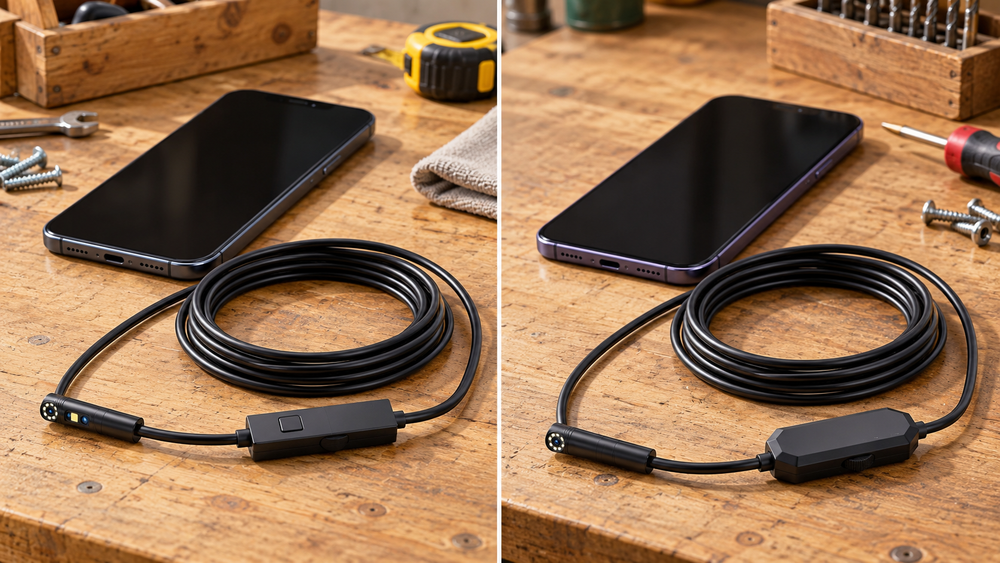
DPduct or Ferdiiz inspection camera? Compare lens direction, probe fit, phone connections and accessories before relying on resolution claims.
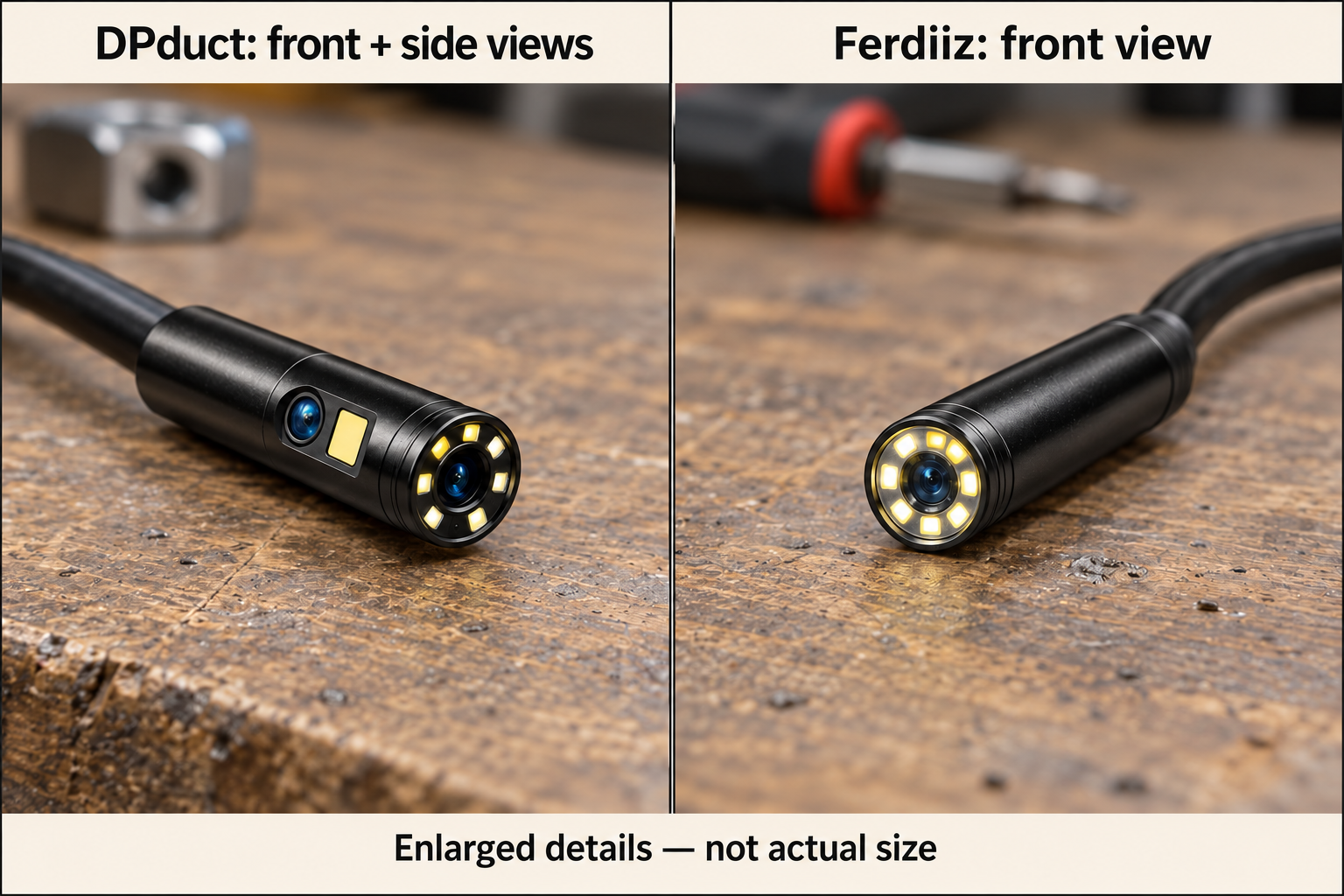
The DPduct has front and side views. The Ferdiiz has a single forward-facing lens. Both use a phone as the screen and advertise a five-metre semi-rigid cable.
If you are looking straight into an accessible opening, the extra lens may add little. If the surface you need to examine is beside the probe, the DPduct gives you another view without as much repositioning. Neither camera has a remotely steered tip.
Check probe clearance and phone compatibility first
DPduct dual-lens inspection camera
 Shop at Amazon.ca
Ferdiiz inspection camera
Shop at Amazon.caThe important difference is the direction of the target
Imagine an opening with an object directly ahead. A forward-facing camera is naturally positioned for that job, provided the target is within the useful focus range and the probe can reach it. In that situation, Ferdiiz's single view may cover the need without an extra lens changing the result.
Now imagine a marking on the side wall of an accessible cavity. The front lens may look past it or require awkward repositioning. DPduct's side view is relevant because it changes the angle from a similar probe position. That is the practical reason to pay attention to the second lens.
Neither example establishes a winner in image quality. More lenses do not prove better detail, and fewer lenses do not prove simpler software or greater reliability. Choose the viewing arrangement for the job, then assess the phone connection, clearance and handling that let you use it.
Four checks before comparing prices
First, identify the entry opening and the path beyond it. A straight, accessible gap is a different problem from a series of bends. Confirm the probe dimensions for the exact bundle and allow space for any attachment rather than choosing from cable length alone.
Second, decide what evidence you need. Finding an object, reading a label and understanding a possible defect place different demands on the view. Neither camera should be purchased on the assumption that a resolution label guarantees it can answer all three questions.
Third, confirm the full phone setup. Include the operating system, connector, app and case clearance. A lower price has little value if the camera cannot work with the phone you actually intend to carry to the inspection.
Finally, consider the cost of an unsuccessful purchase: return conditions, support and the time spent diagnosing a connection problem. For an occasional household tool, a clear manual and workable return route can be a stronger advantage than an ambiguous specification.
Start with the route to the object
The DPduct’s head is advertised at 7.9 mm. Confirm the Ferdiiz bundle’s exact probe diameter before choosing for a narrow opening; do not assume it is smaller because it has one lens.
Measure the entrance and consider any bends beyond it. A hook, magnet or mirror attachment takes up additional room. The probe also needs a route back out; a camera that fits through the first gap may still snag farther along.
Five metres of cable is useful reach in open space. It does not mean either camera can be pushed through five metres of twisted pipe. The cable is positioned by hand, and friction and bends limit its travel.
Handling can matter more than another metre of cable
Both cameras place the picture on a phone while you move the cable by hand. That creates two things to manage at once. Plan where the phone will sit and how you will operate its controls without allowing the lead to pull it toward an edge.
A semi-rigid cable can hold a shape within its limits, but it is not a remotely controlled arm. Twisting or bending at the accessible end does not guarantee precise movement at the hidden tip. Avoid forcing either model when the route becomes uncertain or resistance increases.
The cable also needs room outside the opening. Keep the unused length arranged so it does not snag nearby objects or drag the phone. The five-metre specification describes available cable, not the amount that must be fed into every job.
On arrival, practise with a familiar object in open space. Observe how the view changes as the tip approaches, turns and moves away. This gives you a reference for interpreting an unfamiliar picture later, and makes it easier to separate focus or lighting limitations from an actual connection fault.
The phone connection can decide the purchase
Confirm compatibility with your phone model and operating-system version. Check the connector in the selected bundle, the required app and whether your phone case leaves enough room for the plug.
Both cameras use UseePlus. Confirm the current app instructions and support for your phone rather than assuming that a familiar-looking connector guarantees compatibility.
Test a new camera at a dry table while it is still straightforward to return. Switch every available view, adjust the lights and save a short recording. Open that recording afterwards. These are separate checks: seeing a live image does not prove that the saved file will work as expected.
Test the complete recording workflow
If you only need a live view, the app still has to stay usable while you position the probe. If you want records, check capture and playback separately. Save a short video or photograph, locate it and confirm that you can open or share it in the way you need.
For the DPduct, include both lenses in the test. A successful front view does not prove that switching views and saving the result behave as expected. For the Ferdiiz, check the forward image across several useful distances and lighting settings. These are acceptance checks you can perform without inserting either tool into a difficult space.
Use the current instructions to obtain the correct app and review its permissions. Both products identify UseePlus, but that shared app name does not guarantee that every phone, operating-system version or connector arrangement will work equally well. Confirm support for your exact setup.
Keep private surroundings out of recordings you intend to share. An inspection inside a home can inadvertently capture labels, documents or other identifying details. Save the evidence needed for the job without assuming every frame is relevant to a repair request.
What a useful inspection image should include
A tightly framed close-up is easier to understand when it is accompanied by a view showing where the camera entered and what surrounds the finding. Capture context before moving closer. A recognisable edge or fitting can make the difference between a useful record and an unexplained dark patch.
If something looks suspicious, try another angle or light level before describing it confidently. Reflections, shadows and surface moisture can change the appearance. Neither camera establishes the depth of a defect or the material behind a surface simply by showing it.
DPduct's extra direction may help you look at the same area another way. It still does not turn the camera into a measurement instrument or replace a qualified assessment when electrical, structural or other safety concerns are involved.
Ignore the resolution contest
Saved pixel dimensions do not describe focus distance, glare or the amount of detail visible at the working distance. Choose the viewing direction and probe clearance before treating resolution as a tie-breaker.
For an inspection, focus distance and reflections can matter more than the headline resolution. A nearby shiny surface may become a bright blur under the LEDs. Practise on a familiar object so you know how distance, angle and light level affect the picture.
The extra lens changes viewing direction. It does not establish that DPduct produces a sharper image.
Which would suit your household jobs?
Choose around a recurring sideways view
The DPduct is the more relevant option if you already know that a side-facing surface is difficult to see with a forward view. Make sure its advertised 7.9 mm head and any attachment fit the route. The additional lens has value when it solves that specific positioning problem.
Choose around a straightforward forward inspection
The Ferdiiz is worth considering when the target lies ahead and its confirmed probe size and phone support meet the task. Do not assume it is narrower, sharper or more reliable merely because the arrangement is simpler. Those are separate questions.
Reconsider both when the route is the problem
If the opening is too narrow, the bends are inaccessible or the environment is unsafe, an extra lens will not resolve the issue. Neither camera is suitable for live electrical spaces, hot or moving machinery, or medical use. Stop at the limits of safe access rather than trying to make the purchase justify a risky inspection.
The useful comparison is therefore quite focused: DPduct adds a side view; Ferdiiz provides a forward view. Once that choice is clear, compatibility, clearance and safe handling should settle the purchase rather than a contest between resolution headlines.
Use the accessories carefully
Both bundles advertise small retrieval attachments. Confirm what is included and how each attachment locks onto the probe. A loose magnet or hook is another object to retrieve.
Water-resistance claims need the model’s own instructions: which parts are protected, and under what conditions? Keep the phone and connectors dry. Do not insert either camera near live wiring, hot components or machinery that could start, and do not use them on people or animals.
The DPduct is the more relevant choice when a side view solves a job you can describe. The Ferdiiz may be enough for a straightforward forward view, provided its size and phone compatibility check out. Buy around the opening and the phone you actually have; the resolution label is a poor tie-breaker.
DPduct dual-lens inspection camera
Shop at Amazon.caFerdiiz inspection camera
Shop at Amazon.caImages are AI-generated illustrations based on product references.


Sign up or sign in to join the conversation.