
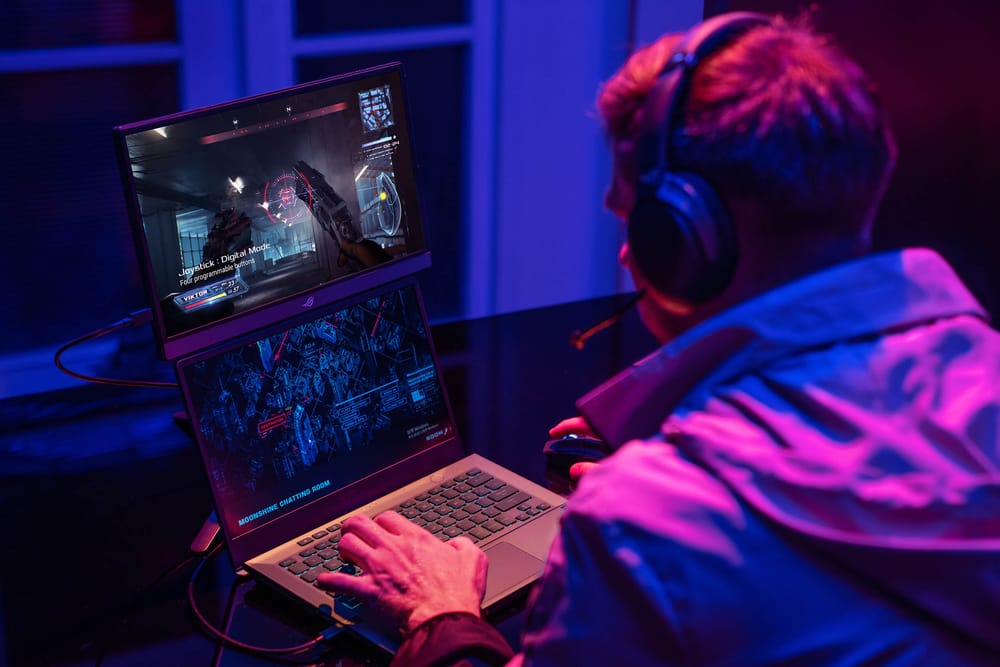
Gaming on a laptop screen is fine. Gaming on a 15.6" or 16" portable monitor with a 165 Hz refresh rate and 3 ms response time? That's a different experience entirely. Portable gaming monitors have gone from a niche curiosity to a legitimate category, and the options in 2026 are genuinely impress...
Gaming on a laptop screen is fine. Gaming on a 15.6" or 16" portable monitor with a 165 Hz refresh rate and 3 ms response time? That's a different experience entirely. Portable gaming monitors have gone from a niche curiosity to a legitimate category, and the options in 2026 are genuinely impressive—high refresh rates, low latency, USB-C connectivity, and panels that rival budget desktop monitors.
Whether you're extending your Steam Deck, adding a second screen to your gaming laptop, or setting up a portable console station for road trips across Canada, a portable gaming monitor gives you a bigger, better display that fits in a backpack. The trick is finding one that balances refresh rate, response time, colour accuracy, and portability without costing more than the device you're plugging into it.
Here's what's worth buying right now.
Top Portable Gaming Monitors Compared
| Monitor | Size | Resolution | Refresh Rate | Response Time | Panel | Connectivity | Price |
|---|---|---|---|---|---|---|---|
| ASUS ROG Strix XG16AHPE | 15.6" | 1080p | 144 Hz | 3 ms | IPS | USB-C, Micro HDMI | ~$500 CAD |
| Lenovo Legion Go Portable | 16" | 2560x1600 | 165 Hz | 3 ms | IPS | USB-C (x2), Mini HDMI | ~$450 CAD |
| INNOCN 15A1F | 15.6" | 1080p OLED | 120 Hz | 1 ms | OLED | USB-C, Mini HDMI | ~$380 CAD |
| ViewSonic VX1655-4K-OLED | 15.6" | 4K OLED | 60 Hz | 1 ms | OLED | USB-C, Mini HDMI | ~$520 CAD |
| UPERFECT UGame J5 | 16" | 2560x1600 | 144 Hz | 5 ms | IPS | USB-C (x2), Mini HDMI | ~$300 CAD |
Best Overall: ASUS ROG Strix XG16AHPE
Built for Gamers, By Gamers
The ASUS ROG Strix XG16AHPE is the portable gaming monitor that other brands are trying to catch. It's the only portable monitor with a built-in 7,800 mAh battery that delivers up to 3 hours of gaming without an external power source. Plug in your Steam Deck or Nintendo Switch via USB-C, and you've got a self-powered gaming station anywhere—on a Via Rail train, at a friend's place, or in a hotel room in Banff.
Gaming Performance
The 144 Hz refresh rate with 3 ms response time and Adaptive-Sync support means smooth, tear-free gameplay. The IPS panel covers 100% sRGB with decent colour accuracy out of the box. It's not going to match a desktop gaming monitor, but for a portable display, the motion clarity is excellent. Fast-paced games like Valorant, Fortnite, and racing titles feel responsive and fluid.
ROG Features
ASUS packed in gaming-specific features: GamePlus crosshair overlay, FPS counter, timer, and display alignment tools. GameVisual presets optimize the display for different game genres. The built-in kickstand is sturdy with adjustable angles, and the included ROG Tripod stand gives you more positioning flexibility.
- Size: 15.6"
- Resolution: 1920x1080 (Full HD)
- Refresh Rate: 144 Hz
- Response Time: 3 ms (GtG)
- Panel: IPS, 100% sRGB
- Brightness: 300 nits
- Battery: 7,800 mAh (up to 3 hours)
- Connectivity: USB-C (DP Alt Mode), Micro HDMI
- Weight: 900g
- Price: ~$500 CAD
The ROG Strix XG16AHPE is the best portable gaming monitor if you want a complete, self-contained solution. The built-in battery is the killer feature—no other portable gaming monitor at this level offers it. At $500 CAD from Amazon.ca or Best Buy Canada, it's not cheap, but it's the most polished option available.
Best High-Res Gaming: Lenovo Legion Go Portable
QHD+ at 165 Hz in a Portable Package
The Lenovo Legion Go Portable pushes the resolution to 2560x1600 (QHD+) while maintaining a 165 Hz refresh rate—the highest on this list. The 16:10 aspect ratio gives you more vertical screen space, which is great for games with UI elements at the top and bottom. The extra pixels are noticeable, especially in RPGs and strategy games where detail matters.
USB-C Power Delivery
Two USB-C ports with 65W Power Delivery passthrough means you can charge your laptop or Steam Deck while gaming. Connect your device to one USB-C port and a charger to the other—the monitor passes power through to your device. This solves the biggest annoyance of portable gaming: running out of battery.
- Size: 16"
- Resolution: 2560x1600 (QHD+)
- Refresh Rate: 165 Hz
- Response Time: 3 ms (GtG)
- Panel: IPS, 100% sRGB, 500 nits
- Battery: None (USB-C powered)
- Connectivity: USB-C (x2, DP Alt Mode + PD), Mini HDMI
- Weight: 850g
- Speakers: Built-in 2W stereo
- Price: ~$450 CAD
The Lenovo Legion Go Portable is the best choice for gamers who want higher resolution without sacrificing refresh rate. QHD+ at 165 Hz is a sweet spot that looks sharp and plays smooth. The 65W passthrough charging is a practical feature that the ASUS lacks. At $450 CAD, it's $50 less than the ROG Strix with a better display—just no built-in battery.
Best OLED Portable Gaming Monitor: INNOCN 15A1F
OLED Blacks on the Go
OLED on a portable monitor changes the game. The INNOCN 15A1F delivers true blacks, infinite contrast, and 1 ms response time that IPS panels simply can't match. Dark scenes in horror games, space games, and cinematic RPGs look stunning. The per-pixel lighting means no backlight bleed, no IPS glow—just pure, deep blacks.
The 120 Hz Trade-Off
The refresh rate tops out at 120 Hz instead of 144 Hz or 165 Hz. For most gamers, the difference between 120 Hz and 144 Hz is imperceptible. The 1 ms OLED response time more than compensates—pixel transitions are faster than any IPS panel on this list, so motion clarity is actually better despite the lower refresh rate.
- Size: 15.6"
- Resolution: 1920x1080 (Full HD)
- Refresh Rate: 120 Hz
- Response Time: 1 ms
- Panel: OLED, 100% DCI-P3, 400 nits peak
- Battery: None
- Connectivity: USB-C, Mini HDMI
- Weight: 750g
- Price: ~$380 CAD
If image quality matters more than raw refresh rate, the INNOCN 15A1F is the pick. OLED contrast and 1 ms response time deliver a visual experience that no IPS portable monitor can match. At $380 CAD, it's the most affordable premium option on this list. Just be aware of OLED burn-in risk with static HUD elements over long gaming sessions.
Best 4K Portable Monitor for Gaming and Media: ViewSonic VX1655-4K-OLED
4K OLED for the Visual Purist
The ViewSonic VX1655-4K-OLED is for gamers who also use their portable monitor for content creation, movie watching, and productivity. The 4K OLED panel with 100% DCI-P3 coverage delivers reference-grade colour accuracy in a portable form factor. It's the best-looking portable monitor you can buy.
The 60 Hz Reality
At 4K, you're limited to 60 Hz. For competitive gaming, that's a dealbreaker. For single-player RPGs, strategy games, and cinematic experiences, 60 Hz at 4K OLED is gorgeous. If you split your time between gaming and creative work (photo editing, video review), this monitor does double duty better than anything else.
- Size: 15.6"
- Resolution: 3840x2160 (4K UHD)
- Refresh Rate: 60 Hz
- Response Time: 1 ms
- Panel: OLED, 100% DCI-P3, 400 nits peak
- Battery: None
- Connectivity: USB-C (x2, 65W PD), Mini HDMI
- Weight: 780g
- Price: ~$520 CAD
The VX1655-4K-OLED is the best portable monitor for gamers who also do creative work. 4K OLED with DCI-P3 coverage is stunning for both gaming and content creation. The 60 Hz limitation means it's not for competitive gamers, but for everything else, it's the best display on this list.
Best Budget Portable Gaming Monitor: UPERFECT UGame J5
Solid Performance for $300
The UPERFECT UGame J5 proves you don't need to spend $500+ for a good portable gaming experience. At ~$300 CAD, it delivers 2560x1600 resolution at 144 Hz—matching the Lenovo's resolution at a lower refresh rate and significantly lower price. The IPS panel covers 100% sRGB with acceptable colour accuracy for gaming.
What You Give Up
The build quality is noticeably cheaper than the ASUS or Lenovo—thinner bezels but flimsier kickstand, and the speakers are barely usable. The 5 ms response time is adequate but not as crisp as the 3 ms options. For the price, these are reasonable compromises.
- Size: 16"
- Resolution: 2560x1600 (QHD+)
- Refresh Rate: 144 Hz
- Response Time: 5 ms (GtG)
- Panel: IPS, 100% sRGB
- Brightness: 350 nits
- Battery: None
- Connectivity: USB-C (x2), Mini HDMI
- Weight: 800g
- Price: ~$300 CAD
The UPERFECT UGame J5 is the best budget portable gaming monitor. QHD+ at 144 Hz for $300 CAD is excellent value. It won't match the build quality or features of the ASUS or Lenovo, but the gaming experience is 90% as good at 60% of the price. Available on Amazon.ca.
Portable Gaming Monitor Buying Tips
Refresh Rate vs. Resolution: What Matters More?
For competitive gaming (FPS, fighting games, racing): prioritize refresh rate. 144 Hz+ at 1080p is better than 60 Hz at 4K.
For single-player and cinematic games: prioritize resolution. QHD+ or 4K at 60 Hz delivers a more immersive experience.
For a balance of both: QHD+ at 144-165 Hz (Lenovo Legion Go Portable or UPERFECT UGame J5) is the sweet spot.
USB-C Compatibility Check
Not all USB-C ports support video output. Your device needs USB-C with DisplayPort Alt Mode for a single-cable connection. Here's what works:
- Steam Deck: USB-C with DP Alt Mode ✓ (via dock or direct)
- Nintendo Switch: USB-C video out ✓ (docked mode only, use HDMI adapter)
- Most gaming laptops (2023+): USB-C with DP Alt Mode ✓
- PS5/Xbox: No USB-C video out ✗ (use HDMI)
- ROG Ally / Legion Go: USB-C with DP Alt Mode ✓
Power Considerations
Portable gaming monitors draw 10-15W. If your device has limited battery, the monitor will drain it faster. Options:
- Built-in battery (ASUS ROG Strix): Monitor powers itself—no drain on your device
- USB-C PD passthrough (Lenovo, ViewSonic): Charge your device through the monitor while playing
- Separate power bank: A 20,000 mAh USB-C power bank can run most portable monitors for 6-8 hours
For Canadian gamers travelling between cities—whether it's a flight from Toronto to Vancouver or a road trip to Montreal—a portable gaming monitor with a built-in battery or PD passthrough is essential. You don't want to hunt for outlets at Pearson Airport when you could be gaming.
Panel Type: IPS vs. OLED
| Feature | IPS | OLED |
|---|---|---|
| Contrast | Good (1000:1) | Perfect (infinite) |
| Black levels | Grey-ish | True black |
| Response time | 3-5 ms | 1 ms |
| Brightness | 300-500 nits | 400 nits peak |
| Burn-in risk | None | Yes (with static elements) |
| Colour accuracy | Good | Excellent |
| Price | Lower | Higher |
| Best for | Competitive gaming | Cinematic gaming, media |
📺 Watch: Best Portable Gaming Monitors 2026 — Tested and Compared
Got Questions About Portable Gaming Monitors? Let's Clear Things Up.
Can I use a portable gaming monitor with a PS5 or Xbox?
Yes, but you'll need the HDMI input (Mini HDMI or Micro HDMI with an adapter). PS5 and Xbox don't output video over USB-C. All monitors on this list have an HDMI input option. Just note that most portable monitors max out at 1080p or 1440p over HDMI—check the specs for your specific model.
Is 144 Hz noticeable on a 15.6" screen?
Absolutely. Refresh rate affects motion smoothness regardless of screen size. The jump from 60 Hz to 144 Hz is immediately noticeable in fast-paced games—smoother camera movement, less motion blur, and more responsive input. You'll notice it within seconds of switching.
How do I connect a Steam Deck to a portable monitor?
Direct USB-C connection. Plug a USB-C cable from the Steam Deck to the monitor's USB-C port (make sure it supports DP Alt Mode). The Steam Deck will automatically output to the external display. You can set the resolution and refresh rate in Steam Deck's display settings. A USB-C dock with HDMI also works if your monitor doesn't support USB-C video.
Will a portable gaming monitor drain my laptop battery faster?
If powered via USB-C from your laptop, yes—expect 10-15W of additional power draw, which reduces laptop battery life by roughly 20-30%. Use USB-C PD passthrough monitors (Lenovo, ViewSonic) to charge your laptop simultaneously, or use the monitor's own power adapter.
Are portable gaming monitors good for console gaming on the go?
They're great for it. A portable monitor turns your Switch, Steam Deck, or ROG Ally into a proper gaming setup anywhere. For PS5/Xbox, you'll need an HDMI connection and a power outlet (these consoles aren't portable), but a portable monitor is much easier to transport than a TV for LAN parties or travel.
A portable gaming monitor is the best upgrade for handheld and laptop gaming on the go. The ASUS ROG Strix XG16AHPE leads with its built-in battery, while the Lenovo Legion Go Portable offers the best resolution-to-refresh-rate balance. For more display options, check our best portable monitors guide or our best portable monitor for MacBook roundup for productivity-focused options.
🖥️
Take Our Free Monitor Finder Quiz
Answer a few quick questions and get personalized recommendations.
Start Quiz →
Sign up or sign in to join the conversation.