
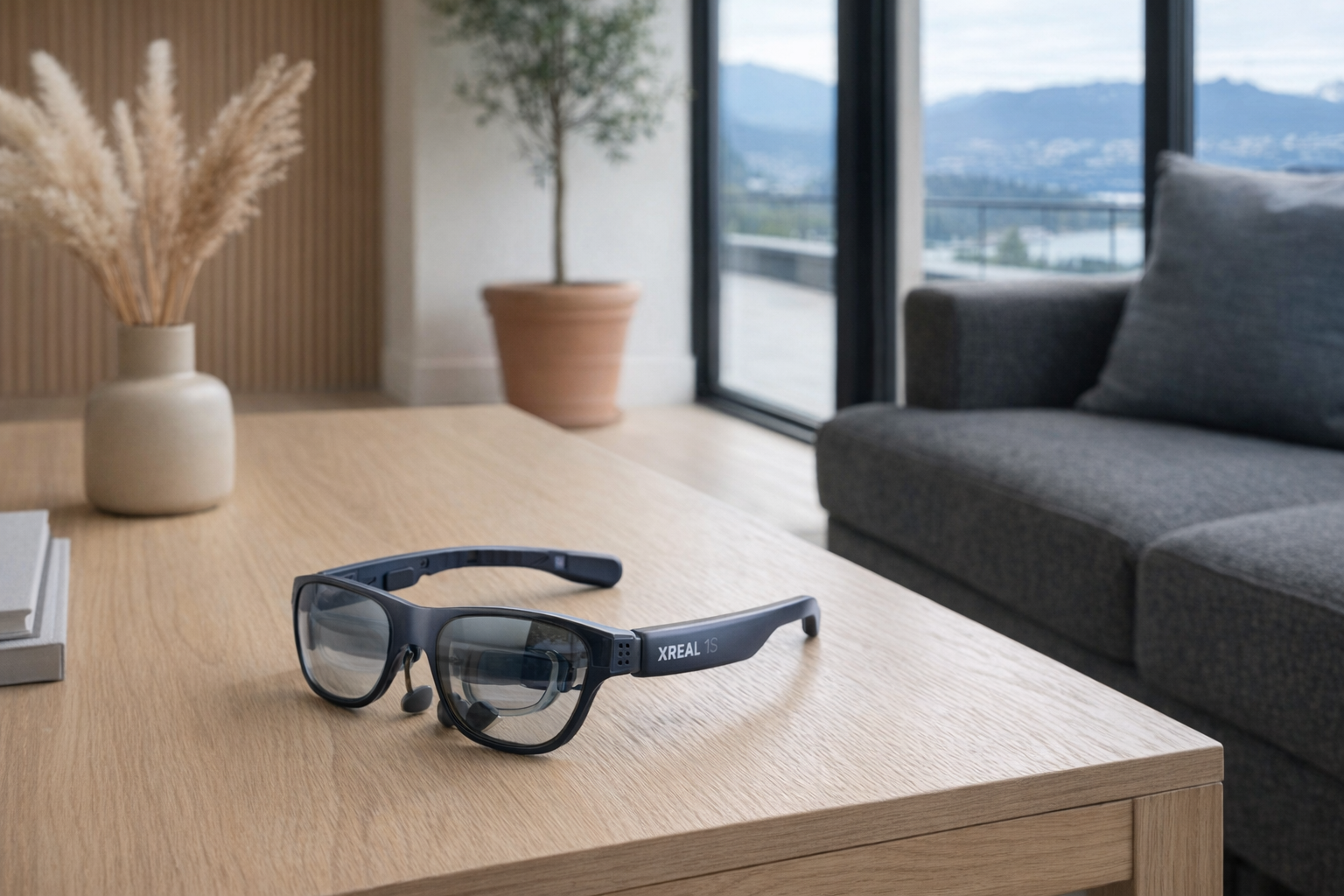
The XREAL 1S sits in a part of consumer tech that is still easy to misunderstand: smart glasses that are less about full mixed-reality computing and more about giving you a private, wearable display. These are not ordinary sunglasses, and they are not quite a Vision Pro-style headset either. ...
The XREAL 1S sits in a part of consumer tech that is still easy to misunderstand: smart glasses that are less about full mixed-reality computing and more about giving you a private, wearable display. These are not ordinary sunglasses, and they are not quite a Vision Pro-style headset either. Think of them more as a lightweight screen you wear on your face — one that can mirror a phone, handheld gaming device, or laptop through USB-C, while adding a few spatial tricks to make the image feel more stable and more cinema-like.
This article is not a hands-on review. Nothing here is based on personally using the XREAL 1S. Instead, the goal is to explain what the product appears to be from its listed features, where it fits in the smart-glasses market, and who it realistically makes sense for. If you are curious about wearable displays but want a calmer breakdown than the usual hype-heavy product pages, this is for you.
📺 Watch: XREAL 1S in context
Quick snapshot
| Question | What the XREAL 1S actually is |
|---|---|
| Category | Smart Glasses |
| Made by | XREAL |
| Typical price | ~$619 CAD (listing at the time of writing — verify current pricing) |
| Rating signal | Check current reviews |
| Best for | Portable gaming, private video watching, and travel-friendly second-screen use |
| Skip if | You want true standalone AR computing, prescription simplicity, or a cable-free experience |
Pro tip: Treat the XREAL 1S like a premium personal monitor, not like a futuristic computer replacement. If that mental model sounds useful, the product makes much more sense.
What the XREAL 1S actually is
In plain English, the XREAL 1S is a pair of display glasses that projects a large virtual image in front of your eyes while relying on another device — like a phone, Steam Deck, handheld PC, or laptop — for content. The core appeal is straightforward: instead of hunching over a small 7-inch handheld screen or balancing a tablet on an airplane tray, you wear glasses that create the impression of a much larger display. XREAL says that can feel like a 500-inch virtual screen, which is the kind of number that sounds dramatic on a product page but is best understood as a perceived viewing scale, not a literal television floating in your living room.
The XREAL 1S are AR smart glasses offering a 500-inch virtual screen experience with Sony micro-OLED displays at 1920x1200 resolution per eye, 52° field of view, 120Hz refresh rate, and 700 nits peak brightness. Powered by the X1 chip with native 3DoF spatial anchoring and Real 3D conversion for instant 2D-to-3D video. At 84g with electrochromic dimming, they work via USB-C plug-and-play with any compatible device.
That description tells you almost everything important. These glasses are about display quality, low weight, and compatibility. The nearest mainstream comparison is the RayNeo Air 2 category of wearable displays, but XREAL's pitch here leans harder on its X1 chip, 3DoF spatial anchoring, and 120Hz refresh rate. In other words, it is not just trying to be a face-mounted monitor; it is trying to be a face-mounted monitor with better stability and a few smarter viewing modes. That is a more honest angle than pretending these glasses replace a laptop or a full AR headset.
Key features at a glance
- Sony micro-OLED displays at 1920x1200 per eye
- 120Hz refresh rate for smoother motion in games and video
- 500-inch virtual screen claim with 52° field of view
- X1 chip with native 3DoF spatial anchoring
- Real 3D conversion for instant 2D-to-3D video playback
- 84g weight for lighter long-session wear than a headset
- Electrochromic dimming to darken the outside view when needed
- USB-C plug-and-play with devices including iPhone, Steam Deck, and ROG handhelds
How the XREAL 1S actually works
The XREAL 1S is best understood as an external display you wear. Instead of putting a large LCD or OLED panel in front of you, the glasses use micro-OLED panels — one for each eye — and optical elements that project the image into your field of view. The listed resolution is 1920x1200 per eye, which is meaningful because wearable displays can look soft or cramped if pixel density is not handled well. On paper, this should give the XREAL 1S enough sharpness for movies, UI elements, and game interfaces, though the real experience will still depend on fit, source device, and how your eyes handle the optics.
The USB-C plug-and-play part matters a lot. These glasses are not described as a standalone computer with their own app ecosystem in the way a Meta Quest headset is. They appear to depend on a compatible source device sending video over USB-C. That means the XREAL 1S is closer to a monitor than a headset: connect it to a supported phone, laptop, handheld console, or portable PC, and it becomes your screen. If your device compatibility is messy, the ownership experience can also become messy. That is one of the first things worth checking before buying.
The extra intelligence comes from the X1 chip and 3DoF spatial anchoring. In practical terms, 3DoF usually means the image can remain more stable relative to your head movement, rather than feeling like a crude screen glued directly to your face. It is not full six-degrees-of-freedom room mapping, but it can still make long viewing sessions feel more natural. For this kind of product, that is important. A huge virtual display sounds exciting until it drifts, jitters, or feels tiring after 20 minutes.
Then there is electrochromic dimming, which is one of the more practical features here. Wearable displays work best when outside light is controlled. If you are in a bright room, on a train, or sitting by a plane window, extra ambient light can wash out the virtual image. Electrochromic dimming is essentially a built-in way to darken the lenses and improve contrast. That is especially useful given the listed 700 nits peak brightness: decent brightness helps, but controlling incoming light is often the difference between “that’s usable” and “this feels faint.”
A realistic "day in the life" with XREAL 1S
Because this is an informational explainer, the scenario below is based on what the listed features imply, not on direct testing.
- Morning commute. You plug the XREAL 1S into a compatible phone or handheld and watch a show without holding a tablet at chest height. The electrochromic dimming helps on a bright train or near a window, and the private-screen effect is the main draw.
- Midday break. At lunch, you connect it to a Steam Deck or ROG handheld and use the 120Hz display mode for smoother gaming. The point here is less “AR” and more “I want a bigger screen than the handheld itself provides.”
- Afternoon work session. Back at a desk or hotel room, the glasses act like a compact external display for a laptop or USB-C device. The 3DoF spatial anchoring is the feature that should make this feel less like a floating nuisance and more like a screen parked in front of you.
- Evening wind-down. You watch a movie in bed or on the couch with the virtual large-screen effect, possibly trying the 2D-to-3D conversion for compatible content. Whether that feature feels genuinely useful or just amusing will depend on your tolerance for 3D gimmicks.
Who the XREAL 1S is actually for (and who it isn't)
Great fits
- People who travel often and want a portable private screen for planes, trains, and hotel rooms.
- Steam Deck and handheld PC owners who like the idea of a much larger display without packing a separate monitor.
- Apartment dwellers who want a cinema-like viewing option without buying a giant TV.
- Tech enthusiasts who already understand USB-C display output and do not mind checking compatibility lists carefully.
- Remote workers who sometimes want a second screen in a temporary workspace, especially when desk space is poor.
Poor fits
- Anyone expecting a standalone AR headset with apps, hand tracking, and room-scale experiences.
- Buyers who hate cables. The XREAL 1S may be lightweight at 84g, but it is still attached to a source device.
- People who need an effortless prescription-eyewear solution and do not want to think about fit, inserts, or optics.
- Users who are sensitive to face-worn displays, eye strain, or the general weirdness of screen-on-your-face gadgets.
- Shoppers looking for cheap casual viewing. At roughly $619 CAD, this is not an impulse accessory.
Practical trade-offs
Comfort and wearability
The listed 84g weight is one of the strongest arguments for the XREAL 1S. That is dramatically lighter than a full headset, and it points to a product designed for longer sessions than something like a bulky VR visor. But weight is not the only comfort factor. Fit on the nose, pressure on the ears, cable tug, and how well the image aligns with your eyes all matter just as much. Lightweight glasses can still be annoying if the sweet spot is picky.
This is why smart glasses should be evaluated more like eyewear than like speakers or monitors. A spec sheet can tell you the grams; it cannot tell you how your face gets along with the frame.
Compatibility and setup friction
The product promises USB-C plug-and-play with devices including iPhone, Steam Deck, and ROG handhelds. That sounds simple, but “plug-and-play” in this category often has conditions: the source device needs compatible video output, the right software path, or the right adapter situation. So the XREAL 1S may be straightforward for one buyer and frustrating for another.
That is not unusual for wearable displays. It just means you should verify your exact phone, handheld, or laptop before spending ~$619 CAD. Do not assume that one USB-C port equals full compatibility.
Optics, brightness, and expectations
The display specs here are solid on paper: 1920x1200 per eye, 120Hz, 700 nits peak brightness, and a 52° field of view. But there is always a gap between impressive numbers and lived reality. A “500-inch virtual screen” is not the same thing as having a real 500-inch panel in your room. Perceived screen size depends on virtual distance, fit, and your own visual comfort.
The same goes for AR framing. These are not transparent magic windows that perfectly blend digital objects into your home. They are display glasses. If you buy them expecting a private monitor with some spatial polish, the proposition looks sensible. If you buy them expecting sci-fi holograms, disappointment is likely.
Where the XREAL 1S fits in a smart home
The XREAL 1S makes the most sense as part of a personal media and gaming setup, not as the centre of a smart home. It fits beside devices like a Steam Deck, ASUS ROG Ally, USB-C laptop, tablet, or compatible phone. In that ecosystem, the glasses solve a very specific problem: how to get a bigger, more private screen without carrying more hardware.
At home, that could mean using the XREAL 1S instead of monopolizing the main TV, especially if someone else is watching something in the living room. In a bedroom setup, it can pair naturally with a handheld console, a docked phone, or a compact mini PC. In a travel kit, it makes more sense next to a Nintendo Switch alternative handheld, portable battery setup, and noise-cancelling headphones than next to your smart thermostat or Matter hub.
That distinction matters because some smart-glasses marketing tries to imply a lifestyle overhaul. The XREAL 1S is narrower than that. It is best seen as a screen accessory for the devices you already own. If you already live on a handheld PC, laptop, or USB-C phone, that is promising. If you do not, the value drops fast.
The buying decision, in plain terms
Before buying the XREAL 1S, three questions tend to sort people quickly:
- Do you actually want a wearable screen, or do you just want a better tablet or portable monitor? If the cable-and-glasses setup sounds awkward from the start, a normal portable display may be the better answer.
- Is your main device definitely compatible? The XREAL 1S only makes sense if your phone, laptop, or handheld can drive it properly. This is not a product to buy first and troubleshoot later.
- Will you use private big-screen viewing often enough to justify about $619 CAD? For frequent travel, handheld gaming, or shared-space living, maybe yes. For occasional novelty use, probably not.
If you answer yes to all three, the XREAL 1S looks like a sensible premium gadget. If not, treat it like an interesting niche accessory rather than a necessary upgrade.
Got Questions About the XREAL 1S? Let's Clear Things Up.
Is this a hands-on review?
No. This is an informational explainer based on the product listing, stated features, and broader smart-glasses context. The goal is to clarify what the XREAL 1S appears to offer, not to substitute for direct testing.
Does the XREAL 1S work without a phone or handheld?
Based on the listing, it is designed to work via USB-C plug-and-play with a compatible device. That suggests it is not a standalone headset with its own full computing environment. You should expect to connect it to something else for content and control.
Is the XREAL 1S good for gaming?
On paper, yes — especially for portable gaming. The listed 120Hz refresh rate and support for devices like Steam Deck and ROG handhelds suggest gaming is a core use case, not an afterthought. The bigger question is whether you personally like gaming through face-worn optics rather than on a normal screen.
What is 3DoF spatial anchoring, and does it matter?
It generally means the virtual image can stay positioned more naturally as you move your head, rather than acting like a flat display pasted to your vision. For wearable displays, that can make viewing more comfortable and less distracting. It is not the same as full mixed reality with room mapping, but it is still a meaningful feature for this category.
Does the XREAL 1S support 3D video?
According to the listing, yes — it includes Real 3D conversion for instant 2D-to-3D video. That sounds fun, but it is worth treating as a bonus feature rather than the main reason to buy. Many buyers will care more about the core screen quality than about converted 3D effects.
Where can I verify compatibility or buy the XREAL 1S?
The safest place to start is the retailer listing and XREAL's current support materials. The Amazon product page is here. Before ordering, verify your exact device support rather than relying on a general “works with USB-C” assumption.
What does it cost in Canada?
At the time of writing, the listed price is ~$619 CAD. Pricing for gadgets like this can move around with exchange rates, promotions, and retailer stock, so it is worth checking the current listing before buying.
Where is the Celmin Directory listing for this product?
For a catalog-style view of the same product — structured specs, pros and cons, similar picks, and FAQ — see XREAL 1S on Celmin Directory.
If you're building a smarter home in Canada and want honest explainers on gadgets worth considering — plus the ones worth skipping — Celmin covers the full catalog without the marketing theater. More reviews, comparisons, and buyer guides at https://celmin.ca.
Discussion
Sign up or sign in to join the conversation.