
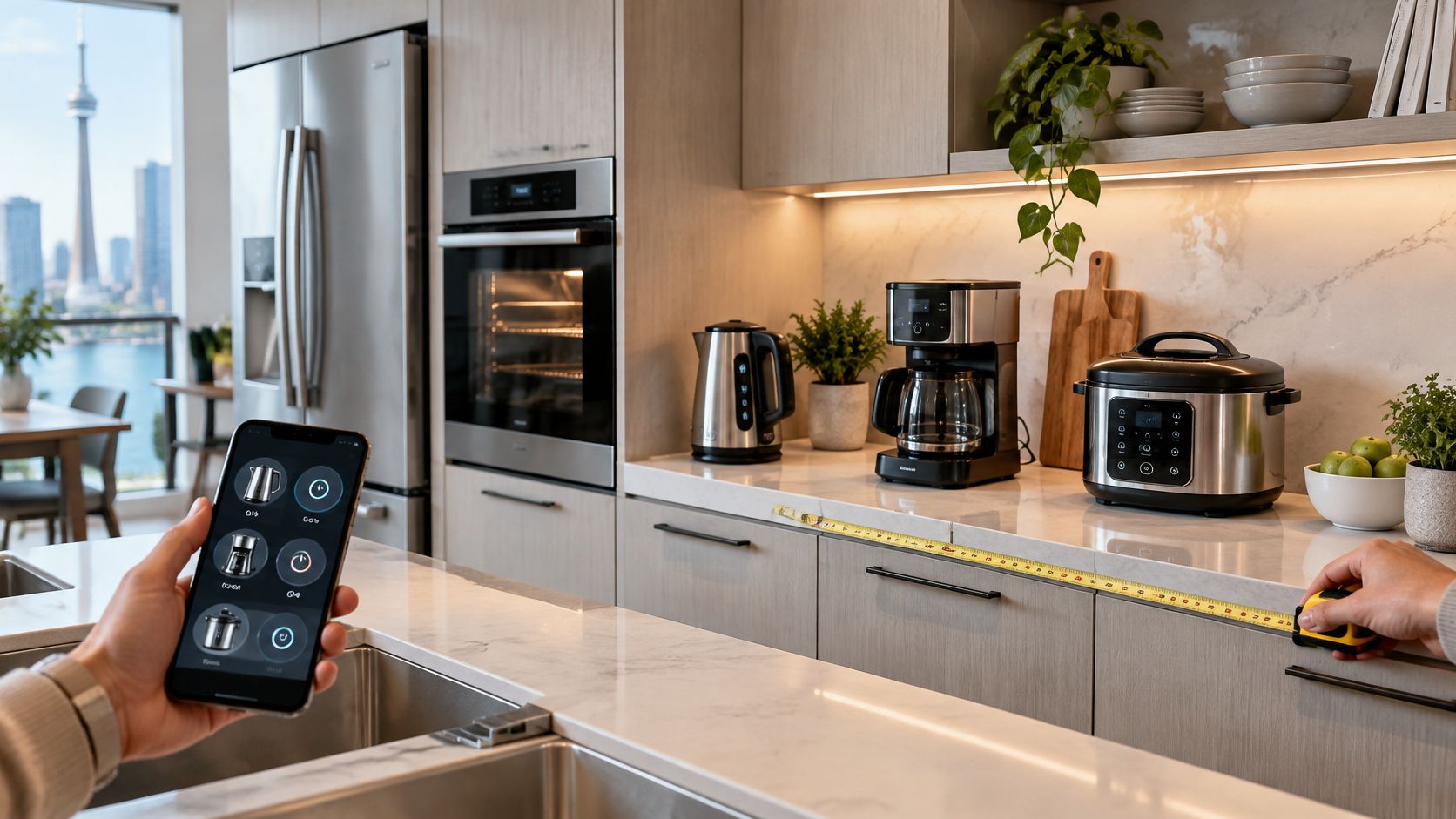
The popular advice is to buy the appliance with the longest feature list and connect everything at once. Don't. In a Canadian condo kitchen, that approach buys you counter clutter, another app to maintain, and features you'll ignore after the first month. Judge smart appliances for kitchen use by what each feature costs you in space, standby power, offline usability and years of support. If a feature doesn't remove a step, shorten a wait or measure something you'd otherwise guess at, it isn't worth paying for, no matter how well it demos in store.
Table of Contents
- Smart Kitchen Appliances at a Glance
- What Makes an Appliance Smart in Practice
- Condo and Small Counter Fit Checklist
- Whether Smart Features Lower Your Power Bill
- Privacy, Updates and Offline Control
- CAD Prices and Where to Buy Locally
- Confirm Your Counter Fit Before You Buy
Smart Kitchen Appliances at a Glance
Buy the appliance that replaces a daily task, because feature counts rarely decide daily use. The market context explains why choice is expanding so fast. Grand View Research reported that the Canadian smart home market generated USD 9,072.7 million in revenue in 2024, with smart kitchen appliances identified as its fastest-growing product segment. More models don't make the decision easier. They make fit, support and one useful automation more important than a long spec sheet.
Quick picks by fit
| Appliance | Best fit | Smart feature worth paying for | Main trade-off |
|---|---|---|---|
| Smart wall oven | Households that cook full meals | Preheat from phone and probe alerts | Installation and 240V wiring |
| Counter-depth smart fridge | Families wanting a flush fit | Door camera and inventory tracking | Less interior volume per dollar |
| Smart kettle with temperature control | Tea drinkers and singles | Preset temperatures from the app | Few features beyond heating |
| Smart coffee maker | Households that brew on a timer | Scheduled brewing and brew profiles | Reservoir refills and descaling |
| Compact multi-function unit | One or two people with small counters | Recipe presets and app timers | Permanent counter space and added heat |
In order of how often people buy them, start with the small, reversible purchases. A variable-temperature smart kettle suits tea drinkers and singles on a crowded counter, because preset temperatures remove guesswork without claiming much space. An app-linked coffee maker suits households that brew on a timer and have about 30 cm (12 in) of width, provided you'll fill the reservoir and descale it. A compact multi-function unit suits one or two people with 60 cm of counter, but only if its presets replace two or more appliances you already own.
The larger purchases demand more commitment. A smart wall oven suits households that cook full meals and have a built-in cavity of 60 to 76 cm (24 to 30 in), with preheating from a phone and probe alerts as the features to pay for. A counter-depth smart fridge suits families who want a flush fit about 60 cm (24 in) deep, with door cameras and inventory tracking as extras rather than reasons to buy.
Count the steps before and after the smart feature. If the count doesn't drop, you're buying a display, not help.
I would shortlist one row only, then measure your space against the fit checklist that follows before you compare brands. That order saves you from falling for a model your kitchen can't house.
What Makes an Appliance Smart in Practice
A connected appliance is only smart if its added controls make daily use easier without demanding more counter space, power, or attention. The practical test is simple: what can it do that the appliance's physical controls cannot, and will that benefit still matter if the Wi-Fi or app stops working?
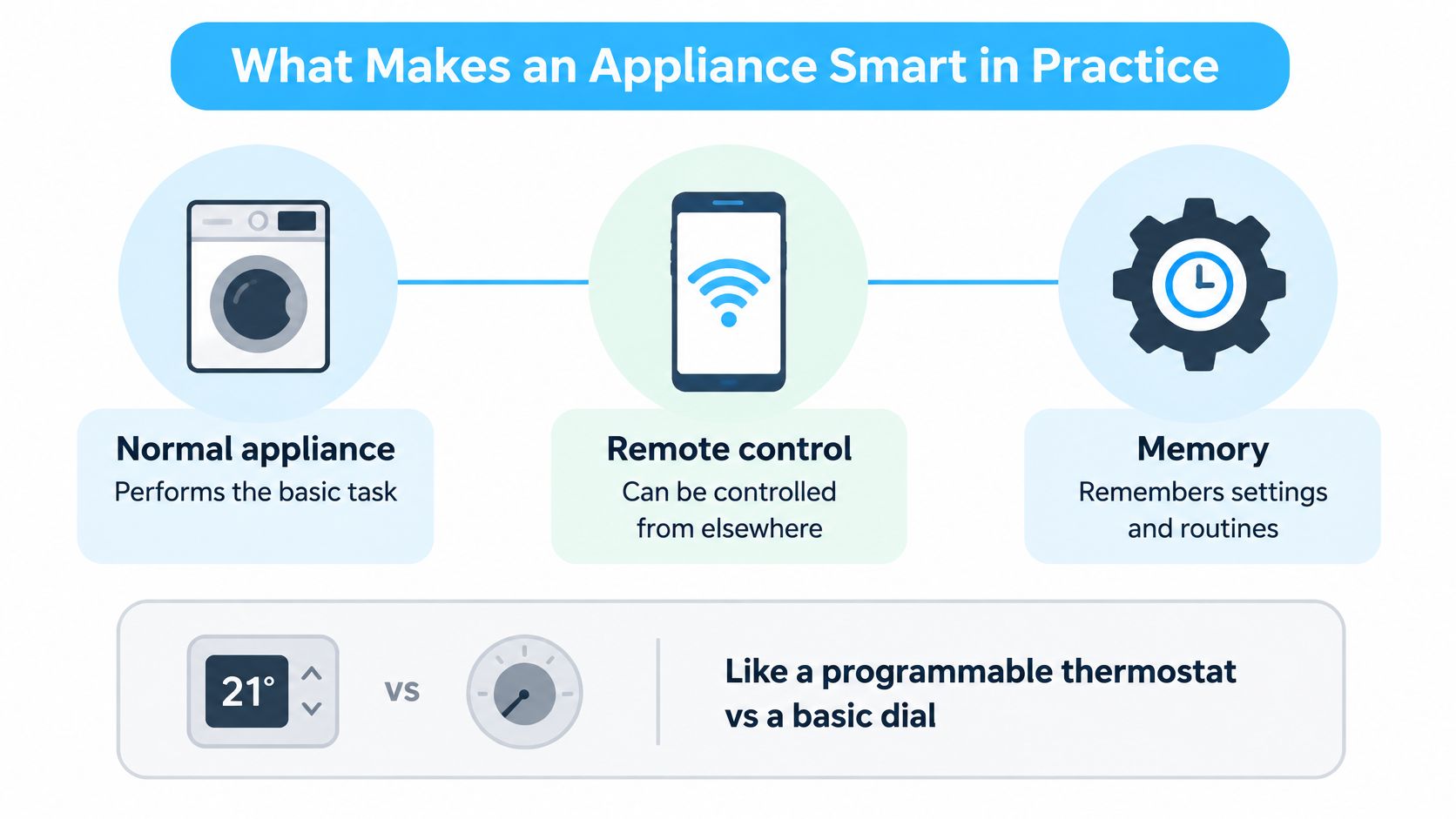
Three layers to judge separately
- Hardware layer: Heating elements, sensors, and door switches handle the appliance's core job. A weak element remains weak, whatever the app promises.
- Connection layer: Wi-Fi, Bluetooth, or a hub using Matter or Zigbee carries commands between the appliance, your phone, and any home platform.
- Control layer: An app, voice assistant, or on-device screen lets you set temperatures, timers, and routines.
Smart appliances build on familiar kitchen equipment and home internet already found in many Canadian households. Their added value depends on how well these three layers work together, not on the number of controls listed on the product page.
Judge each feature by the layer it improves. A more accurate probe can help you cook consistently; a polished app adds little if the connection drops or the appliance cannot perform its basic job offline. Check the power draw as well as the footprint: a connected feature that sits in standby all day should earn its keep through a useful routine, not just a notification.
Remote control is not automation
Remote control lets you operate an appliance from elsewhere, such as starting an oven before you arrive home. Automation responds to a setting or measurement without requiring you to send each command. A dishwasher that can delay a cycle to a cheaper period, or a fridge that flags an unusually long compressor run, offers a more practical benefit than a phone-based button alone.
Pay for automation when it saves a step or responds to useful information. Treat remote control as a convenience, especially if you usually stand beside the appliance when using it. Also check what remains usable without internet and how long the manufacturer supports the app. If an app becomes unavailable, the appliance should still cook, chill, or brew through its onboard controls.
The strongest smart feature is the one that earns its space and standby energy, works when connectivity fails, and remains useful over years of app support.
Condo and Small Counter Fit Checklist
Say you've got a one-bedroom condo with 60 cm (24 in) of counter beside the fridge, one standard 120V outlet on a shared circuit, and 45 cm (18 in) between the counter and the upper cabinets. That single example eliminates half the catalogue before price enters the discussion. Work through it candidly and you'll see why measuring beats browsing.
The checklist below turns that example into measurements you can take in ten minutes.
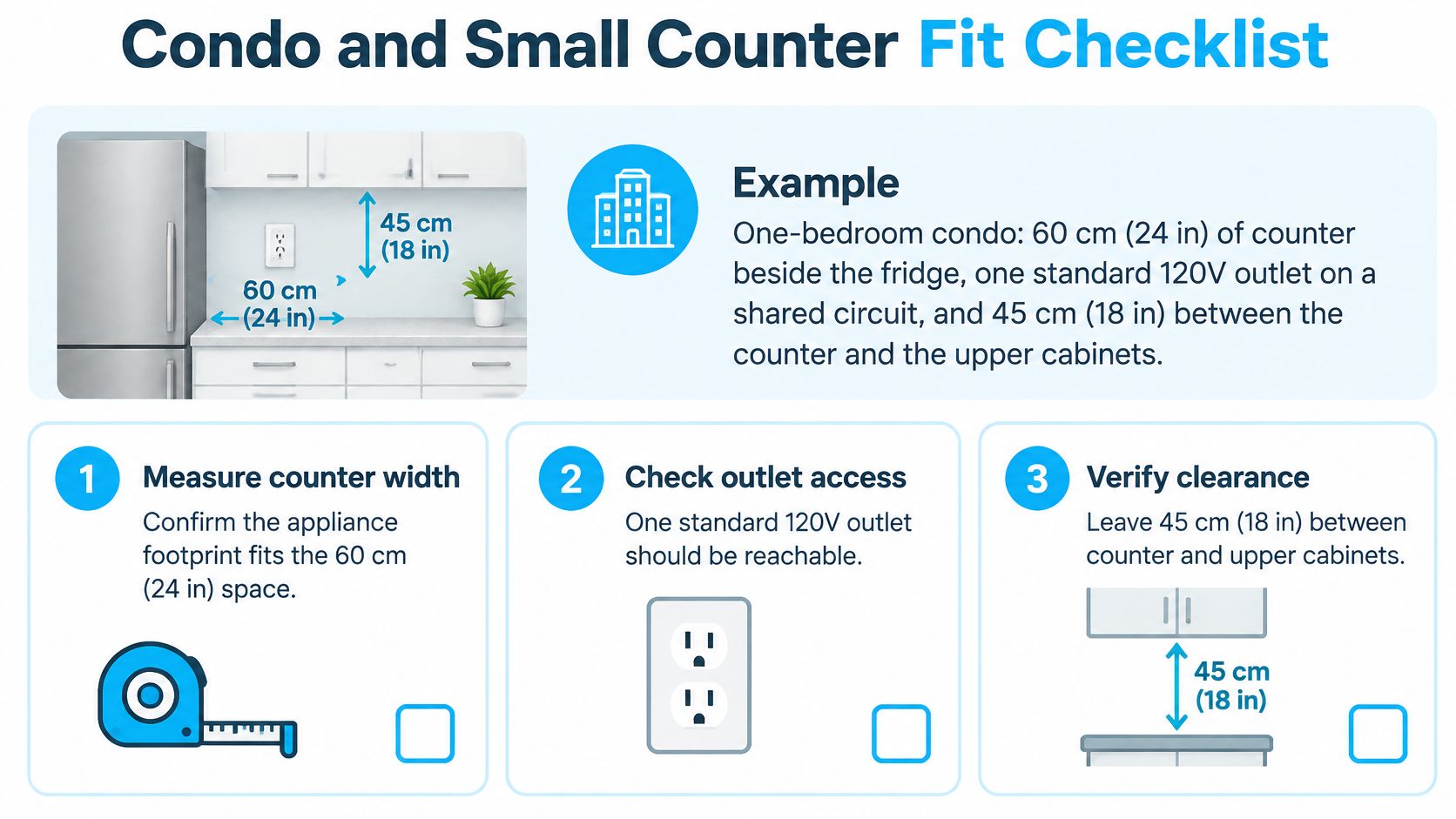
Test your kitchen against the example
| Criterion | What to measure | Worked-example limit | Trade-off |
|---|---|---|---|
| Depth | Wall to door front, handles included | Flush with standard counter depth, handles included | Counter-depth models cost more and hold less |
| Width | Cutout width plus side clearance | 60 cm (24 in) beside the fridge | Only compact or two-burner units fit |
| Height under cabinets | Upper cabinet bottom to counter | 45 cm (18 in) | Taller units may not fit under cabinets |
| Power | Outlet voltage, amperage and shared circuit | One standard 120V outlet on a shared circuit | Wall ovens often need a dedicated 240V circuit |
| Heat and venting | Heat output, steam and any range hood | Many condos have recirculating or no hood | Summer heat load can warm the whole kitchen |
| Wi-Fi reach | Signal strength at the counter | Concrete walls can weaken the signal | A mesh node or hub may be needed |
| Noise | Fan and pump noise in dB, if listed | Open-plan layouts carry sound | Quieter units usually cost more |
| Building rules | Condo bylaws on installations and renovations | Some boards approve 240V or venting work | Check before you buy, not after delivery |
Measure depth from the wall to the door front with handles included, not the box depth on a spec sheet. Check width with side clearance, because a unit that technically fits but can't vent will run hot and loud. Test Wi-Fi at the counter with your phone, since concrete walls weaken signal and a smart plug that needs a patient router will frustrate you weekly. We name trade-offs like these in our coverage, from noisy robot vacuums to air fryers that take up counter space, because they decide whether you'll keep using a product.
Seasonal and building limits
A compact combo unit adds heat to a small condo kitchen in summer, right when you least want it. In winter the warmth is welcome, but cooking steam has nowhere to go in a kitchen with no hood, so windows fog and cabinets collect moisture. Fan noise carries in open-plan layouts, which turns a late dishwasher cycle into a living room problem. For more layouts and compact options, see our guide to kitchen appliances for small spaces.
Before any order: Check condo bylaws before any 240V or venting work, and use a licensed electrician for hard-wired ovens. Approval after delivery is an expensive sequence.
Copy this into a phone note before you shop:
- Counter width and depth: Measured wall to front edge, handles allowed for
- Height under cabinets: Lowest cabinet bottom to counter surface
- Outlet and circuit: Voltage, shared or dedicated, distance from the unit
- Wi-Fi at the counter: Signal tested where the appliance will sit
- Noise and venting: Hood type noted, open-plan distance considered
Whether Smart Features Lower Your Power Bill
Connected doesn't mean efficient. That's the contrarian point most product pages skip. A smart feature lowers your bill only when it changes when or how long an appliance runs, and plenty of features do neither while adding standby draw of their own.
The chart below puts kitchen energy in its proper, modest place.
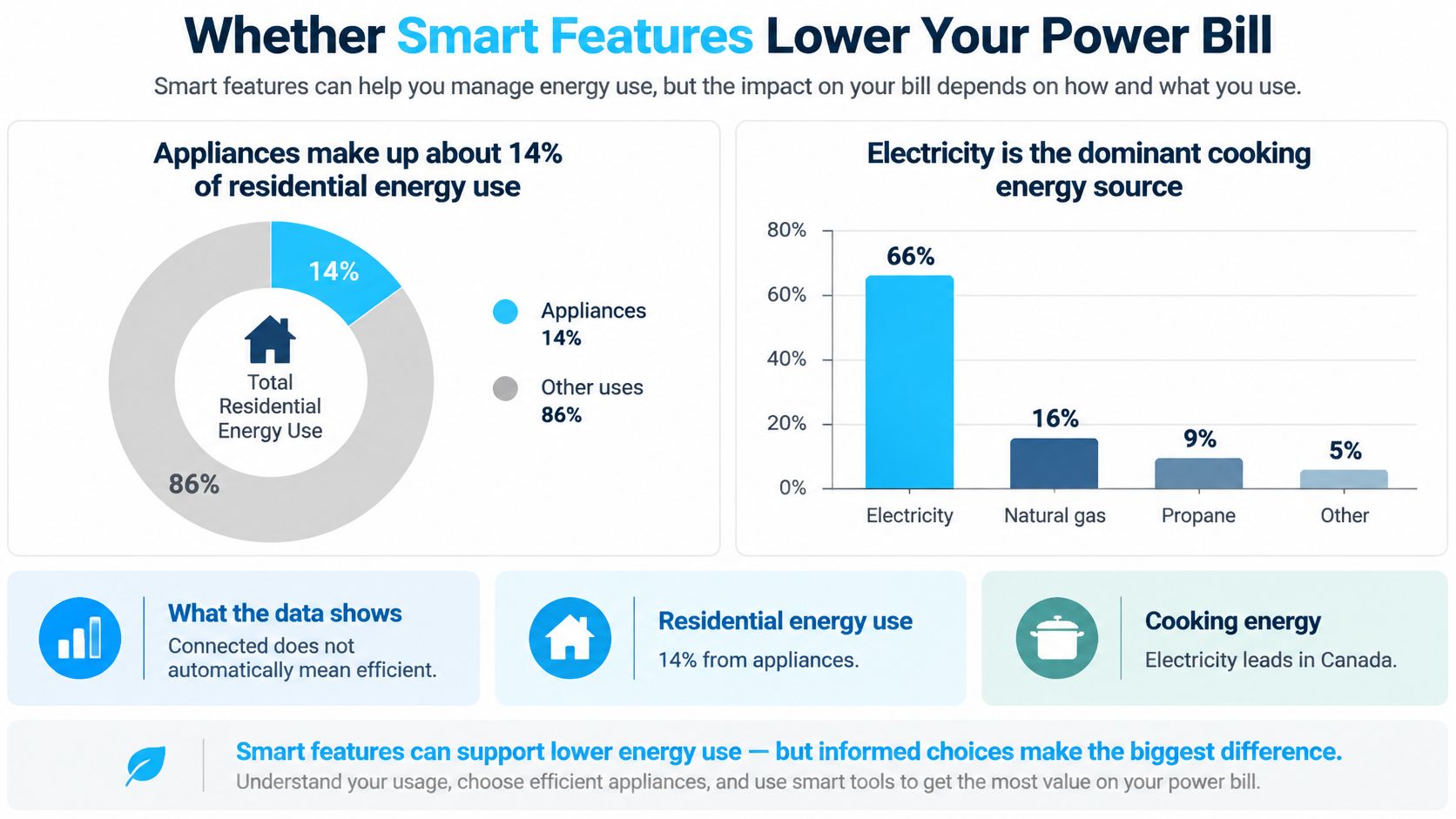
Run your own numbers
Natural Resources Canada's Survey of Household Energy Use 2019 found Canadian households consumed approximately 1.5 billion gigajoules (GJ) of energy in 2019, with appliances representing about 14% of residential energy use, and electricity was the dominant cooking energy source, used by more than 7.3 million households. Use this formula with your own label ratings: watts multiplied by hours of use, divided by 1,000, multiplied by your rate per kWh. The table below is illustrative and uses 12 cents per kWh as an example rate, so swap in your provincial time-of-use rate and the rating on each appliance label before deciding.
| Device | Assumed use | Smart saving lever |
|---|---|---|
| Smart plug or hub | Always on, drawing standby power | Cut standby with a schedule |
| Electric kettle | 30 minutes a day | Boil only when needed |
| Dishwasher | 1 hour a day | Delay start to off-peak hours |
| Smart fridge | Runs continuously | Act on abnormal runtime alerts |
| Wall oven | 1 hour a day when cooking | Preheat only when you cook |
Savings are real when scheduling moves a kettle boil, a dishwasher cycle or a preheat to off-peak hours. They're also real when a plug cuts the standby draw of a coffee maker that sits idle most of the day, which is why a smart plug with energy monitoring often beats a smarter appliance as a first purchase. Savings disappear when hubs, always-on displays and subscriptions add running costs that gradually eat the difference.
Keep expectations in order
Home demand-response thinking rates kitchen loads as secondary flexibility, because nobody wants dinner delayed for the grid. Buying a fridge or oven for grid participation is weak logic. The credible wins are short and low-disruption, like postponing a dishwasher cycle or avoiding simultaneous startup of several heating elements.
Choose a high-efficiency model first, use scheduling second, and treat remote control as a convenience rather than an energy feature.
Follow that order and the smart premium has to justify itself in measured kilowatt-hours, not marketing language. If a seller can't show you energy-use reporting in the app, assume the savings claim is decorative.
Privacy, Updates and Offline Control
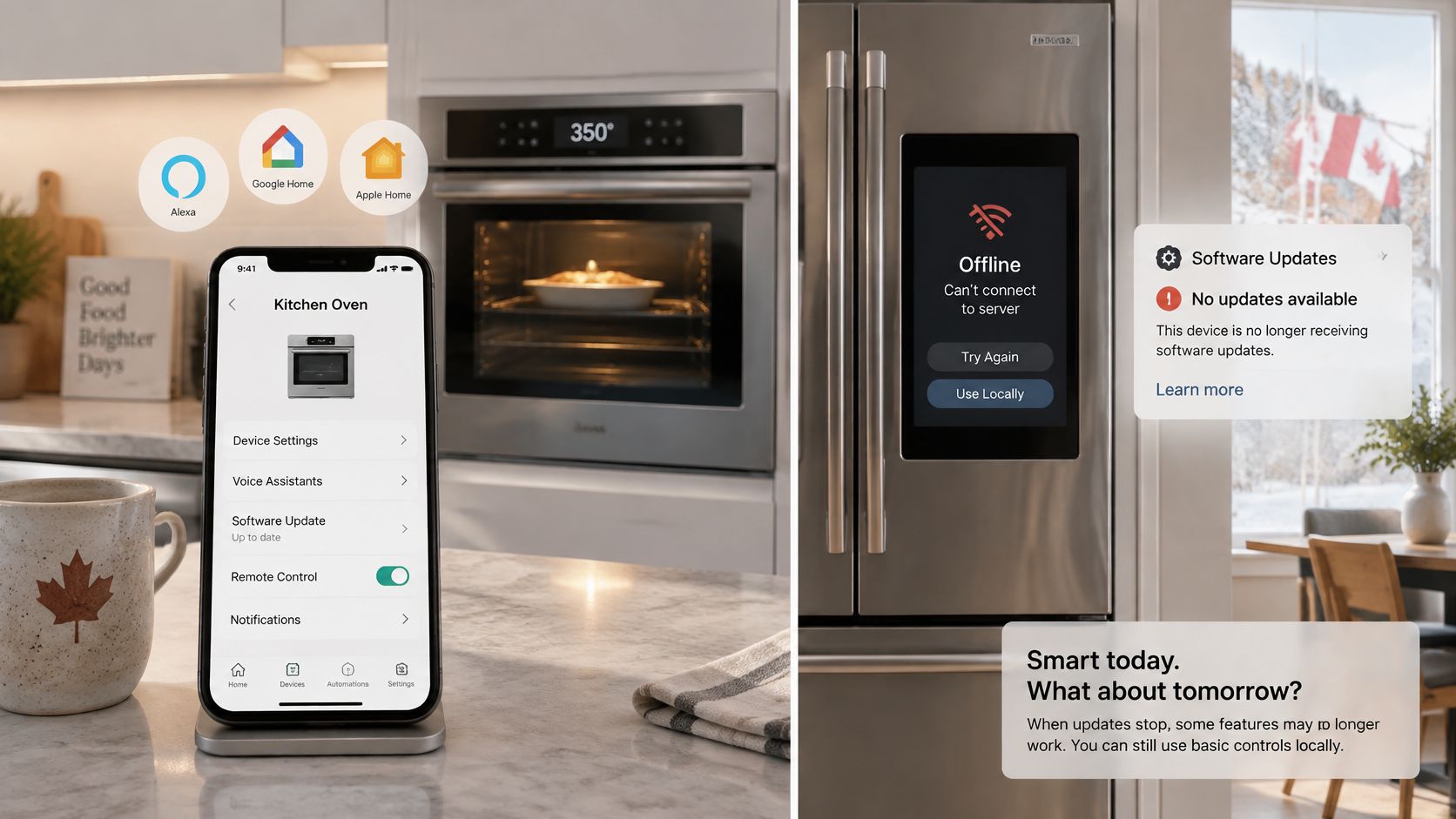
Product pages tell you whether an appliance works with Alexa, Google Home or Apple Home. They rarely say what happens when updates stop, cloud terms change, or a subscription ends and features switch off. That gap is where expensive regrets live, especially for built-in appliances you can't easily return.
The image below shows the moment buyers should plan for, not fear after installation.
Four questions before checkout
A connected oven, fridge or kettle is a network device sitting on your counter. Before you pay for the app features, ask how long the manufacturer will issue security updates, what data the device collects, and whether it still cooks without the internet. Include camera feeds and usage logs in that data question. Then ask whether processing happens on the appliance or in a company cloud.
A stated number of years matters more than a long feature list. If the listing won't name an update window, treat remote start, voice control and recipe sync as extras that can disappear, not as reasons to give up counter space.
Matter helps an appliance talk to several ecosystems, which reduces app clutter and lock-in. It doesn't guarantee true local control, because that depends on the device and the manufacturer, and advanced features may still route through a company cloud. Our explainer on the Matter smart home protocol walks through that distinction in plain language. Interoperability alone doesn't guarantee longevity or privacy.
The short video below is worth watching before you apply the test to a specific model.
The offline test
- Manual cook works offline: The oven runs a full manual cook with no internet connection.
- Two-factor login exists: The app supports two-factor authentication for your account.
- Update promise is stated in years: The manufacturer commits to a number, not a vague assurance.
- Subscription features are listed first: You can see what sits behind a paywall before checkout.
- Five-year cost is honest: Your total includes subscriptions and replacement risk if the app is discontinued.
I would walk away from any major appliance that fails the first item. A kettle that loses its app is an annoyance. A wall oven that loses its controls is a renovation problem.
CAD Prices and Where to Buy Locally
Treat every price band you see this year as an approximate 2026 CAD range to verify on the listing day, because sale pricing moves weekly and delivery fees change the total. The table below pairs each appliance type with where Canadians find stock and when discounts tend to appear. Use it to plan timing, then confirm the band on the retailer's listing before you commit.
| Appliance | Where to look | Timing note |
|---|---|---|
| Smart kettle with temperature control | Amazon.ca, Canadian Tire, Best Buy Canada | Black Friday and Boxing Day |
| Smart coffee maker | Best Buy Canada, Amazon.ca, kitchen specialty stores | Boxing Day and spring sales |
| Compact multi-function unit | Canadian Tire, Walmart Canada, Amazon.ca | Back-to-school and Black Friday |
| Counter-depth smart fridge | The Brick, Home Depot Canada, local appliance stores | Spring moving season; check delivery fees |
| Smart wall oven | Local appliance stores, The Brick | Plan around installer availability |
What moves a price within its band
Built-in displays and door cameras push a model toward the top of its band without improving how it cools or cooks. Cloud features can do the same, and they may carry subscription costs after purchase. The brand's support record is the premium worth paying, because firmware updates, parts availability and a service network determine whether the appliance is still usable in five years. A cheaper model with no stated update commitment isn't cheaper over its life. It's a shorter-lived appliance at a lower entry price.
Timing follows the product type. Black Friday and Boxing Day suit small appliances like kettles and coffee makers, where stock is deep and shipping is simple. Spring moving season suits fridges and ovens, when retailers compete for households setting up new kitchens. End-of-summer clearance can clear leftover stock, but selection narrows and the exact size you measured for may be gone.
Book the installer before the discount ends. Installation scheduling for built-in ovens and fridges can stretch weeks past the sale, and a boxed oven in your hallway helps no one.
Cross-border deals need extra caution. US prices are in USD, and duty, shipping and currency conversion can erase the discount before the box reaches your door. Before buying from a US seller, confirm the warranty applies in Canada and the product is sold for 120V power and Canadian plugs. A lower sticker price with no Canadian warranty is a gamble, not a saving, and returning a faulty wall oven across the border will cost more than you saved.
Confirm Your Counter Fit Before You Buy
You've measured, compared and questioned the marketing. Now follow a decision path instead of reopening every choice. Each step below narrows the field, so by the end you're placing one confident order rather than managing a shortlist that never closes.
Your five-step action path
- Measure first: Record counter depth, width, height under cabinets, and the outlet and circuit using the worked example from the fit checklist.
- Pick one appliance: Choose a single row from the quick-pick table at the start, the one that replaces a daily task in your kitchen.
- Run the offline test: Apply the privacy section's test to your top two models and keep the one that still cooks without internet.
- Check the price window: Confirm the CAD price band on listing day, then buy in the window that matches the product type.
- Confirm the full cost: Verify delivery and installation fees before checkout, including removal of the old unit if you need it.
If you're new to connected devices entirely, Celmin's Smart Home Starter quiz helps new smart home users find which devices to start with, so your first kitchen purchase fits a sensible order. Start with one appliance that earns its counter space daily. Add a second only after the first has survived a month of real routines, a Wi-Fi outage and at least one firmware update without drama.
One disclosure belongs here plainly. Celmin's editorial content and product recommendations may be influenced by its affiliate relationships, so weigh each recommendation against your own measurements and offline test results. Your tape measure and your test outcomes outrank any guide, including this one.
The next concrete action is simple. Book the installer or place the order for the one model that passed every test, and put the measurements, circuit details and update promise in the same phone note. When delivery day comes, you'll be checking a plan instead of improvising around a box that doesn't fit.
Measure your counter, run the offline test on your top two models, then explore Celmin's Canadian buying guides for smart kitchen appliances with local pricing and seasonal context. Visit Celmin to compare your shortlist against our trade-off reviews before you order.
Sign up or sign in to join the conversation.