
The KeySmart iPro lives in a slightly awkward but real category: the everyday-carry gadget that tries to solve an old annoyance with a bit of tech. In this case, that annoyance is bulky, noisy keys and the very common habit of losing them somewhere between the front door, the car, and the cou...
The KeySmart iPro lives in a slightly awkward but real category: the everyday-carry gadget that tries to solve an old annoyance with a bit of tech. In this case, that annoyance is bulky, noisy keys and the very common habit of losing them somewhere between the front door, the car, and the couch cushions. Key organizers are not new, and neither are Bluetooth trackers. What makes the iPro interesting is that it combines both ideas into one pocket tool rather than asking you to clip a separate tracker onto a keyring already full of clutter.
This is not a hands-on review. Nothing here is based on personally testing the KeySmart iPro. Instead, this is a plain-English explainer built around the product listing, the brand's broader product category, and what these gadgets generally imply in real use. If you are wondering whether the iPro is actually a smarter way to carry keys or just a nicer-looking impulse buy, this is the calmer breakdown.
Quick snapshot
| Question | What the KeySmart iPro actually is |
|---|---|
| Category | Unique & Lifestyle |
| Made by | KEY SMART |
| Typical price | ~$51 CAD (listing at the time of writing — verify current pricing) |
| Rating signal | 3.8/5 on the source listing |
| Best for | People who hate jangly keys, misplace essentials often, and want a tidier pocket carry |
| Skip if | You already use an AirTag setup you like, carry many specialty keys, or want zero charging/maintenance |
Pro tip: The KeySmart iPro makes the most sense if you want to replace both a messy keyring and a separate Bluetooth tracker at the same time. If you already have a key setup that works, this is harder to justify as an "upgrade."
What the KeySmart iPro actually is
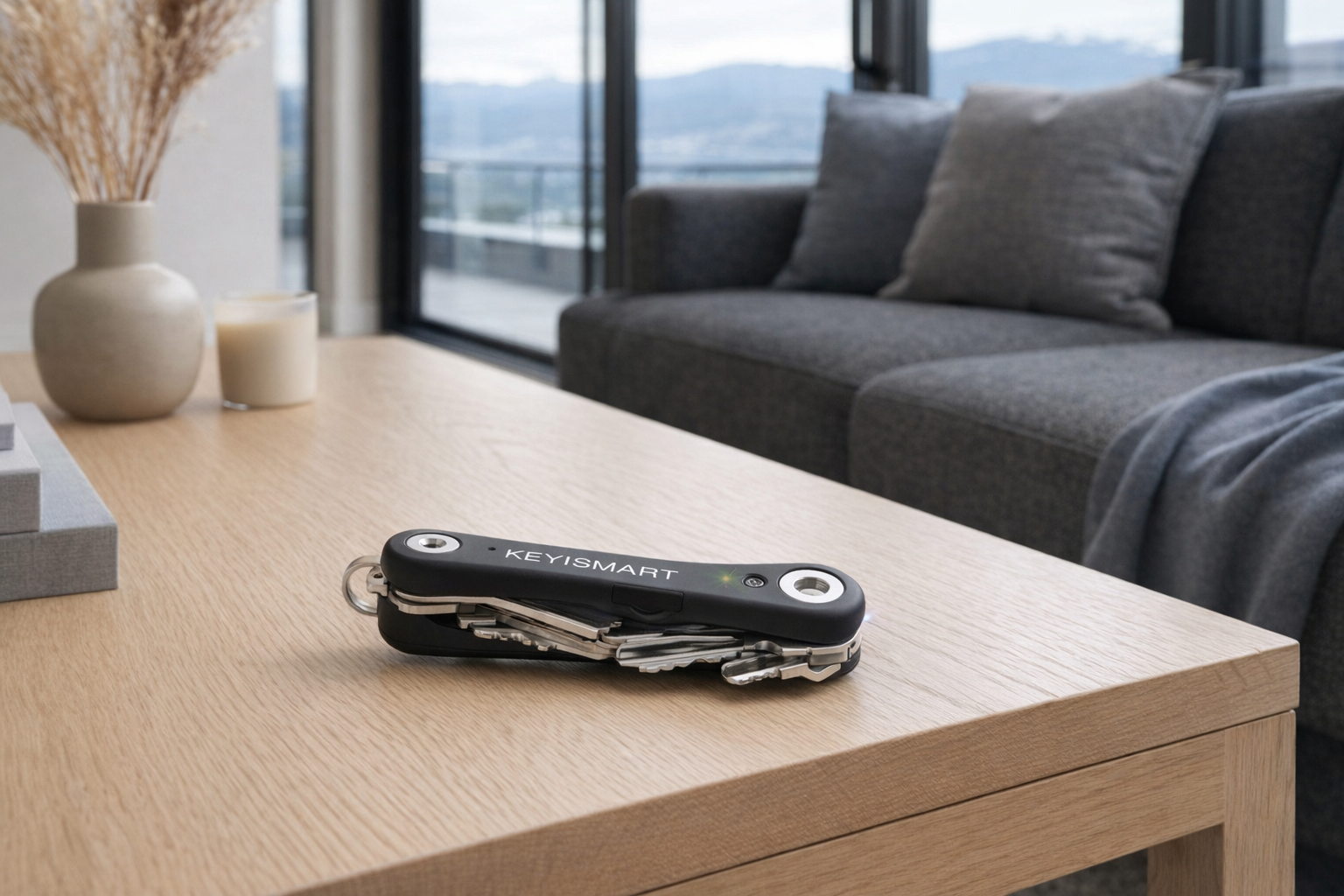
In plain terms, the KeySmart iPro is a compact key organizer with built-in tracking. Instead of dangling all your keys from a traditional ring, you fold compatible keys into a slim holder, more like a pocket knife than a janitor's loop. The "iPro" part is the connected layer: it is meant to help you locate your keys when they wander off, while also reducing the bulk and noise of a normal keychain.
That empty description field tells you something by itself: the listing is light on detailed explanation, so the safest read is to treat the iPro as a convenience product, not a miracle tool. The basic promise is clear enough, though. It is a tidier key carrier that adds trackable smarts and, according to the product name on the listing, a flashlight. That is a sensible combination on paper. Keys are small, easy to misplace, and often needed in dim places like parking lots, condo hallways, and front porches in winter.
The clearest comparison here is with Apple AirTag. An AirTag can help find lost keys too, but it needs to be attached to a standard keychain or accessory holder. The KeySmart iPro aims to make the whole bundle neater by building the organization and tracking into one object. That is a more elegant idea than bolting an AirTag onto a noisy keyring, though it is also less flexible if your keys are unusual or if you prefer Apple's very mature Find My ecosystem.
Key features at a glance
- Key organizer format that folds compatible keys into a cleaner, quieter stack
- Built-in tracking function intended to help locate misplaced keys
- Integrated flashlight, according to the product naming on the listing
- Pocket-friendlier carry than a loose metal keyring
- Lifestyle-oriented design for people who care about everyday carry neatness as much as utility
How the KeySmart iPro actually works
The core idea is mechanical first, electronic second. On the mechanical side, the KeySmart iPro holds your keys between two outer plates so they pivot inward instead of hanging loose. If you have ever carried keys that poke your thigh through jeans, scratch a phone in the same pocket, or make a racket every time you walk, you already understand the appeal. It is less about adding new capability than about removing everyday friction.
On the connected side, the iPro is meant to function as a trackable item. In practical terms, that usually means pairing it with a phone app over Bluetooth so you can make the organizer ring, see its last known location, or use proximity to help track it down nearby. Since the supplied product data does not include a full spec sheet, the exact app ecosystem and range should be verified on the current retailer page before buying. But the expected use is straightforward: if your keys are in the apartment somewhere, the phone helps you narrow the search; if they were left elsewhere, the app may show where they were last detected.
The built-in flashlight is the third layer, and it is the kind of small feature that can matter more than marketing makes it sound. Keys tend to come out in low-light moments: opening a car at night, finding a lock in a dark entryway, checking a mailbox, or rummaging in a bag. A tiny flashlight will not replace your phone or a dedicated torch, but for quick lock-and-door jobs, it can be genuinely handy.
A realistic way to think about the KeySmart iPro is as three tools stacked together:
- A key organizer to reduce bulk and jingle
- A tracker to reduce the odds of losing your keys completely
- A mini flashlight for those brief, annoying low-light tasks
If all three sound useful to you, the iPro has a strong case. If only one does, a simpler and cheaper option may be the better buy.
A realistic "day in the life" with KeySmart iPro
Because this is an informational explainer rather than a test report, the best approach is to picture what the listed concept implies in normal use.
- Morning: You grab your keys on the way out and notice the first benefit immediately: less jingle, less pocket clutter, and fewer sharp key edges pressing into your leg or catching on a phone screen.
- Midday: You get to work or a café and realize your keys are not where you thought they were. Instead of emptying every bag and jacket pocket, you use the trackable function to help locate them nearby or confirm where they were last left.
- Afternoon: In a parking garage or dim condo corridor, the built-in flashlight handles a quick lock or bag check. It is a small convenience, but this is exactly the kind of product where small conveniences are the whole point.
- Evening: Back home, the organizer goes onto a tray or hook by the door. If you forget where you dropped it later, the tracking feature becomes the difference between a 10-second find and a 20-minute house search.
None of that is dramatic, and that is actually the right way to judge a product like this. The KeySmart iPro is not supposed to transform your life. It is supposed to quietly remove a few recurring annoyances.
Who the KeySmart iPro is actually for (and who it isn't)
Great fits
- Apartment dwellers who carry a few essential keys every day and are tired of hearing them rattle in a hallway or elevator.
- People who misplace keys indoors on counters, in jacket pockets, or in bags and want a faster way to track them down.
- Minimalist everyday-carry fans who want a cleaner, slimmer alternative to a bulky keyring.
- Gift buyers looking for a practical gadget in the roughly $51 CAD range that feels a bit more thoughtful than a basic tracker.
- Commuters and drivers who often unlock doors or check bags in darker environments where a tiny flashlight actually gets used.
Poor fits
- Anyone deeply invested in AirTag or Tile already, especially if their current tracking setup works fine and they do not mind a standard keychain.
- People with many odd-sized keys or fobs, because key organizers tend to work best with standard flat keys and become awkward as accessories pile up.
- Those who want no maintenance from their keychain gear. A connected organizer is still one more device to pair, charge, or troubleshoot.
- Users who lose keys far away from home regularly and expect long-range recovery magic. Bluetooth-style tracking is useful, but it is not the same thing as guaranteed retrieval.
- People who mostly carry one car fob and one house key, because the organizer format may add complexity without much payoff.
Practical trade-offs
Compatibility with your actual keys
This is the first thing to think about, and it is more important than the tracking. Key organizers tend to work best with standard flat house keys. If your setup includes thick car fobs, office access tags, mailbox keys, condo fobs, or unusually shaped security keys, the tidy "Swiss Army knife for keys" idea can break down quickly. Before buying, compare your current keyring to the product photos and check the listing details carefully.
That sounds obvious, but this is where many lifestyle gadgets fall apart. A product can be well made and still not fit your specific daily carry. Evaluate it like a piece of personal organization hardware, not just a tech accessory.
Charging and upkeep
A normal keyring needs nothing. The KeySmart iPro, by definition, asks more from you because it includes tracking electronics and a flashlight. That means there is some kind of power management involved, whether recharge cycles, battery replacement, or periodic pairing checks depending on the exact implementation on the current model page.
That trade-off is not unreasonable. Plenty of people already charge earbuds, watches, and bike lights without thinking twice. But if the appeal of keys to you is that they are dumb, durable, and always ready, adding electronics can feel like overengineering.
Tracking limits and expectations
A trackable key organizer is best at solving the "where in the house did I put that?" problem. It is less reliable as an all-purpose recovery system for truly lost items, especially if you are comparing it with mature crowd-location networks like Apple's Find My. That does not make the iPro useless. It just means you should buy it for nearby retrieval and organization first, and treat any broader tracking ability as a bonus.
That is a more honest frame than many listings use. The iPro can be a practical anti-frustration tool without being a perfect anti-loss tool.
Where the KeySmart iPro fits in a smart home
This is not a smart-home hub, and it does not need to be. The KeySmart iPro fits best into the small routines around the edges of a modern home: the entryway, the drop zone, the commute, and the leave-the-house checklist.
In a typical setup, it pairs nicely with:
- A smart lock from brands like August, Yale, or Schlage, if your door routine already includes tech but you still keep physical backup keys.
- A smart speaker like an Echo or Nest device placed near the entryway for reminders, shopping lists, or "where are my keys?" moments in the broader sense.
- A charging tray or valet station by the front door, where the iPro can live alongside earbuds, wallet, and phone.
- A phone-based ecosystem that already handles your daily carry, since the iPro's tracking value depends on that phone connection.
The healthiest way to view it is as an entryway convenience tool, not a central smart-home device. It is closer to a better wallet or a nicer flashlight than to a thermostat or camera.
The buying decision, in plain terms
Before buying the KeySmart iPro, three yes-or-no questions usually make the answer pretty clear:
- Are your current keys actually annoying to carry?
If they jingle, poke, scratch things, or turn into a cluttered mess, the organizer format has real value. If your current setup is already simple, the upgrade may feel cosmetic. - Do you regularly misplace keys nearby?
If your problem is losing them in the house, office, or car, built-in tracking is useful. If you are hoping for a foolproof long-distance recovery network, check the ecosystem details very carefully first. - Are you okay with a little maintenance for a keychain?
If pairing, charging, and occasional app interaction sound acceptable, the iPro is a reasonable lifestyle gadget. If you want keys to remain purely mechanical, skip it.
If those answers are mostly yes, the KeySmart iPro looks like a sensible buy at around $51 CAD. If not, a plain key organizer or an AirTag on a basic ring is probably the better move.
Got Questions About the KeySmart iPro? Let's Clear Things Up.
Is this a hands-on review?
No. This is an informational explainer based on the listing details, the product category, and what the KeySmart iPro's design implies in daily use. It is meant to help you decide whether the concept fits your routine before you spend money.
Is the KeySmart iPro basically just an AirTag alternative?
Not exactly. An AirTag is primarily a tracker, while the KeySmart iPro is trying to be a key organizer, a tracker, and a small flashlight in one. If you want one tidy object instead of multiple accessories clipped together, the iPro has a different appeal.
Will it work with any set of keys?
That is the main thing to verify before buying. Key organizers usually work best with standard flat keys and can get awkward with chunky fobs, specialty keys, or a lot of attachments. Check the current listing photos and compatibility details against your real everyday key setup.
Does the built-in flashlight actually matter?
For some people, yes. It is not a replacement for a dedicated flashlight, but it can be useful for quick tasks like finding a lock, checking a bag, or walking through a dim hallway. This is one of those features that sounds minor until you realize keys often come out at night.
Where can I verify the latest details or buy it?
The safest place to verify current pricing, compatibility, and any updated listing notes is the retailer page. Here is the current product link: KeySmart iPro on Amazon.
What does it cost in Canada?
At the time of writing, the listed price is roughly ~$51 CAD. Prices on Amazon and similar retailers can shift, so it is worth checking the live listing before buying, especially for imported lifestyle gadgets.
Is a 3.8/5 rating a red flag?
A 3.8/5 rating is not a disaster, but it is also not a universal crowd-pleaser. For a product like this, middling ratings often reflect fit issues more than outright failure: compatibility with certain keys, expectations around tracking, or annoyance with charging and setup. Read a few recent reviews with your own use case in mind rather than treating the score alone as the whole story.
Where is the Celmin Directory listing for this product?
For a catalog-style view of the same product — structured specs, pros and cons, similar picks, and FAQ — see KeySmart iPro on Celmin Directory.
If you're building a smarter home in Canada and want honest explainers on gadgets worth considering — plus the ones worth skipping — Celmin covers the full catalog without the marketing theater. More reviews, comparisons, and buyer guides at https://celmin.ca.
Discussion
Sign up or sign in to join the conversation.