
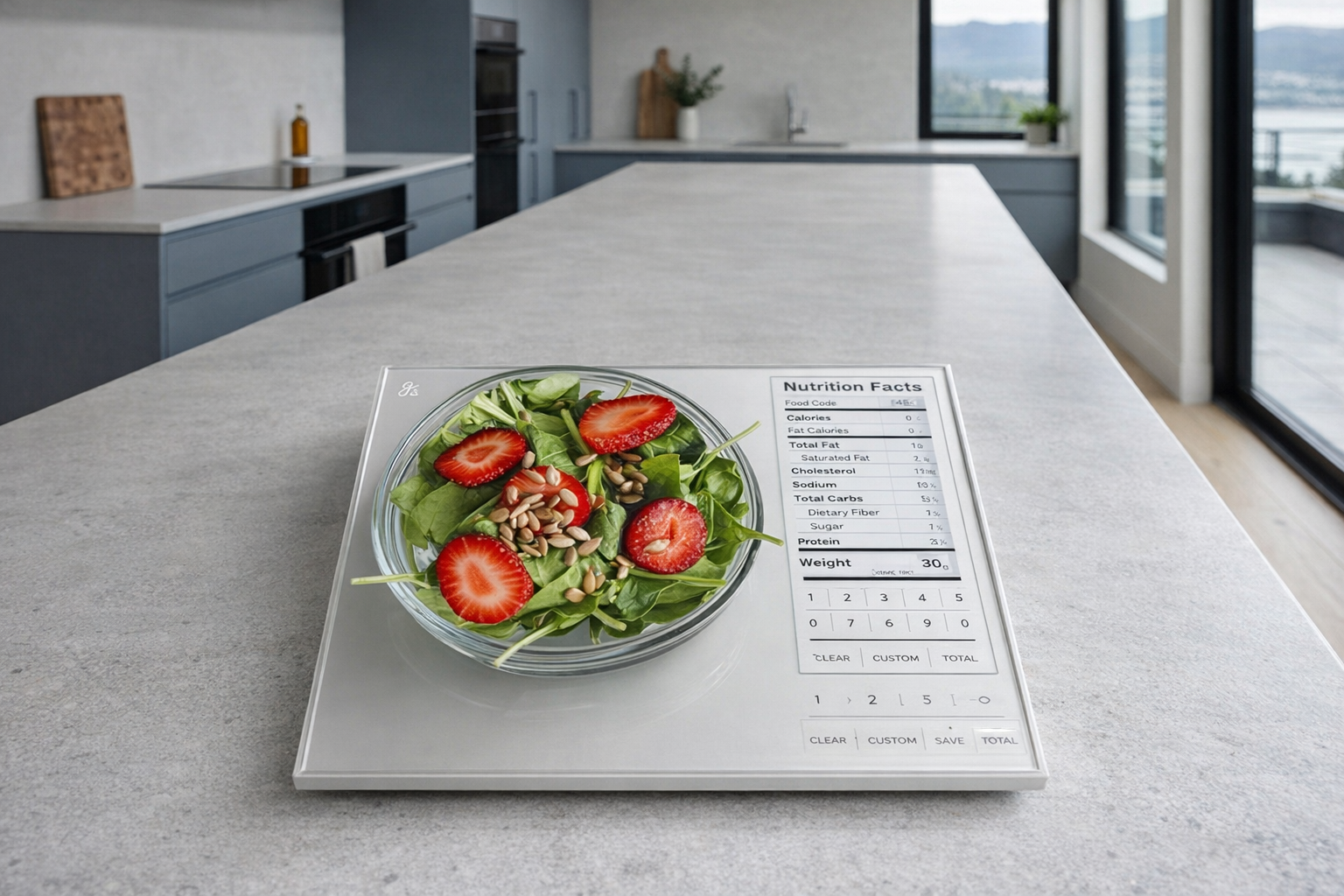
The Greater Goods Nutrition Scale sits in a slightly odd corner of the kitchen-tech world. It is not just a basic digital scale for weighing flour or coffee beans, and it is not a full app-heavy smart appliance either. Instead, it is a countertop nutrition calculator: a scale designed to help...
The Greater Goods Nutrition Scale sits in a slightly odd corner of the kitchen-tech world. It is not just a basic digital scale for weighing flour or coffee beans, and it is not a full app-heavy smart appliance either. Instead, it is a countertop nutrition calculator: a scale designed to help you weigh food and quickly see calories, protein, carbs, fat, fibre, sodium, and sugar based on a built-in food database. That makes it more practical than a normal kitchen scale for some people, and more fussy than necessary for others.
This article is not a hands-on review. Nothing here is based on personally using the scale in a kitchen. The goal is simpler: explain what the Greater Goods Nutrition Scale actually is, how its food-code system works, where it fits into a real meal-planning routine, and who it genuinely makes sense for — all based on the listed features and what this type of product usually does well or poorly.
📺 Watch: Greater Goods Nutrition Scale in context
Quick snapshot
| Question | What the Greater Goods Nutrition Scale actually is |
|---|---|
| Category | Smart Kitchen |
| Made by | Greater Goods |
| Typical price | ~$59 CAD (listing at the time of writing — verify current pricing) |
| Rating signal | 4.5/5 on the source listing |
| Best for | Macro tracking, portion control, meal prep, and people who want nutrition math done on the counter instead of in an app |
| Skip if | You only need basic weight readings, hate entering food codes, or prefer scanning everything into MyFitnessPal on your phone |
Pro tip: The Greater Goods Nutrition Scale makes the most sense if you eat a lot of repeat foods — oats, rice, chicken, yogurt, fruit, meal-prep staples. If every meal is highly packaged, restaurant-based, or improvised, a phone app may be less annoying.
What the Greater Goods Nutrition Scale actually is
In plain English, this is a digital kitchen scale with a built-in nutrition database. You place food on it, enter the matching food code, and the scale calculates nutritional values based on the weight on the platform. That is the whole pitch. It is not trying to run your entire kitchen, talk to Alexa, or automate shopping. It is trying to make food tracking faster than weighing an ingredient on one device and then looking up the numbers somewhere else.
Premium nutrition scale that tracks calories, protein, carbs, fat, fiber, sodium, and sugar. Food-safe glass surface with capacitive touch buttons. Comes loaded with nutritional values of 2,000 foods.
That built-in database is the main difference between this and a normal kitchen scale. A standard scale tells you "132 g." The Greater Goods Nutrition Scale is supposed to tell you what that 132 g means nutritionally, assuming you have selected the right food entry. Compared with a real competitor like the Etekcity Smart Nutrition Scale, the Greater Goods approach appears a little less app-centric and more self-contained. For plenty of buyers, that is a more honest design than many competitors: fewer promises about a connected ecosystem, more focus on doing one job directly on the scale itself.
Key features at a glance
- Tracks primary nutrition values with precision down to 0.1 g
- Shows calories, protein, carbs, fat, fibre, sodium, and sugar
- Food-safe glass surface with capacitive touch buttons
- Save and view totals of multiple ingredients for macro tracking and meal building
- Loaded with nutritional values of 2,000 foods
- Stores up to 99 custom entries for foods not already in the database
- Compact 9.33 x 6.02 x 0.91 in footprint for meal-prep counters and smaller kitchens
How the Greater Goods Nutrition Scale actually works
The core idea is simple: weight plus food identity equals nutrition estimate. The scale measures the amount of food on the platform, then uses its internal database to convert that weight into calories and macros. If you are weighing something generic and common — say oats, banana, chicken breast, or rice — the process is fairly straightforward. If you are weighing a homemade casserole or a branded frozen dinner, it gets more complicated.
There are really three parts to how this kind of scale works:
- Weighing the food accurately. The listed precision goes down to 0.1 g, which is finer than many cheap kitchen scales. For coffee dosing or tight macro tracking, that level of sensitivity is useful. For ordinary family cooking, it is nice but not essential.
- Matching the food to a database entry. The scale reportedly comes loaded with 2,000 foods, which should cover a lot of staples. You still have to choose the correct item, though. A nutrition scale is only as useful as the quality of the match between your food and the database category.
- Adding up ingredients. One of the more practical features here is the ability to save and view totals of multiple ingredients. That means you can build a simple meal on the scale — for example, yogurt, berries, and granola — and track the combined nutrition instead of doing calculator work yourself.
The 99 custom entries matter more than they first appear to. They are what keep the product from being limited to a static food list. If you buy the same protein powder, cereal, or specific bread every week, creating a custom entry can make the scale much more useful over time. That is the difference between a gadget you use twice and a kitchen tool that actually stays on the counter.
The physical design also tells you what this product is aiming for. A food-safe glass surface with capacitive touch buttons is about cleanup and convenience. Sticky honey, flour dust, oil splatter, and protein-powder residue are normal kitchen realities. Smooth glass is much easier to wipe down than raised plastic buttons with crumbs trapped around them. That sounds minor, but in a real kitchen it is the sort of detail that determines whether something remains pleasant to use.
A realistic "day in the life" with Greater Goods Nutrition Scale
Based on the listed features and the way nutrition scales are typically used, here is what a normal day might look like.
- Morning. You make a repeat breakfast: oats, peanut butter, and berries. The scale lets you weigh each ingredient, pull its food entry, and add totals together so you can see the full calorie and macro count before you eat. This is where the multi-ingredient total function is genuinely useful.
- Midday. You portion out lunch for work or school — maybe rice, chicken, and vegetables. Instead of guessing at serving sizes, you use the scale to build a more consistent container. If you meal prep several times a week, this is probably where the product earns its keep.
- Afternoon. You weigh a snack like almonds, yogurt, or fruit and check sodium, sugar, or protein, depending on what you track. For people managing intake rather than just calories, seeing more than one number on the device is the whole point.
- Evening. You cook dinner and use the custom entry function for a packaged ingredient that is not already in the built-in database. Over time, those saved entries make future meals faster, especially if your household repeats the same staples.
None of that is a tested account. It is what the listed features imply when translated into ordinary kitchen behaviour. And that matters, because a product like this only makes sense if you can picture it becoming part of an existing routine.
Who the Greater Goods Nutrition Scale is actually for (and who it isn't)
Great fits
- People tracking macros for fitness goals, especially those regularly weighing protein, carbs, and portion sizes.
- Meal-prep households that cook the same core foods each week and want more consistency without opening a phone app every five minutes.
- Anyone managing a doctor-recommended eating plan where sodium, sugar, or fibre matter, not just calories.
- Home cooks who want a cleaner, easier-to-wipe scale than the usual plastic-button budget models.
- Parents portioning common foods for older kids or teens involved in sports, where repeat meals make the built-in food list more useful.
Poor fits
- Shoppers who only need to weigh flour, butter, or postage-style items and do not care about nutritional breakdowns.
- People whose diet is heavily based on restaurant meals, takeout, or ultra-specific branded products not neatly covered by generic food entries.
- Anyone who dislikes entering codes, switching modes, or interacting with a scale beyond "put item on platform, see grams."
- Households already committed to an app-first workflow with barcode scanning and recipe imports, where a scale without that broader ecosystem may feel redundant.
- Buyers expecting this to behave like a fully connected smart appliance. It is smarter than a normal scale, but still a scale.
Practical trade-offs
Database accuracy versus real-world food messiness
The biggest honest limitation of any nutrition scale is that foods are not always neat database objects. A raw apple, plain rice, or chicken breast is easy enough. A homemade chili, bakery muffin, marinated meat, or mixed salad is much less precise. The Greater Goods Nutrition Scale can only calculate based on the entry you choose and the weight it reads.
That does not make it useless. It just means you should evaluate it like a countertop estimating tool, not a laboratory instrument. For repeat staple foods, it is likely very handy. For highly variable meals, it can only ever be approximate.
Usability and input friction
The product includes capacitive touch buttons, which usually look cleaner and wipe more easily than physical buttons. The trade-off is that touch controls can sometimes be a bit more particular when your hands are wet, oily, or covered in flour. In a kitchen, that is not a trivial issue.
There is also the simple fact that entering food information takes effort. Even with 2,000 foods built in, you still have to find the right entry. Some buyers will love having nutrition data right on the device. Others will quickly decide that tapping on a phone is faster. That is a personal workflow question more than a product defect.
Counter space and kitchen role
At 9.33 x 6.02 x 0.91 inches, the scale is compact enough for most kitchens, but it still needs a place to live. If you use it daily for breakfast, meal prep, and portioning, leaving it accessible makes sense. If you only track food occasionally, it may become another flat object in a drawer.
This is worth saying plainly: the Greater Goods Nutrition Scale is not a general smart-kitchen centrepiece. It is a specialised tool. If that specialty matches your habits, the price around $59 CAD is reasonable. If not, a basic digital scale for half the cost may do 90 percent of what you actually need.
Where the Greater Goods Nutrition Scale fits in a modern kitchen
This scale fits best in a kitchen that already has a few boring, dependable tools. Think of it as part of a meal-planning station rather than a standalone smart-home star.
A realistic setup might look like this:
- a basic food-storage system with glass containers for meal prep
- a reliable instant-read thermometer for meats
- a standard coffee or baking scale if your household already uses one
- a nutrition app such as MyFitnessPal, Cronometer, or Lose It! for longer-term logging
- and the Greater Goods Nutrition Scale on the counter for fast weighing and macro math
That is where it makes sense. It complements an organized routine; it does not create one from scratch. If your kitchen habits are already chaotic, this scale will not magically make them disciplined. If your habits are mostly stable and you want less guesswork, it can slot in neatly.
It is also a better fit for home cooking than for heavy packaged-food households. The value is highest when you are regularly weighing ingredients, not just reading labels off boxes. Put differently: this is more useful beside oats, rice, lentils, chicken, and produce than beside drive-through bags.
The buying decision, in plain terms
Before buying the Greater Goods Nutrition Scale, three questions usually cut through the marketing.
- Do you actually track food in a consistent way now? If yes, this could remove friction. If no, a nutrition scale will not create discipline by itself.
- Do you mostly eat repeat ingredients or one-off meals? Repeat ingredients are where the built-in 2,000-food database and 99 custom entries become genuinely useful. One-off meals are where the process gets messy.
- Would you rather do nutrition math on the counter or on your phone? If you want fewer app steps, this scale is appealing. If you already trust your app workflow, it may feel like duplication.
If you answer yes to repeat-food tracking and want a dedicated countertop tool, the Greater Goods Nutrition Scale looks like a sensible buy; otherwise, a plain digital scale or an app-based smart scale may be the better fit.
Got Questions About the Greater Goods Nutrition Scale? Let's Clear Things Up.
Is this a hands-on review?
No. This is an informational explainer based on the listed product details and the way nutrition scales generally work. It is meant to help you decide whether the product category and feature set fit your kitchen routine.
Does the Greater Goods Nutrition Scale need an app?
Based on the provided listing details, the main nutrition functionality appears to be built into the scale itself rather than dependent on an app. That is part of its appeal. Still, check the current product page and manual to verify exactly how setup and custom entries work.
How many foods does it include?
According to the listing, it comes loaded with nutritional values for 2,000 foods and supports 99 custom entries. That should cover a solid base of staple items, but buyers with very brand-specific diets should verify whether their common foods can be matched easily.
Is 0.1 g precision actually useful?
Yes, for some buyers. If you are measuring coffee, supplements, or tightly controlled portions, 0.1 g precision is helpful. For ordinary cooking and rough portioning, it is more of a nice extra than a necessity.
Is it good for macro tracking?
On paper, yes — that is one of its clearest use cases. The listed features specifically mention calories, protein, carbs, fat, fibre, sodium, and sugar, plus multi-ingredient totals. If you are tracking macros from mostly home-prepared foods, that is exactly the kind of job this scale is built for.
Where can you verify the current listing or buy it?
The most direct place to check current pricing, availability, and listing details is the Amazon product page: Greater Goods Nutrition Scale on Amazon Canada. As always, verify the current spec page before buying, since listings, pricing, and included details can change.
What does it cost in Canada?
At the time of writing, the listed price is ~$59 CAD. More specifically, the snapshot price is ~$59 CAD (listing at the time of writing — verify current pricing). That puts it above a basic kitchen scale, but still well below most large countertop smart appliances.
Where is the Celmin Directory listing for this product?
For a catalog-style view of the same product — structured specs, pros and cons, similar picks, and FAQ — see Greater Goods Nutrition Scale on Celmin Directory.
If you're building a smarter home in Canada and want honest explainers on gadgets worth considering — plus the ones worth skipping — Celmin covers the full catalog without the marketing theater. More reviews, comparisons, and buyer guides at https://celmin.ca.
Discussion
Sign up or sign in to join the conversation.