

Programming is typing. Not exclusively—there's thinking, debugging, and staring at Stack Overflow—but a significant portion of your day involves pressing keys. The keyboard you use matters more than most developers realize. A good mechanical keyboard reduces fatigue during long coding sessions, p...
Programming is typing. Not exclusively—there's thinking, debugging, and staring at Stack Overflow—but a significant portion of your day involves pressing keys. The keyboard you use matters more than most developers realize. A good mechanical keyboard reduces fatigue during long coding sessions, provides tactile feedback that helps you type accurately, and can be customized with programmable layers that put shortcuts, macros, and special characters exactly where your fingers expect them.
The best mechanical keyboards for programming aren't gaming keyboards with RGB lighting. They're keyboards designed for sustained, accurate typing: tactile switches that tell your fingers when a keypress registers, programmable layers for IDE shortcuts and special characters, split or ergonomic layouts that reduce wrist strain, and build quality that lasts years of daily use.
Here's what developers are actually using in 2026.
Top Mechanical Keyboards for Programming Compared
| Keyboard | Layout | Switches | Programmable | Split | Hot-Swap | Connectivity | Price |
|---|---|---|---|---|---|---|---|
| Keychron Q11 | 75% split | Gateron G Pro (various) | Yes (QMK/VIA) | Yes | Yes | USB-C (wired) | ~$280 CAD |
| ZSA Voyager | Columnar split | Kailh Choc V2 (low-profile) | Yes (Oryx/QMK) | Yes | Yes | USB-C (wired) | ~$480 CAD |
| HHKB Professional Hybrid Type-S | 60% | Topre 45g (electrostatic) | Limited (DIP switches) | No | No | USB-C + Bluetooth | ~$420 CAD |
| Keychron Q1 Pro | 75% | Gateron Jupiter (various) | Yes (QMK/VIA) | No | Yes | USB-C + Bluetooth | ~$280 CAD |
| Kinesis Advantage360 | Columnar split | Cherry MX (various) | Yes (ZMK) | Yes | No | USB-C + Bluetooth | ~$550 CAD |
Best Overall for Programming: Keychron Q11
Split Layout, Full Programmability, Reasonable Price
The Keychron Q11 is the keyboard that checks every box for programmers. The split 75% layout separates the keyboard into two halves, letting you position each half at shoulder width—reducing wrist ulnar deviation (the inward bend that causes strain during long typing sessions). The 75% layout keeps function keys and arrow keys while eliminating the numpad, saving desk space.
QMK/VIA Programmability
The Q11 runs QMK firmware with VIA support, which means you can reprogram every single key, create multiple layers, and set up macros—all through a browser-based GUI (VIA) or by editing the firmware directly (QMK). For programmers, this is transformative:
- Layer 1 (default): Standard QWERTY layout
- Layer 2 (code): Brackets, braces, semicolons, arrows mapped to home row positions
- Layer 3 (navigation): Vim-style HJKL navigation, page up/down, home/end
- Layer 4 (macros): IDE shortcuts, git commands, common code snippets
Build Quality
The Q11 has a full aluminium CNC-machined case with a gasket mount that provides a satisfying, slightly bouncy typing feel. The double-gasket design absorbs vibration and reduces noise. At 2.1 kg total (both halves), it's heavy—which means it stays put on your desk. The included coiled USB-C cable connects the two halves, and a separate USB-C cable connects to your computer.
- Layout: 75% split (89 keys total)
- Switches: Gateron G Pro (Brown tactile, Red linear, Blue clicky—hot-swappable)
- Keycaps: OSA profile double-shot PBT
- Programmability: QMK/VIA (fully programmable, layers, macros)
- Connectivity: USB-C (wired only)
- Backlight: South-facing RGB
- Case: CNC aluminium, gasket mount
- Price: ~$280 CAD
The Keychron Q11 is the best mechanical keyboard for most programmers. Split layout reduces strain, QMK/VIA lets you customize everything, and the aluminium build quality is exceptional at $280 CAD. The only downside: wired only. If you need wireless, look at the Keychron Q1 Pro (non-split) or the Kinesis Advantage360. Available on keychron.ca and Amazon.ca.
Recommended Switches for Programming
The Q11 is hot-swappable, so you can try different switches without soldering:
- Gateron G Pro Brown (tactile): The default choice for programmers. Tactile bump at the actuation point tells your fingers when the keypress registers without bottoming out. Moderate noise.
- Gateron G Pro Red (linear): Smooth, no bump. Faster for rapid typing but less feedback. Preferred by some developers who type very quickly.
- Boba U4 (silent tactile): Aftermarket switch (~$0.65 CAD each). Tactile bump with almost no sound. Ideal for shared offices.
Best Ergonomic for Programming: ZSA Voyager
The Keyboard That Eliminates Wrist Pain
The ZSA Voyager is a low-profile columnar split keyboard designed from the ground up for ergonomics. The columnar layout aligns keys in straight columns instead of the staggered rows of traditional keyboards—matching the natural movement of your fingers. Combined with the split design and low-profile Kailh Choc switches, it's the most ergonomic keyboard on this list.
Oryx Configuration
ZSA's Oryx configurator is the best keyboard configuration tool available. It's a web-based visual editor where you drag and drop key assignments, create layers, and set up tap-hold keys (tap for one character, hold for a modifier). The learning curve is steep—expect 2-3 weeks to reach your normal typing speed—but the ergonomic benefits are worth it for developers who type 6+ hours daily.
Low-Profile Advantage
The Kailh Choc V2 switches are low-profile, which means your wrists sit flatter and more naturally. Traditional mechanical keyboards require wrist rests because the key height forces your wrists into extension. The Voyager eliminates this—many users type without a wrist rest entirely.
- Layout: Columnar split (52 keys + 4 thumb keys per side)
- Switches: Kailh Choc V2 (Red linear or Brown tactile—hot-swappable)
- Keycaps: Low-profile PBT
- Programmability: Oryx/QMK (fully programmable, layers, tap-hold, combos)
- Connectivity: USB-C (wired only)
- Backlight: Per-key RGB
- Case: Aluminium, magnetic tenting legs
- Price: ~$480 CAD
The ZSA Voyager is the best keyboard for programmers with wrist pain or RSI concerns. The columnar split layout and low-profile switches are genuinely easier on your hands. At $480 CAD (shipped from ZSA directly), it's an investment—but cheaper than physiotherapy. The 2-3 week learning curve is real, but most developers report faster typing speeds after adaptation.
Best for Vim/Terminal Users: HHKB Professional Hybrid Type-S
The Legendary Programmer's Keyboard
The Happy Hacking Keyboard (HHKB) has been a cult favourite among Unix/Linux developers and Vim users since 1996. The 60% layout with Control where Caps Lock usually sits, Backspace above Enter, and no dedicated arrow keys (use Fn layer) is designed specifically for touch typists who keep their fingers on the home row.
Topre Switches
The HHKB uses Topre electrostatic capacitive switches—a hybrid between mechanical and rubber dome that produces a unique, satisfying "thock" sound. The 45g actuation force is light enough for all-day typing without fatigue, and the tactile bump is smooth and refined. Topre switches are quieter than most mechanical switches, making the HHKB office-friendly.
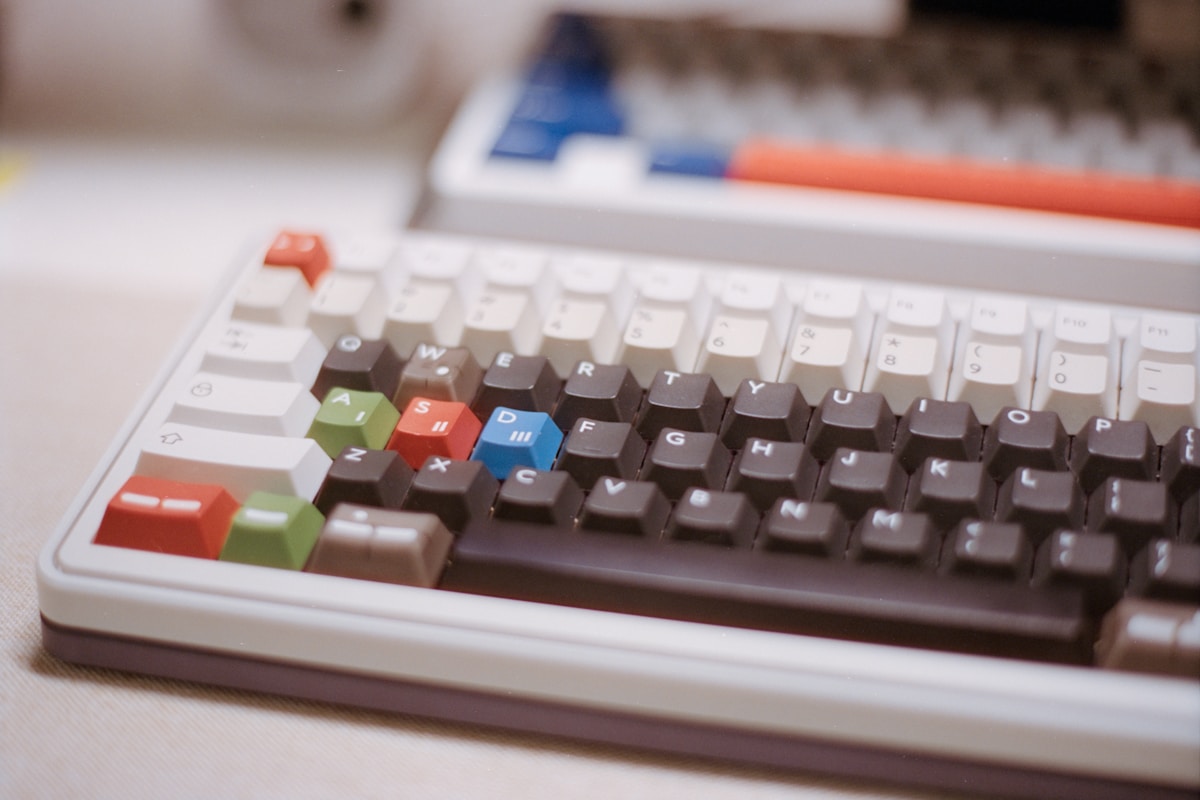
- Layout: 60% (no arrow keys, no function row—Fn layer)
- Switches: Topre 45g (electrostatic capacitive, silenced)
- Keycaps: PBT (dye-sublimated)
- Programmability: DIP switches (limited), key remapping via software
- Connectivity: USB-C + Bluetooth 4.2 (multi-device, up to 4)
- Backlight: None
- Case: Plastic (lightweight)
- Weight: 540g
- Price: ~$420 CAD
The HHKB is the best keyboard for Vim users and terminal-heavy developers. The layout is optimized for keeping your fingers on the home row, and Topre switches are addictive once you adapt. At $420 CAD, it's expensive for a plastic keyboard—you're paying for the switches and the layout philosophy. Not recommended as a first mechanical keyboard; the learning curve is significant.
Best Wireless for Programming: Keychron Q1 Pro
Premium Build with Bluetooth
The Keychron Q1 Pro is the non-split version of the Q11 with added Bluetooth 5.1 connectivity. The same CNC aluminium case, gasket mount, QMK/VIA programmability, and hot-swappable switches—plus the freedom to go wireless. For developers who switch between a desktop and a MacBook, the Q1 Pro connects to up to 3 devices via Bluetooth and one via USB-C.
macOS and Windows Compatibility
The Q1 Pro ships with both macOS and Windows keycaps and has a physical Mac/Win switch on the side. The QMK/VIA firmware supports both operating systems natively, and you can create separate layers for each OS. For developers who use macOS at work and Windows/Linux at home, this dual-OS support is practical.
- Layout: 75% (82 keys)
- Switches: Gateron Jupiter (Brown, Red, or Banana—hot-swappable)
- Keycaps: OSA profile double-shot PBT (Mac + Windows sets included)
- Programmability: QMK/VIA
- Connectivity: USB-C + Bluetooth 5.1 (3 devices)
- Backlight: South-facing RGB
- Case: CNC aluminium, gasket mount
- Battery: 4,000 mAh (up to 100 hours with backlight off)
- Price: ~$280 CAD
The Q1 Pro is the best wireless mechanical keyboard for programming. Same build quality and programmability as the Q11, plus Bluetooth for multi-device switching. At $280 CAD, it matches the Q11's price with added wireless capability. The trade-off: no split layout. If ergonomics matter more than wireless, get the Q11.
Best for RSI Prevention: Kinesis Advantage360
The Most Ergonomic Keyboard Available
The Kinesis Advantage360 takes ergonomics to the extreme. The concave key wells position keys in a bowl shape that matches the natural curl of your fingers, the columnar layout eliminates lateral finger movement, and the integrated palm rests support your hands in a neutral position. For developers with existing RSI or carpal tunnel, the Advantage360 is often recommended by occupational therapists.
ZMK Firmware
The Advantage360 runs ZMK firmware (similar to QMK but designed for wireless split keyboards). Full programmability, layers, macros, and tap-hold keys. The configuration is done through a web-based GUI or by editing ZMK config files—which, for programmers, feels natural.
- Layout: Columnar split with concave key wells
- Switches: Cherry MX (Brown or Red)
- Programmability: ZMK (fully programmable)
- Connectivity: USB-C + Bluetooth 5.0
- Tenting: Adjustable (built-in)
- Palm Rests: Integrated
- Price: ~$550 CAD
The Advantage360 is the nuclear option for RSI prevention. If you've tried flat split keyboards and still have pain, the concave key wells and integrated palm rests provide the most ergonomic typing position available. At $550 CAD, it's the most expensive keyboard on this list—but it's cheaper than chronic wrist pain.
Programming Keyboard Tips
Switch Types for Coding
| Switch Type | Feel | Noise | Best For | Popular Options |
|---|---|---|---|---|
| Tactile | Bump at actuation | Moderate | Most programmers | Gateron Brown, Boba U4T, Holy Panda |
| Linear | Smooth, no bump | Quiet | Fast typists | Gateron Red, Cherry MX Red, Gateron Yellow |
| Silent tactile | Bump, dampened | Very quiet | Shared offices | Boba U4, Zilent V2 |
| Clicky | Bump + click sound | Loud | Solo offices only | Cherry MX Blue, Kailh Box White |
Essential Programmable Layers
Most developers benefit from 3-4 layers:
- Base layer: Standard QWERTY (or Colemak/Dvorak if you've switched)
- Symbol layer: Brackets
[]{}(), operators+=!<>, semicolons, and pipes mapped to comfortable positions - Navigation layer: Arrow keys, Home/End, Page Up/Down, Ctrl+Tab, Alt+Tab on the home row
- Macro layer: Git commands (
git status,git commit -m ""), IDE shortcuts (Ctrl+Shift+F, Ctrl+P), and common code patterns
The biggest productivity gain from a programmable keyboard isn't speed—it's reducing hand movement. When brackets, arrows, and shortcuts are on the home row via layers, your hands stay in position instead of reaching for distant keys. After a week of adaptation, most developers report less fatigue and fewer typos.
Ergonomic Considerations for Long Coding Sessions
- Split keyboards reduce ulnar deviation (wrist bending inward)
- Tenting (angling the keyboard halves) reduces pronation (wrist rotation)
- Low-profile switches reduce wrist extension (bending wrists upward)
- Negative tilt (front of keyboard higher than back) is more ergonomic than positive tilt
- Take breaks: No keyboard prevents RSI if you type for 8 hours straight. Use a timer (Pomodoro technique) to take regular breaks
📺 Watch: Best Mechanical Keyboards for Programming 2026 — Developer Review
Got Questions About Mechanical Keyboards for Programming? Let's Clear Things Up.
Are mechanical keyboards actually better for programming?
Yes, for most people. The tactile feedback helps you type more accurately (fewer typos), the consistent actuation force reduces fatigue over long sessions, and programmable layers put frequently-used symbols and shortcuts within easy reach. The improvement is most noticeable during 4+ hour coding sessions.
What switch is best for programming?
Tactile switches (Brown-type) are the most popular among developers. The tactile bump tells your fingers when the keypress registers, which reduces bottoming out and finger fatigue. Silent tactile switches (Boba U4) are ideal for shared offices. Linear switches work well for fast typists who prefer a smooth keystroke.
Is a split keyboard worth the learning curve?
If you type more than 4 hours daily, yes. The 2-3 week adaptation period is real—your typing speed will drop initially. But the ergonomic benefits (reduced wrist strain, better posture) are significant for long-term health. Most developers who switch to split keyboards never go back.
Do I need a full-size keyboard for programming?
No. Most programmers prefer 75% or 65% layouts. The numpad is rarely used in programming, and arrow keys/function keys are accessible via layers on smaller keyboards. The smaller footprint also means less hand movement to reach the mouse, which reduces strain.
Can I use a mechanical keyboard with a MacBook?
Absolutely. All keyboards on this list work with macOS. The Keychron models ship with Mac-specific keycaps and have a Mac/Win switch. QMK/VIA firmware supports macOS key mappings natively. The HHKB was originally designed for Unix systems and has a Mac-friendly layout.
The right mechanical keyboard makes programming more comfortable and more efficient. The Keychron Q11 offers the best balance of split ergonomics and programmability, while the ZSA Voyager is the top choice for developers with wrist concerns. For more keyboard options, check our best mechanical keyboards guide or our best mechanical keyboard for office roundup for quieter options.

Discussion
Sign up or sign in to join the conversation.